OscarinCB
Participant
August 15, 2018
解決済み

Uneven color shades in color panel?

  • August 15, 2018
  • 返信数 1.
  • 324 ビュー

Hi there, lately I've been using more PS and I have a question regarding the color panel.

You see, from colors blue to magenta, the color shaders appear broken and uneven. Here I attach two images so you can get what I am talking about.
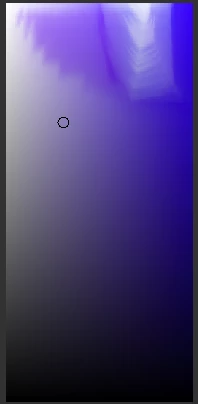
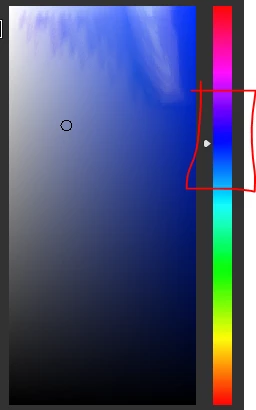
This only happens in between the selected area.

My question is, any color I select from the broken area, will be broken once applied? And, what is causing this?
Here I post my pc setup in case it tells you something.

Public - Google Drive

Thanks in advance!

このトピックへの返信は締め切られました。
解決に役立った回答 D Fosse

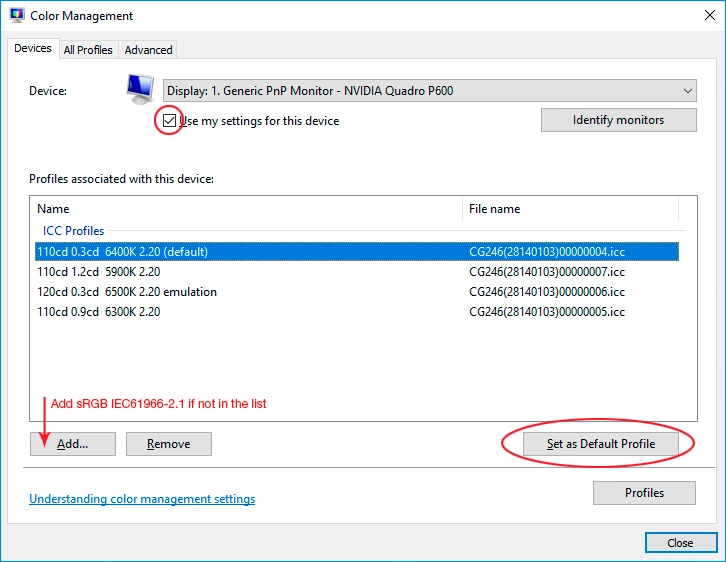
Here it is. Relaunch Photoshop when done, it needs to load the new profile at application startup:

返信数 1

D Fosse
Community Expert
Community Expert
August 15, 2018

This is a defective monitor profile, most likely distributed through Windows Update.

Use a calibrator to make a new profile, or if you don't have one, replace the profile with sRGB IEC61966-2. This is generic, but often close enough.

You do this in the Windows Color Management dialog. I'm not at my workstation now, but I'll post a screenshot instruction later.

D Fosse
Community Expert
D FosseCommunity Expert解決!
Community Expert
August 15, 2018

Here it is. Relaunch Photoshop when done, it needs to load the new profile at application startup: