


Inspiring
August 14, 2019
解決済み

Color Dynamics Brush settings

  • August 14, 2019
  • 返信数 2.
  • 2052 ビュー

I have trouble getting the colors I want to use when I try to adjust Color Dynamics in Photoshop CC2019.  I set the foreground to a color I want to use and the background to the second color I want to mix with it but no matter how I set the sliders I get other colors I don't want.  How do I get just the foreground and the background colors to appear when I paint?
このトピックへの返信は締め切られました。
解決に役立った回答 zenginejulia

You can play around with the color dynamics in the brush settings.

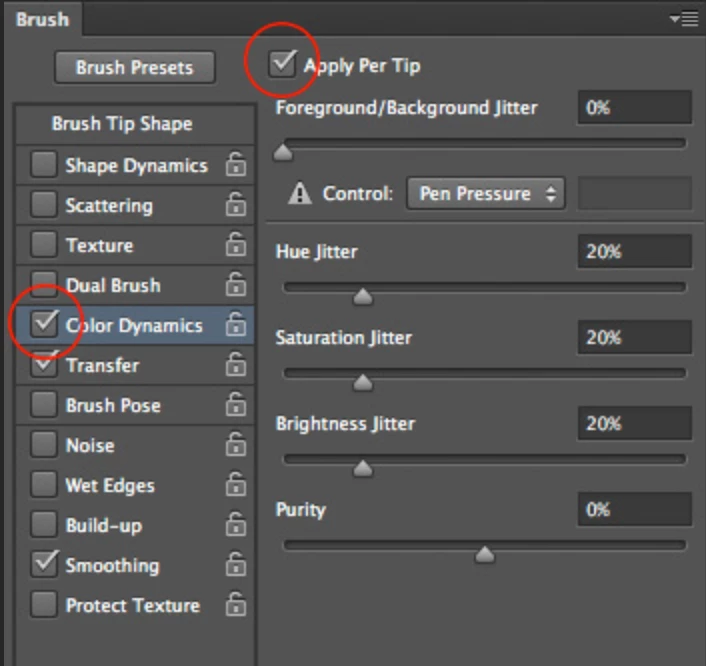
If you want the brush to paint only with the exact colors of your foreground and background colors, make sure to set the foreground/background jitter to 100%

Set the hue, saturation, brightness and purity jitter to 0%.

You also have to check the box "apply per tip" so the colors mix while painting.

Is this helpful for you?

Greetings!   

Julia

返信数 2

zenginejulia
zenginejulia解決!
Participating Frequently
August 14, 2019

You can play around with the color dynamics in the brush settings.

If you want the brush to paint only with the exact colors of your foreground and background colors, make sure to set the foreground/background jitter to 100%

Set the hue, saturation, brightness and purity jitter to 0%.

You also have to check the box "apply per tip" so the colors mix while painting.

Is this helpful for you?

Greetings!   

Julia

pslane1作成者
Inspiring
August 15, 2019

Thank you!  I played around, setting jitter to 100 % like you suggested but found that to get the dual colors I also had to set the purity to about 50%.

c.pfaffenbichler
Community Expert
Community Expert
August 14, 2019

Please post meaningful screenshots including the pertinent Panels to illustrate what you mean.

What exactly do you want to achieve (could you post an example)? 

But if I understand you correctly you want the feature to do something it is not designed to do.

Foreground/Background Jitter and Control

Specifies how paint varies between the foreground color and background color.

To specify a percentage by which the color of the paint can vary, type a number, or use the slider to enter a value. To specify how you want to control the color variance of brush marks, choose an option from the Control pop-up menu: