


Participant
July 6, 2019
質問

Why is my layer mask filling with black instead of texture I created?

  • July 6, 2019
  • 返信数 2.
  • 2839 ビュー

Hi,

so, I am new to Photoshop (CC 2018) and I am trying to replicate a fire effect tutorial on YouTube Fire effect in Photoshop - YouTube .

At moment 5:08 of the video, we are rescaling a layer with a mask. So far, so good.

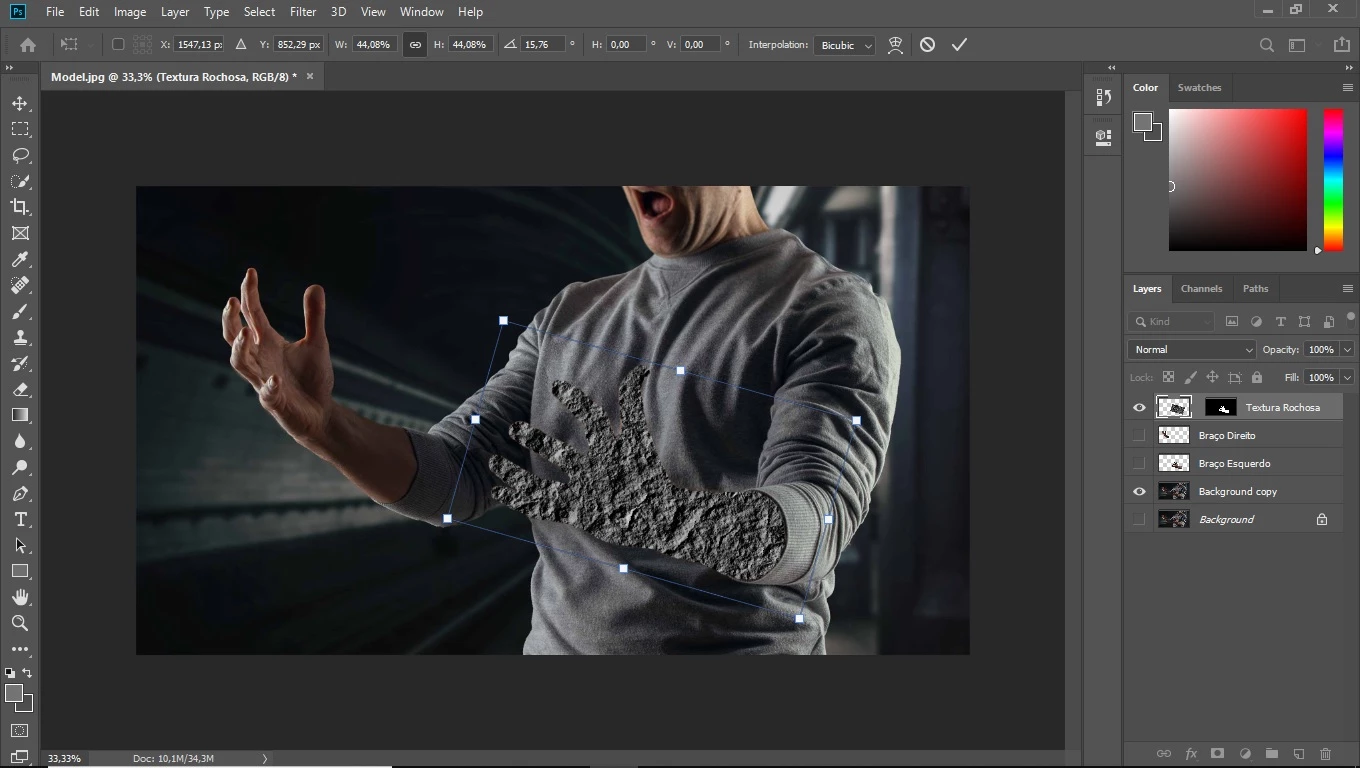
However, when I press enter to confirm the transformation, my mask is filled with black, instead of keeping the original texture made for it.

Can anyone help me find out why?

Here is a print screen right before I press Enter to confirm, in case it helps:
このトピックへの返信は締め切られました。

返信数 2

Mohammad.Harb
Community Expert
Community Expert
July 6, 2019

I would suggest the following workarounds:

  1. go to Preferences -> Performance , then check Legacy compositing and restart photoshop

    if you get the same result,   create a NEW document and follow all steps again

JJMack
Community Expert
Community Expert
July 6, 2019

What video your screen capture show a layered document open in Photoshop with which has no video layers a background copy layer is visible as is the top rotared rectangular texture layer that has a hide all layer mask that is filled with white in a area that maps  to the subject  left hand and arm in the Background copy layer.

JJMack
Participant
July 6, 2019

Hi JJMack, I appreciate you taking your time to answer my question.

However, I cannot fully understand your answer.

Could you, please, rephrase?

Do you mean the screen capture is not useful?