


Participant
October 11, 2023
解決済み

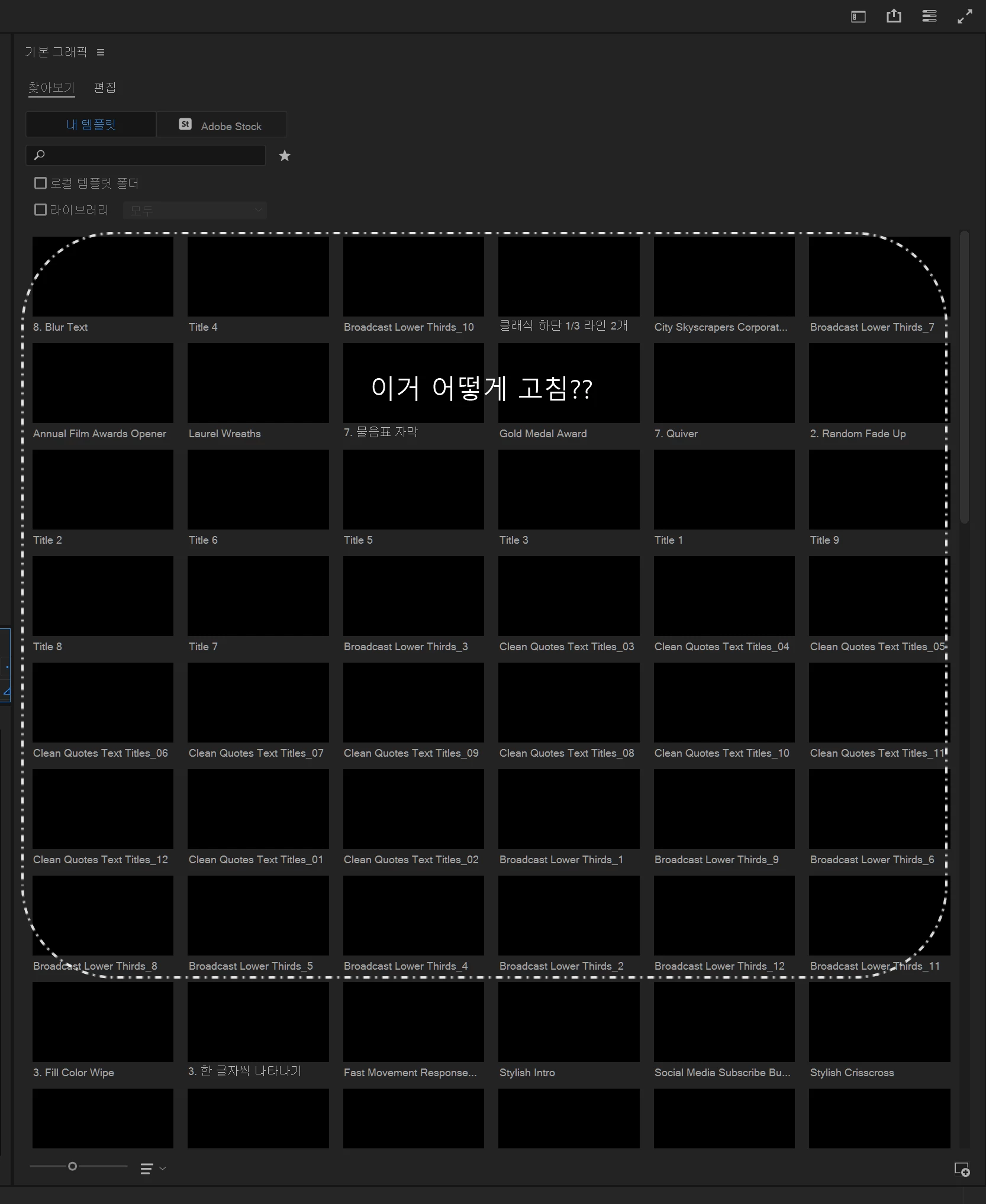
기본 그래픽 미리보기 뭔 짓을 해도 보이지 않는다. [I can't see the essential graphics preview.]
  • October 11, 2023
  • 返信数 1.
  • 1156 ビュー

어도비 측에서 알려준대로

그래픽카드 드라이버 최신으로 업데이트를 해도 안보임.

버전을 낮은 버전을 해도 안보임. (22버전부터 23버전까지 다 해봄 안됨)

시스템 미디어 캐시를 지워도 안보임

시스템 설정을 초기화 해도 안보임


심지어 컴퓨터 윈도우를 포맷하고 다시 설치한 후 프리미어 프로를 설치해도 안됌!


내 PC의 스펙은

운영체재: 윈도우 10

CPU: i9-9900KF

RAM: 64GB

GPU: NVDIA GeForce RTX 2080 Ti


이제 뭘 더 어떻게 해야하나???? 어도비 이거 해결 안해줄꺼냐?

---파파고---

As Adobe told me


I can't see the graphics card driver even if I update it to the latest.
I can't see the lower version. (You can't try everything from 22 to 23)
You can't erase the system media cache
You can't reset the system settings..
Not even to install Premier Pro after formatting and reinstalling computer windows!


The specifications of my PC are
Operating system: Windows 10
CPU: i9-9900KF
RAM: 64GB
GPU: NVDIA GeForce RTX 2080 Ti


What more do I do now? Adobe, you're not going to solve this?

    このトピックへの返信は締め切られました。
    解決に役立った回答 Kevin J. Monahan Jr.

    Hello @고양이아빠,

    I read your message. You are experiencing a probelm I have seen before, but I'm not quite sure of the precise solution. I apologize for that.


    Usually, people having this issue have a subscription from a school or large enterprise. Is that the case? If so, contact your IT Administrator for a full installation of Premiere Pro.


    If that is not the case, please let the community know.


    글을 읽었습니다. 이전에 본 적이 있는 문제를 겪고 계신 것 같은데 정확한 해결 방법은 아직 나와 있지 않습니다. 죄송합니다.


    일반적으로 이 문제를 겪는 사람들은 학교나 대기업에서 구독을 하고 있습니다. 그런 경우인가요? 그렇다면 IT 관리자에게 문의하여 Premiere Pro를 정식으로 설치하세요.


    그렇지 않은 경우 커뮤니티에 알려주세요.


    Thank You,

    Kevin

    返信数 1

    Kevin J. Monahan Jr.
    Community Manager
    Community Manager
    October 25, 2023

    Hello @고양이아빠,

    I read your message. You are experiencing a probelm I have seen before, but I'm not quite sure of the precise solution. I apologize for that.


    Usually, people having this issue have a subscription from a school or large enterprise. Is that the case? If so, contact your IT Administrator for a full installation of Premiere Pro.


    If that is not the case, please let the community know.


    글을 읽었습니다. 이전에 본 적이 있는 문제를 겪고 계신 것 같은데 정확한 해결 방법은 아직 나와 있지 않습니다. 죄송합니다.


    일반적으로 이 문제를 겪는 사람들은 학교나 대기업에서 구독을 하고 있습니다. 그런 경우인가요? 그렇다면 IT 관리자에게 문의하여 Premiere Pro를 정식으로 설치하세요.


    그렇지 않은 경우 커뮤니티에 알려주세요.


    Thank You,

    Kevin

    Kevin Monahan - Sr. Community and Engagement Strategist – Adobe Pro Video and Audio
    Participant
    January 15, 2024
    I purchased and use a genuine personal plan. Other PCs are also showing the same symptoms.

    저는 정품 개인플랜을 구입해서 사용하고 있습니다. 다른 PC에서도 같은 증상을 보이고 있습니다.