


- Home
- Premiere Pro
- Discussions
- Re: This thread is still fine. Re. the Auto-Save f...
- Re: This thread is still fine. Re. the Auto-Save f...

Copy link to clipboard
Copied
So when I was editing, I accidentally deleted half of my video and I didn't know so my project Autosaved and couldn't undo it to get the video files back. I was hoping you can open previous versions of your adobe premiere pro and go back to your project before 1-2 autosaves


 1 Correct answer

There is an auto save folder that contains the auto saves. Pick one of them and see if the deleted video reappears. If you know the time that you actually deleted the footage you can narrow the auto save down more reliably. Then once you have it back, resave the file but give it a new name so you don't get confused.

 15
Replies
15
15
Replies
15

Copy link to clipboard
Copied
There is an auto save folder that contains the auto saves. Pick one of them and see if the deleted video reappears. If you know the time that you actually deleted the footage you can narrow the auto save down more reliably. Then once you have it back, resave the file but give it a new name so you don't get confused.

Copy link to clipboard
Copied
Outside of the auto-save files, the only way to go back a project version is if you're constantly saving to a new version, performing a Save As rather than a normal Save.

Copy link to clipboard
Copied
or a save copy ( iteration) .

Copy link to clipboard
Copied
This thread is super old and not useful anymore. There is an auto-saved folder now that is stored locally. You can find it in the working folder of your project. The auto-save folder has all the recent versions that were previously auto-saved. Hope this helps.


Copy link to clipboard
Copied
Saved me from having to redo a vid. Thank you.

Copy link to clipboard
Copied
This still works. Almost lost a week's worth of editing. Thank you very much!

Copy link to clipboard
Copied
exactly what I was looking for!


Copy link to clipboard
Copied
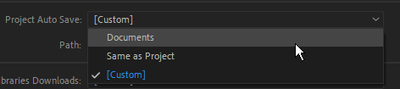
This thread is still fine. Re. the Auto-Save folder [You can find it in the working folder of your project.]
That's if you set it up that way. The location can be changed or set in the default location which I believe is the Documents folder. Look under FILE\Project Settings\Scratch Disks....

Copy link to clipboard
Copied
you're the man!! thanks for saving my whole project ❤️

Copy link to clipboard
Copied
How do you select the video? It just says "browse" and when I click on it, it brings up the computer files.
Copy link to clipboard
Copied
I'm not sure what you are asking Amelia. Are you trying to set your AutoSave folder? If not, what 'video' are you looking for?
Copy link to clipboard
Copied
I was editing footage and I either didn't save it right or I just can't find it. However, the project still exists on my Adobe Premiere account. Is it possible to find the autosaves in Premiere instead of in the computer files?
Copy link to clipboard
Copied
I went to project settings and then scratch disks. It pulled up a window with video files labeled autosave, but when I click browse, it just takes me back to the general computer files.
Copy link to clipboard
Copied
I don't know why Adobe lacks there, instead of opening the location it is set to, on mine, it just opens to 'This PC'?
You'll have to look at the autosave folder in the project dialog as you've done, and then navigate there in file explorer. Are you on Windows or Mac? I suggest you copy the autosave file to the same folder as your project is in before you open it.

Copy link to clipboard
Copied
Here's what happened. I was launching to Premiere Pro and I picked a video that I want to use for slow motion. In the time interpolation, I picked optical flow because it makes your video smooth. I started to render it, and then was done. I saved my project for tomorrow, but when I went back in I saw it has restarted previously to the beginning. This is terrible.


Find more inspiration, events, and resources on the new Adobe Community
Explore Now
 AdChoices