



Is there a way to export an h.264 at 20fps?
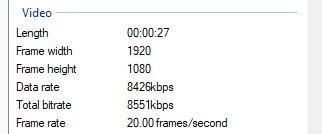
I have an 8mm and Super 8mm film scanner and it captures the films at 20fps, which looks perfect (some capture methods at other framerates can make the footage look sped up or slowed down). I can edit the files in Premiere at 20fps, but when I go to export, it won't allow me to export at 20fps no matter what container or codec I choose.
I'd like to keep the final exports at 20fps because converting them to 18, 24, 60, or something else causes noticable frame smearing, jumping, etc. Is there a way to do this? If I used the Apple Pro Res codec as my previews codec and rendered all the previews, then choose "Use Previews" when exporting, would that keep it at 20fps even though it won't let me choose that from the drop-down menu? Then I could take that file into something like Handbrake and export the h.264 from there. From what I understand Handbrake will let you export using h.264 at pretty much any custom framerate.
Edit: I tried rendering previews and then exporting and telling it to "Use Previews" while keeping all the other settings the same (same codec, etc), but it still changes the framerate to whatever it's on in the drop-down menu in the export settings.
 AdChoices