



SK321
Inspiring
October 3, 2025
解決済み

Is there a way to export an h.264 at 20fps?

  • October 3, 2025
  • 返信数 4.
  • 676 ビュー

I have an 8mm and Super 8mm film scanner and it captures the films at 20fps, which looks perfect (some capture methods at other framerates can make the footage look sped up or slowed down). I can edit the files in Premiere at 20fps, but when I go to export, it won't allow me to export at 20fps no matter what container or codec I choose.

I'd like to keep the final exports at 20fps because converting them to 18, 24, 60, or something else causes noticable frame smearing, jumping, etc. Is there a way to do this? If I used the Apple Pro Res codec as my previews codec and rendered all the previews, then choose "Use Previews" when exporting, would that keep it at 20fps even though it won't let me choose that from the drop-down menu? Then I could take that file into something like Handbrake and export the h.264 from there. From what I understand Handbrake will let you export using h.264 at pretty much any custom framerate.

Edit: I tried rendering previews and then exporting and telling it to "Use Previews" while keeping all the other settings the same (same codec, etc), but it still changes the framerate to whatever it's on in the drop-down menu in the export settings.
解決に役立った回答 Averdahl

I did a test and get the same thing that you, iow impossible to export 20 fps.


But it does work if you create a new project in After Effects and just import the 20 fps sequence from Premiere Pro and then create a new After Effects comp that will be 20 fps as well. Then, export the file to QuickTime > Apple ProRes LT. This will give you a 20 fps ProRes file. Then use a non-Adobe encoder to encode it to a 20 fps H.264 file.


I tested to encode my 20 fps ProRes file i got with the Shutter Encoder (free) and in TMPGEnc Video Mastering Works 8 (cost money). Both H.264 are 20 fps and playback great.


So with a workaround it is possible to do it! 🙂


返信数 4

FlyingFourFun
Inspiring
October 3, 2025

I just had a thought, since 20fps is a perfect multiple of 60,  would it be benificial to export at 60 FPS as an option?  I understand you have frame duplication, but not sure there would be any harm, and it would allow you to mix other footage if/when needed and not have delivery/playback problems as you could use more commonly deployed players with no risk.

SK321
SK321作成者
Inspiring
October 3, 2025

Yeah, I thought of this as well and tested a 60fps export, but when I converted it back to 20fps using Handbrake, it looked more jittery than the original video. Not sure exactly why.

FlyingFourFun
Inspiring
October 3, 2025

SK3211 I think I'm suggesting to leave the project as 60fps for delivery and playback....  Idon't think there is a need to convert it back to 20 FPS....  going forward treat it as a 60 FPS video,  if you have 30 FPS clips you need to add later,  put them in at 60 FPS (just double the FPS as its also an even multiple).


I do understand you want 20 FPS because the video looks and plays back at 20fps exactly correct,  but leaving it in 60 fps should also play back and appear exactly the same so long as you don't change the frame rate later.


Ann Bens
Community Expert
Community Expert
October 3, 2025

there is a way: its called frameserving.

I can do this with TEMPenc video mastering works which encodes 20fps.

https://www.softpedia.com/get/Multimedia/Video/Video-Editors/Advanced-FrameServer.shtml

It still works even in the beta.

Averdahl
Community Expert
Community Expert
October 3, 2025

OT:

How does that work today? I gave up some years ago since it was so painfully sloooow. The timelines were about one hour long and exporting an intermediate file (ProRes/CineForm) and then encode it was so much faster than frameserving it back then.

Ann Bens
Community Expert
Community Expert
October 3, 2025

So what if its slow

It probably a one time project.

Averdahl
Community Expert
AverdahlCommunity Expert解決!
Community Expert
October 3, 2025

I did a test and get the same thing that you, iow impossible to export 20 fps.


But it does work if you create a new project in After Effects and just import the 20 fps sequence from Premiere Pro and then create a new After Effects comp that will be 20 fps as well. Then, export the file to QuickTime > Apple ProRes LT. This will give you a 20 fps ProRes file. Then use a non-Adobe encoder to encode it to a 20 fps H.264 file.


I tested to encode my 20 fps ProRes file i got with the Shutter Encoder (free) and in TMPGEnc Video Mastering Works 8 (cost money). Both H.264 are 20 fps and playback great.


So with a workaround it is possible to do it! 🙂


SK321
SK321作成者
Inspiring
October 3, 2025

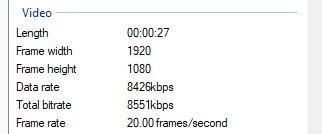
I think I figured out a way to do it. I used Dymanic Link to open my timeline in After Effects, then I was able to export from there as a Quicktime Animation at 20fps. Then, using Handbrake, I was able to export that as a 20fps h.264 file.

Averdahl
Community Expert
Community Expert
October 3, 2025

Yes, that´s the way to do it! 🙂