- Inicio
- Premiere Pro
- Hilos de conversación
- Re: ProRes RAW files in Premiere Pro 23.0 are blac...
- Re: ProRes RAW files in Premiere Pro 23.0 are blac...

Copiar vínculo al Portapapeles
Copiado
Looking for some help with this issue. I've been working with R3D or ProRes HQ prior to this and it's my first time with ProRes RAW from the Ninja V+ so I'm unable confirm if it was working on previous versions.
ProRes RAW files in Premiere Pro 2023 are displaying a black preview (source file and program monitor) - audio is playing fine. This issue is limited to ProRes RAW files only - I have verified numerous other projects using R3D and ProRes HQ are not encountering the same issue.
Preview/program monitor shows image when using Mercury Playback Engine Software Only or OpenCL - both with extremely hindered performance.
Using Mercury Playback Engine (CUDA) in Media Encoder results in files with black screen & audio, as above Software Only or OpenCL successfully export however extremely slowly (~45mins for a 2:05 project file. Single layer 5.9K source media, one technical LUT (CLog2 > Rec.709) 4K UHD export @ 30mbps CBR. I would usually expect this to take less than a couple of minutes.)
Attempted to create 720p ProRes proxies with media encoder - same issue, black image with audio playing.
Files play back with no issue on the Ninja V+
Specs/media:
i9-10980HK
RTX 3070 Laptop GPU
32gb RAM
Premiere Pro 2023 (23.0)
Mercury Playback Engine (CUDA)
ProRes RAW 5.9K/24 from R5C in Super35 mode & Ninja V+
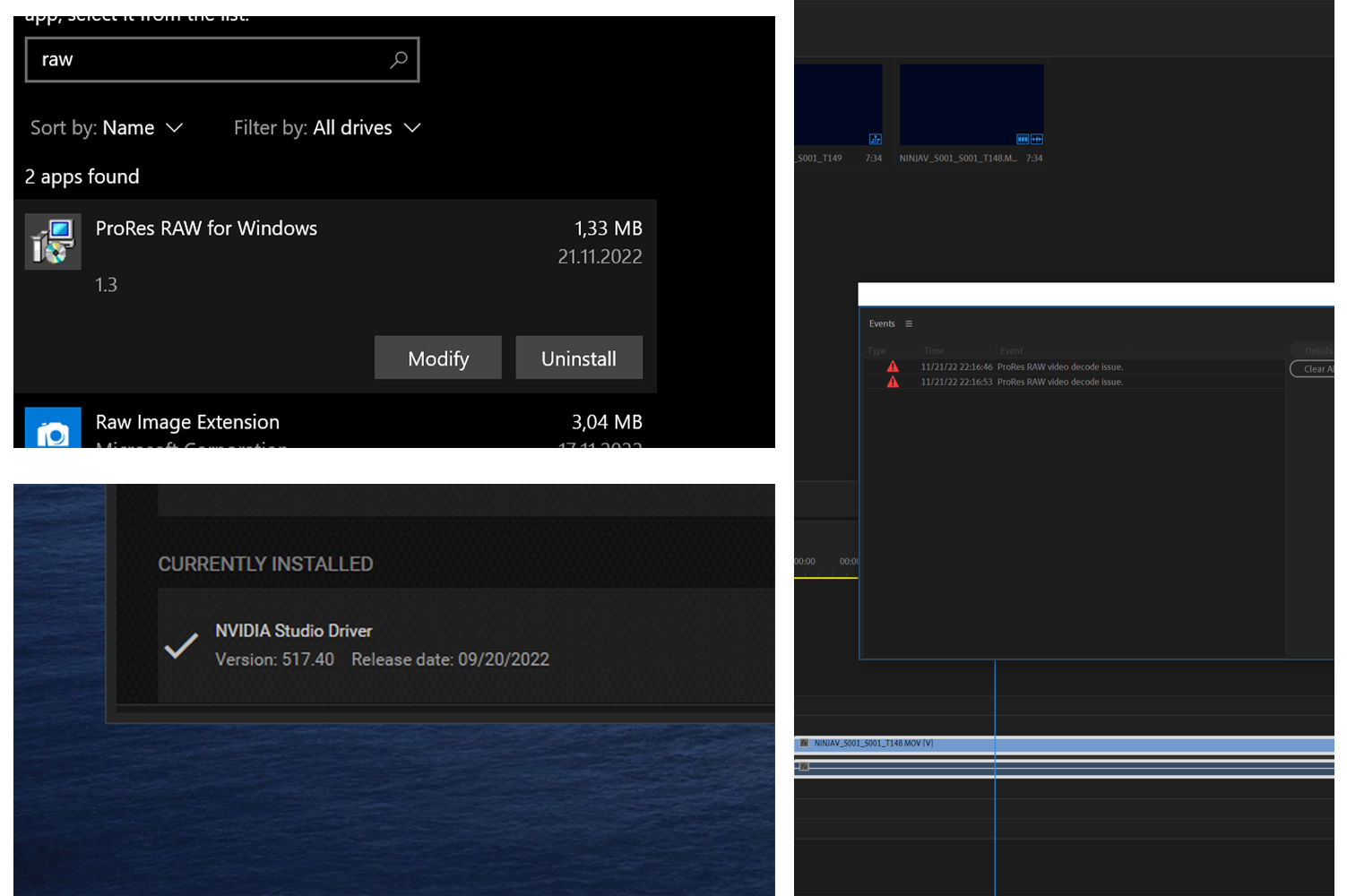
ProRes RAW for windows 1.3 installed
- Latest Nvidia Studio Driver version 526.98 (tried switching between Studio and Game Ready as a hail mary to no avail)
Verified string value of C:\Program Files\Apple\ProRes RAW for Windows\ registry entry under HKEY_LOCAL_MACHINE\SOFTWARE\Microsoft\Windows\CurrentVersion\Installer\Folder
Verified .dll files present in C:\Program Files\Apple\ProRes RAW for Windows\
I've also recreated the project from scratch and cleared the media cache with no luck.


 3 respuestas correctas

A few users have reported they needed to roll back to a studio driver of around 517, that the newest driver isn't working with ProRes on their system. So try that also.
Neil

After a bit of trial and error, I've got the following results:
Premiere Pro 23.0 & NVIDIA Studio Driver 526.98 is not working
Premiere Pro 22.6.2 & NVIDIA Studio Driver 526.98 is not working
Premiere Pro Beta 23.2 & NVIDIA Studio Driver 526.98 is not working
Premiere Pro 23.0 & NVIDIA Studio Driver 517.40 is working
After all that, I think it's safe to conclude that the latest (or newer versions of) the NVIDIA drivers are the problem here, thanks for the suggestion!

You're right, .29 is for games, but it was the most recent and fixing the issue, so i gave it a try.
In the meantime they issued 531.41 that is Studio driver, and should fix the issue.
NVIDIA Studio Driver | 531.41 | Windows 10 64-bit, Windows 11 | NVIDIA
 37
réplicas
37
37
réplicas
37



Copiar vínculo al Portapapeles
Copiado
You're checking all the right things.
Use the "Other versions" option for Premiere Pro in Adobe Creative Cloud Desktop to install Premiere Pro (22.6.2). You can have both 22.6.2 and 23.0 installed at the same time.
Or, use the Beta Apps tab to install Premiere Pro Beta (23.2).
Hopefully, one of those versions of Premiere Pro and corresponding version of Media Encdoer works on your system with the Apple ProRes RAW Decoder for Windows as expected.
Copiar vínculo al Portapapeles
Copiado
Thanks Warren,
I'll try the previous (and beta) versions of PPro and Media Encoder and see if that resolves it!
Copiar vínculo al Portapapeles
Copiado
(yes, I copy-pasted my answer - not sure how I could have worded it any differently really!)
After a bit of trial and error, I've got the following results:
Premiere Pro 23.0 & NVIDIA Studio Driver 526.98 is not working
Premiere Pro 22.6.2 & NVIDIA Studio Driver 526.98 is not working
Premiere Pro Beta 23.2 & NVIDIA Studio Driver 526.98 is not working
Premiere Pro 23.0 & NVIDIA Studio Driver 517.40 is working
After all that, I think it's safe to conclude that the latest (or newer versions of) the NVIDIA drivers are the problem here, thanks for the suggestion!
Copiar vínculo al Portapapeles
Copiado
A few users have reported they needed to roll back to a studio driver of around 517, that the newest driver isn't working with ProRes on their system. So try that also.
Neil
Copiar vínculo al Portapapeles
Copiado
Thanks, Neil!
Sometimes it's the simple things - I'll give it a crack tomorrow when I'm back working.
Cheers,
Alex
Copiar vínculo al Portapapeles
Copiado
Hope it works ... but please post back either way.
Neil
Copiar vínculo al Portapapeles
Copiado
After a bit of trial and error, I've got the following results:
Premiere Pro 23.0 & NVIDIA Studio Driver 526.98 is not working
Premiere Pro 22.6.2 & NVIDIA Studio Driver 526.98 is not working
Premiere Pro Beta 23.2 & NVIDIA Studio Driver 526.98 is not working
Premiere Pro 23.0 & NVIDIA Studio Driver 517.40 is working
After all that, I think it's safe to conclude that the latest (or newer versions of) the NVIDIA drivers are the problem here, thanks for the suggestion!
Copiar vínculo al Portapapeles
Copiado
Very thorough! Thank you for sharing your results.

Copiar vínculo al Portapapeles
Copiado
Thank you so much for posting the fix for this! literally saved my bacon!

Copiar vínculo al Portapapeles
Copiado
Thank you for doing some detailed investigation, it saved me a bunch of trouble!

Copiar vínculo al Portapapeles
Copiado
Thx for me it worked with the 517.40 and PP 23.1 it is definitly a driver issue ...
Ryzen 9 3950X + Rtx 3090 maybe with a intel cpu it will works with the letest driver update

Copiar vínculo al Portapapeles
Copiado
I can confirm that with an intel cpu and 3090 gpu the issue still occurs.

Copiar vínculo al Portapapeles
Copiado
I have the same problem, this after reinstalling windows.
Before it was working, now after the reinstallation it doesn't work anymore....
When I enter the project with ProRes RAW files (from Ninja V) I get an error to enter on "adobe.com/go/proresraw" and that info. there does not help me if I have the correct settings in the program (set to CUDA)
Copiar vínculo al Portapapeles
Copiado
With that error I would say you likely don't have ProRes RAW for Windows 1.3 installed. You can download it here
Once that's installed, you should be able to decode the ProRes RAW files from the Ninja V.
Are you also using an NVIDIA graphics card? As per my previous reply after trial and error, make sure you're on version 517.40 otherwise you'll likely end up with the black screen issue I did.
Copiar vínculo al Portapapeles
Copiado
3, 4 times I installed and uninstalled the codec and the same result......
I actually tried your option with the Nvidia driver and it still appears the same
Copiar vínculo al Portapapeles
Copiado
Copiar vínculo al Portapapeles
Copiado
Strange!
Is there a string value of C:\Program Files\Apple\ProRes RAW for Windows\ showing under HKEY_LOCAL_MACHINE\SOFTWARE\Microsoft\Windows\CurrentVersion\Installer\Folder in your registry?
Win + R > regedit
Copiar vínculo al Portapapeles
Copiado
this is tha last REG: " C:\Program Files (x86)\Apple Software Update\ "
Copiar vínculo al Portapapeles
Copiado
And can you confirm if the video is decoding using OpenCL or Software Only?
Copiar vínculo al Portapapeles
Copiado
it is set to CUDA (i have RTX 2070)


Copiar vínculo al Portapapeles
Copiado
Hi,
Sorry about this. Can you give us details about the computer's CPU?
Thanks,
Kevin
Copiar vínculo al Portapapeles
Copiado
I have
Ryzen 9 7950x
Asrock x670E PRO RS
Crucial 2X32Gb 5600Mhz
Rtx 2070 8Gb
Copiar vínculo al Portapapeles
Copiado
Oh yeah, I get that bit - what I mean is does the video render if you select OpenCL or Software Only? It'll be painfully slow, but it's something to test to see if it's Nvidia/Driver/CUDA related or something else.
Copiar vínculo al Portapapeles
Copiado
I tried all possible methods!
I changed from CUDA to OnepCL,
reinstalled Nvidia v517.40, and the las one v527.56
same error..... to conctact adobe/info......

-
- 1
- 2

Encuentra más inspiración, eventos y recursos en la nueva comunidad de Adobe
Explorar ahora
 AdChoices