


Participating Frequently
August 6, 2013
解決済み

Unbelievably slow audio render times!

  • August 6, 2013
  • 返信数 30.
  • 75112 ビュー

I've been dealing with his for a while now on this documentary I've been working on. When I export my timeline which is right around an hour, it takes around 2 HOURS just to render audio previews before it will export! The bulk of my timeline is a single track with no effects at all. Video renders faster than the audio! The only thing unusual about my project is it is largely composed of longish multi-cam sequences - about 30 sequences ranging from 30 mins to 90 mins. It's appears PP is rendering audio for every bit of my source sequences even though only a few seconds or minutes of each one is actually being used. I don't know what else could be happening.

I was thinking that since some of the audio was recorded at 44.1K maybe that was a problem and some of the sequences had several tracks of audio so to solve this I went through every sequence and rendered out a stereo mix at 48/16 and deleted the old audio. That seemed to help for a while as with CS6 I was getting a very annoying "rendering required audio files" message every time I hit play until I rendered the audio which as I said takes a really long time. Also I can render this but if I close Premiere and re-open I have to render it all over again. It is not keeping the audio render files. Premiere CC is better about playing back without the render message but it still needs to render for export. I have no idea why it would need to render audio from 48/16 source files.

I have reported this to Adobe but just thought I'd put this here to see if anybody else is having issues. If any audio rendering should ever be required in this day and age it should be extremely fast. This problem has really brought exporting to a crawl for this project.
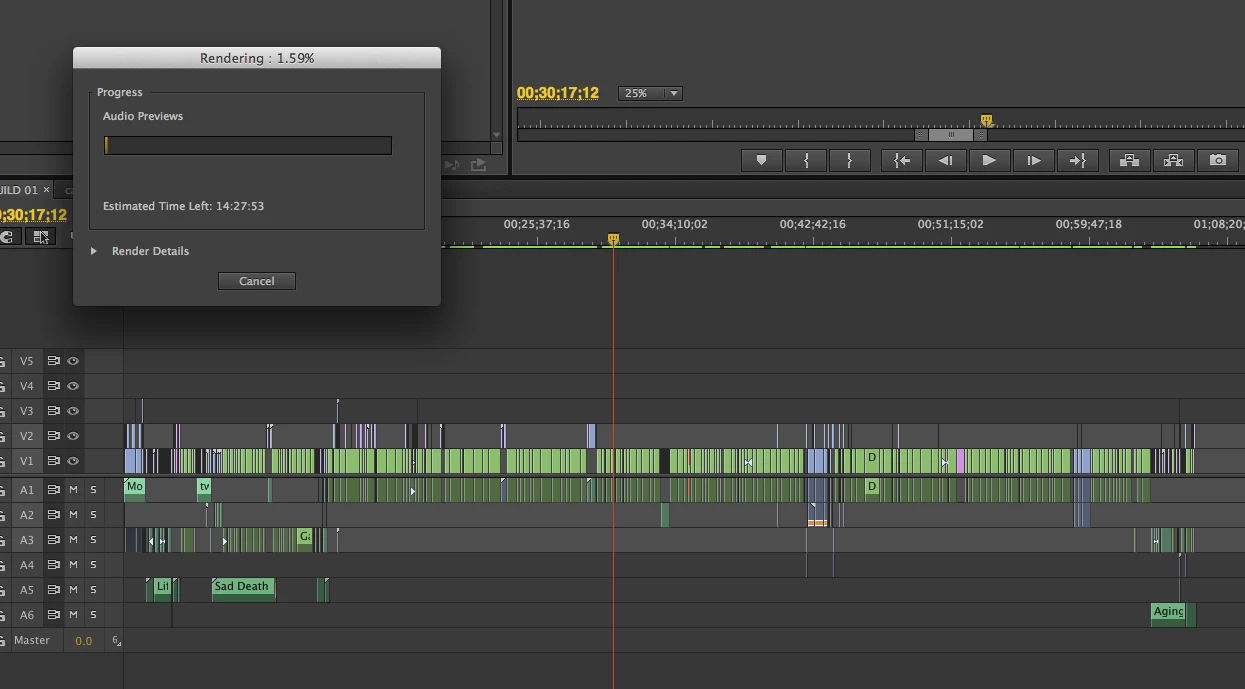
Adobe CC, OSX 10.8.4 on a 12 core Mac Pro with a GTX 570 32GB ram, and BM Studio. My RAID is a 3 disk internal raid with 3 3TB disks in RAID 0. The video renders reload properly. The situation would be better if the audio renders reloaded at least but why it needs to render "audio previews" for such simple audio is beyond me. And as I mentioned I went through quite a bit of trouble to make it as easy on Premiere as possible by replacing all of the 44.1 audio with 48/16 wavs.

    このトピックへの返信は締め切られました。
    解決に役立った回答 Adam Carrel

    I mean seriously... So I would get mine to export faster by just sending it straight to AME. But it still hangs for a good 20 minutes before even starting the processing (I have no idea why but I'm sure it has something to do with the audio bug). Also - by doing this - I totally screwed up a video because it just didn't export 3 tracks of my project. So I had to re-export a video for work, and end up submitting a screwed up version just because Premiere can't handle audio rending? nested tracks? I'm using the latest updated version of CC btw.


    I found this on another forum:

    There were MANY other problems that came up on this project and as a result I was put on the pre-release group with Adobe, but the cause for the issue described above was due to the audio bitrate for the project not matching the bit rate of the audio clips. It has a resample them as a result.


    This seems to have solved it for me.  I opened my audio files in another program, re-sampled them, and then put them back in to Premiere.


    EDIT:  I can confirm that this worked.

    返信数 30

    Participant
    March 7, 2024

    I'm here 11 years later, and I had a similar issue. I found out in my instance that it was the audio in my neststed sequences causing the problem. I moved the audio outside of nests and it works normally now (just kind of sucks for keeping things organized).

    Participant
    November 17, 2023

    Still an issue 11 years later. Project is 48khz, all audio files are 48khz, and it takes 90 minutes to render an audio preview for a 30 min sequence. if I want to see the waveforms in the timeline.


    Yet I can drop any audio file in after effects, press LL, and it magically shows a waveform without any rendering.


    Adobe really needs to stop pretending this is a user issue and fix their program. 

    Participating Frequently
    April 7, 2021

    I had the same issue. I had a 90 minute, multicam sequence that was taking over an hour just to render the audio, and it would crash before even finsihing.  Here is what worked for me: I created a completely new sequence, using parameters copied from one that I knew to be trouble free. 

    I copied my timeline from my old sequence, and pasted into the new one (btw, this is a good thing to try to solve many problems).

    Since I still needed the multicam video, as I am in the rough cut stage, I locked the video tracks, and then flattened the audio tracks.

    I selected my entire timeline, then I right-clicked on the audio to Flatten it.  Note: I had to first click "Enable", then right-click again and "Flatten".

    I then export. The audio render time went down to about 5 minutes.

    April 25, 2021

    If u right click your audio on the time line, look at properties. It'll tell u MHz ( mine was 32000). Make sure you render at that when exporting. If you dont it has to rebuild the audio. I run into this when editing zoom calls.

    Participant
    September 23, 2020

    Just to be clear, this is not a "Solution", this is a correct understanding of THE PROBLEM. it 2020, can someone please FIX THIS PROBLEM?

    jg3333
    Participant
    June 8, 2020

    I'm not sure if this has been posted, but I had the same problem & super simple solution is:


    Create a new seqeunce with any defaul settings, then drop a piece of footage you're working with into the timeline & (here is the key) follow PP's prompt to change sequence settings to match footage properties (this is not the defailt selection).  Once you do this, it will export perfectly with no audio hell render times.  


    Inspiring
    December 8, 2018

    I have found that the issue is directly linked to the sequence containing more footage than is being exported.  Although there are still mixed bitrates and frame rates the issue is totally resolved 100% of the time by simply creating a new sequence for the footage to export.  I went from 58 minutes of audio render time to 8 seconds simply by copying the export to a new sequence where there was no other footage.

    This works.

    Participating Frequently
    June 5, 2019

    When you say copying the export to a new sequence—what do you mean exactly? I want to export the entire sequence—so should I copy the entire sequence and paste it in a new one?

    (Also, I did this and it did not work.)

    Participant
    March 8, 2018

    Here's the real answer.  You do not need to convert your audio files.  Simply go to premiere settings, media cacheClear the cache.  You will not loose anything you're working on.

    Now you'll be able to export quickly.

    Clear the media cache from time to time, you'll be glad you did.

    Participant
    July 3, 2017

    Work-around/solution is quite simple. Make sure the bitrate is the same on your audio, for instance 24 bit. In your audio render settings, make sure you export with 24bit audio. Uncompressed. Then no audio render whatsoever. Straight to encoding video.

    FocusPulling.com
    Known Participant
    July 3, 2017

    RProeis  wrote

    Work-around/solution is quite simple. Make sure the bitrate is the same on your audio, for instance 24 bit. In your audio render settings, make sure you export with 24bit audio. Uncompressed. Then no audio render whatsoever. Straight to encoding video.

    That is a limited rather than universal work-around, despite the way that you characterize it.  The solution is for Adobe to actually address this issue after years of willfully ignoring it.  What you claim is quite simple ​did not result in any change​ on several projects of mine.

    Participant
    July 3, 2017

    Completely agree there should be a fix. I've had the same problems, but that's how I address it and work around it.

    Participant
    September 16, 2016

    I´m having the same problem! And to bring it to the top;

    I´m rendering 2sec of Footage!

    Here´s a screenshot to proof whats going on here;

    Btw;

    8* Xeon E5 3,6

    32GB RAM

    Quadro K4000

    Thats really not acceptable!

    FocusPulling.com
    Known Participant
    June 5, 2017

    Adobe's refusal to fix this years-long bug is anti-consumer. My entire project's many hours of audio files go through cyclical "processing" that takes 95% of my export render time for a single sequence with ONE audio clip. The arrogance of Adobe to refuse to fix this elementary bug is a signal for everyone to bail on Premiere. All that the Adobe employees do here is defend Adobe.

    Participant
    April 1, 2016

    I'm having this same issue... except.. maybe more extreme than most.  I'm simply using AE to turn my audio files Audio files with a wave spectrum.   my 5 minute audio clips take 17 minutes to render, but never complete because CS6 uses all of my disk space.  my 5 minute audio clip continually uses 50 GIGS.   yes you read that correctly.    Not sure how this is even possible.    But it continually uses it all, I have tried three times.  and its seeming like a complete waste of time. Thoughts?