


Nardieloni
Inspiring
March 27, 2022
解決済み

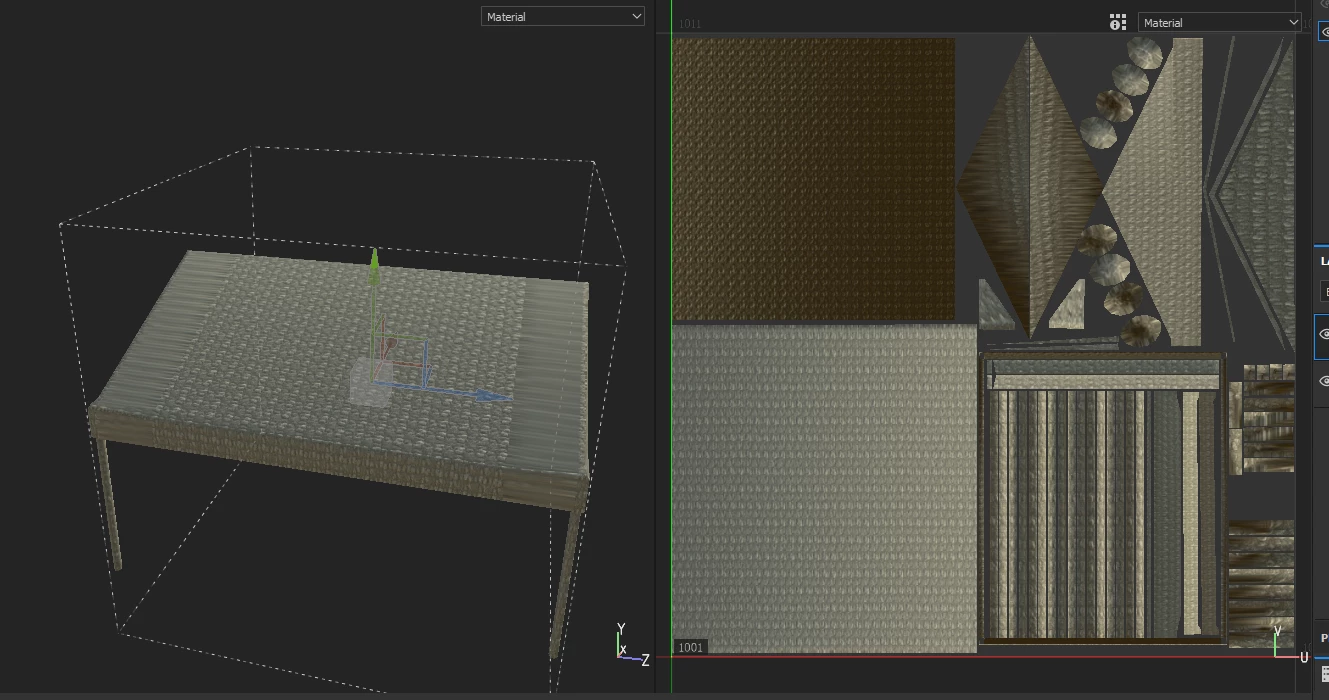
Does anyone have any ideas why the UV behave like this. THE UV edge distortion? I'm lost
  • March 27, 2022
  • 返信数 2.
  • 655 ビュー

このトピックへの返信は締め切られました。
解決に役立った回答 Nardieloni

I fixed the UV in maya again, and that weirdly enough fixed it even though I didn't change much. I tell you all, I tend to create bugs that sometimes baffles me. 

返信数 2

Nardieloni
Nardieloni作成者解決!
Inspiring
March 27, 2022

I fixed the UV in maya again, and that weirdly enough fixed it even though I didn't change much. I tell you all, I tend to create bugs that sometimes baffles me. 

GeoffroySC
Community Manager
Community Manager
March 28, 2022

Hi,

Could you share your different models to that address: sainteca@adobe.com?

Having your models would allow me to reproduce the bugs you encountered and allow the dev team to fix the issues.

Thank you,

Kind Regards,

Geoffroy SC

Nardieloni
Nardieloni作成者
Inspiring
March 28, 2022

I actually made a new post regarding a new issue emerged from this,  where one from your QA analyst will look at the two files data to see what causes this. I will leave a link to that other post, where the files are included, in my comment. 


But thanks for reaching out on this post.

the link is provided below

 https://community.adobe.com/t5/substance-3d-designer-discussions/i-thought-i-found-the-solution-for-my-issue-but-i-still-have-it-my-model-has-weird-uv-distortion/m-p/12841161#M1247 


Nardieloni
Nardieloni作成者
Inspiring
March 27, 2022

Update: So if I import the file straight from Maya to Substance Painter, this distortion doesn't happend, but if I import the model into Zbrush to make the desired changes and then import into substance from Zbrush. This issue occurs. I am so lost in terms what causes this.
