


Inspiring
September 29, 2023

Equalize - Bug

  • September 29, 2023
  • 返信数 5.
  • 774 ビュー

When using the Image to Material Feature, it seems, there is one fundamental bug. 
That feature creates a noticeable seam, that does not exist from a seamless source image.

please find attached the following files

  • the source image file
  • a .psd file
  • the sampler file


The image below shows a noticeable seam on the edges of each tile.
Even more noticeable when "Make it Tile" is applied to it, just for using the Color Equalizer.
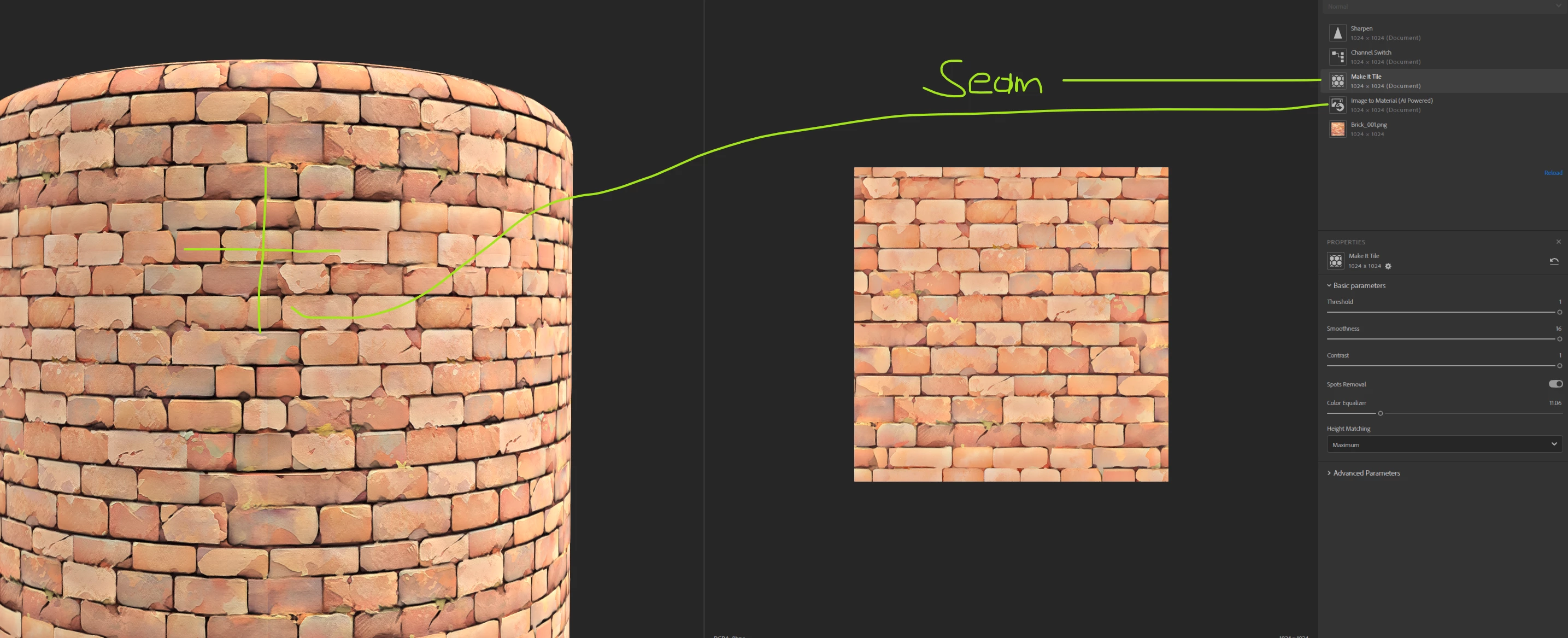
 

I tested several other methods, and no matter what I tested. 
There is always a noticeable seam.

If you are using the source image in Photoshop, you will not get those seams.
That means something in Sampler causes that issue when making the textures tileable.

I would say, that's a major important point. Because it looks like, every texture that will be created with that feature will have a noticeable seam.

I hope I am missing something substantial here and the seam issue could be fixed with a very simple trick.

Thanks for all your thoughts and ideas, 
appreciate it!

返信数 5

PixelFun作成者
Inspiring
October 25, 2023

Any updates or fixes on the seaming issue?
Would be indeed amazing if there is an update with a fix - at this point I can't use Sampler at all because of that major bug.

Thank you so much


PixelFun作成者
Inspiring
October 2, 2023

I hope that helps. But it's not just the Equalizer Filter on top of it. For example, if you are going to change the Image to Material Category, you will also get tiling issues. Depending on the Category you select. Even without adding a Filter on top of it.

Cyril Dellenbach
Community Manager
Community Manager
October 2, 2023

Hello @PixelFun,


Thanks for sharing the issue.


It indeed seems to be a bug, however not related to the Image to material, but whether the Equalize filter/parameter. We are currently investigating on the issue, so thank you for reporting.


Best regards,


Cyril Dellenbach (Micro) | QA Support Artist | Adobe
PixelFun作成者
Inspiring
October 2, 2023

you will see the seam instantly if you add one other layer. For example, add Equalize.


Whatever causes that issue, something in the code/math is creating this noticeable seam.
That's major. When creating a material, and adding multiple layers on top of it, the tiling has to be seamless.

I hope that helps to bring this with high priority to the dev team. It seems like it's a bug.
Thank you.

Ares Hovhannesyan
Community Expert
Community Expert
September 30, 2023

Can't see seam after creating B2M from your PNG