Firefly Model Picker Missing -- Update to Latest Beta Build
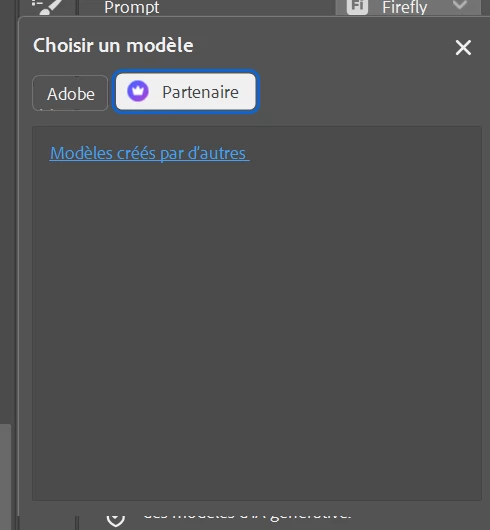
If you've opened Photoshop Beta recently and found that the model picker is completely empty -- no Adobe models, no partner models, nothing showing up in Generate Fill, Generate Expand, or Generate Image -- you're not alone. A build that went out in mid-April had a bug that wiped out the entire model list. This has since been fixed, and updating to the latest Beta build should bring everything back.
First thing to try:
Update Photoshop Beta to the latest available build through the Creative Cloud app, then relaunch Photoshop. The model picker should return to normal once you're on the updated build.
If models still aren't showing up after the update:
Sign out of Creative Cloud completely, then sign back in
Relaunch Photoshop
Go to Settings > Technology Previews and confirm that "Enable Modern User Interface" is turned on
A couple of edge cases worth knowing about:
If you're switching between Generate Fill and Generate Expand and third-party models stop appearing, close and reopen the model picker -- that should bring them back
Some users are seeing an intermittent "feature currently unavailable" message that comes and goes on its own; if that happens, waiting a moment and trying again usually clears it
If you've updated and are still running into problems, reply here with your build number (found under Help > System Info) and we'll take a closer look.
Hi all, the teams are aware of this and the workaround is to roll back to 27.6. There will be a new build on Monday which has the fix in so please update Monday and let us know if things are back.




 AdChoices