



RTX 5070 Laptop - Black Screen/System Freeze and 0 MB VRAM in Photoshop 2026
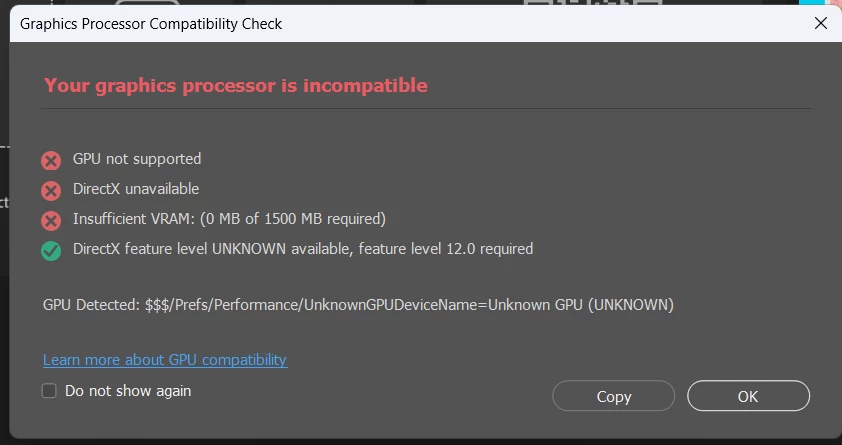
Hello, I am experiencing a critical issue with my new Lenovo Legion Pro 5 (2026) equipped with an NVIDIA RTX 5070 (8GB).
The Problem: When using the laptop screen in "Hybrid Mode", Photoshop fails to detect the GPU (shows 0 MB VRAM). This is random: sometimes it happens, and sometimes it doesn't.. Even worse, moving panels or windows causes a permanent Black Screen that forces me to manually restart the computer.
Important Observations:
-
External Display works: If I move the Photoshop window to my external tablet (Huion), the flickering and black screens disappear. The issue seems tied to the laptop's internal display/Hybrid management.
-
Legacy Mode: The only way to prevent the crash without restarting is checking "Use Older GPU Mode" in Preferences, but performance is terrible.
-
The only real fix: Switching the entire laptop to "dGPU Only" (Discrete Graphics) mode via Lenovo Legion Space.
This is a professional workstation and I cannot rely on disabling my integrated graphics (killing battery life) just to use Photoshop. Please investigate the compatibility between the new 50-series drivers, Windows 11 MPO, and Photoshop's GPU engine.
System Specs:
-
Laptop: Lenovo Legion Pro 5
-
GPU: NVIDIA RTX 5070 Laptop (8GB)
-
OS: Windows 11
 AdChoices