
Participating Frequently
June 30, 2026

Premiere Pro 26.3 incorrectly interprets Xbox Game Bar capture & Clipchamp export H.264 MP4s as Pixel Aspect Ratio 1.778

  • June 30, 2026
  • 3 replies
  • 68 views

Description:

When importing h.264 mp4 files that are from Xbox game bar capture or other h.264 mp4 files that are imported and the exported through Microsoft Clipchamp, it causes them to be stretched/distorted from square pixels to pixel aspect ratio of 1.778. In both the library and sequence they are distorted and and selecting modify clip> interpret foots shows that it is defaulting to pixel aspect ratio of 1.778. The senquence setting still show the correct resolution/aspect ratio and if you conform to square pixels it will correct the aspect ratio of the clip but the sequence video aspect ratio will still be stretched and since the sequence is still saying the correct aspect ratio one cannot simply correct the sequence ratio. Note this issue is not present in version 25.1.0 (build 73).

Setps to reproduce:

  1. Launch Adobe Premiere Pro version 26.3.0 (build 93)
  2. Import an Xbox Game Bar capture video or Clipchamp exported video into project
  3. Drag video clip into sequence
  4. Right click on video file in project library and select Modify>Interpret Footage

Expected result:

The video files should have square pixels (1.0) and appear normal in the libraby thumbnails and sequence

Actual result:

The video clips are stretched in both the sequence and library thumbnails and the pixel aspect ratio defaults to 1.778.
 

Build number: Adobe Premiere Pro version 26.3.0 (build 93) on Microsoft Windows 11 version 25H2 (OS Build 26200.8655)
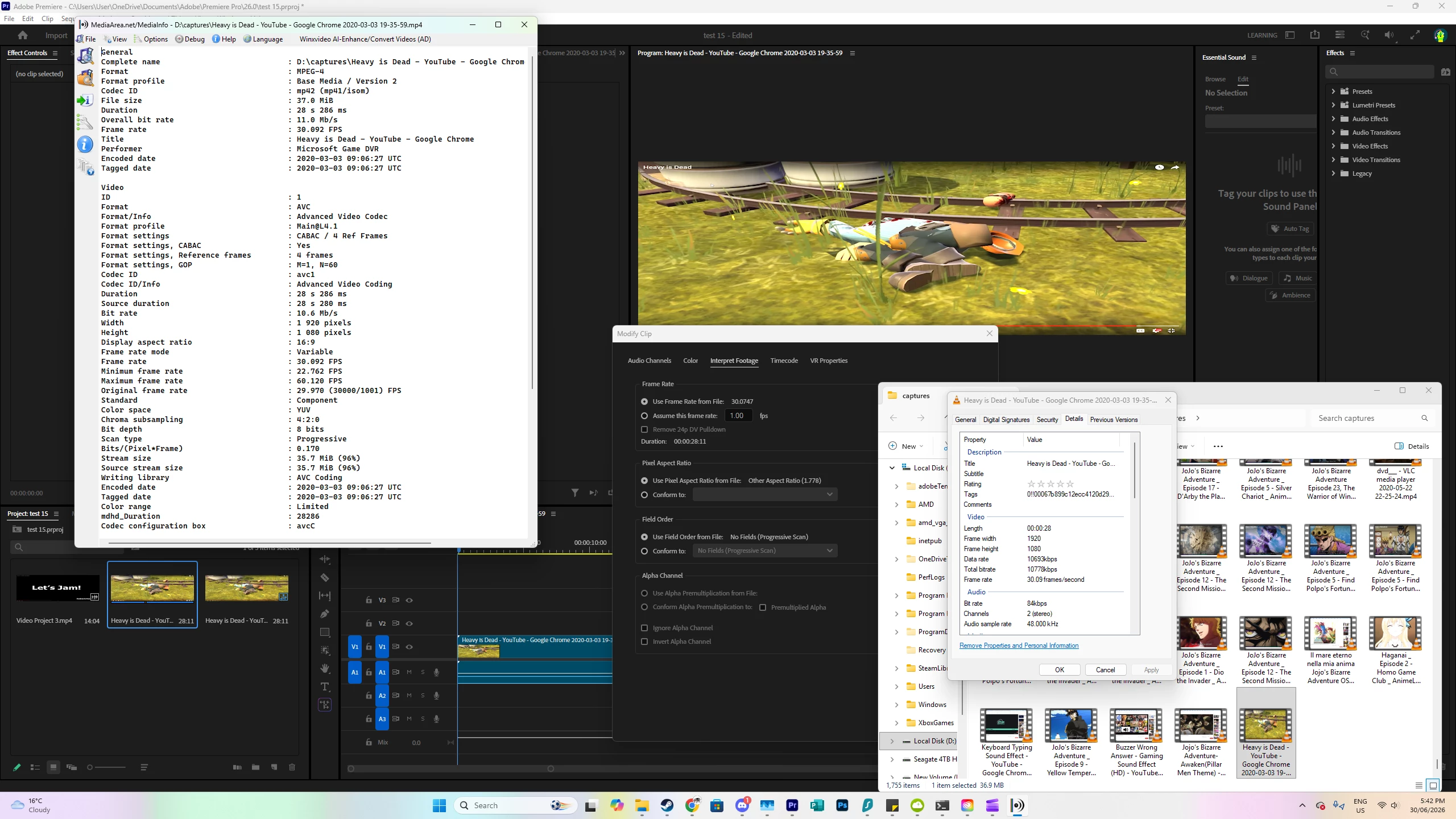
 

    3 replies

    R Neil Haugen
    Legend
    June 30, 2026

    If you Modify/Interpret before adding to a sequence, does it work correctly when then added to a sequence?

    Everyone's mileage always varies ...
    Participating Frequently
    July 2, 2026

    I think that does appear to work. Which should allow me to work with these files in the short term. Hopefully it will get fixed so I don’t have to do that with everying single file with the problem.

    Community Manager
    June 30, 2026

    Hi ​@RoboArmadillo,

    Welcome to the Premiere forums! Thank you for reporting this occurrence and providing screenshots with this information.

    • Could you please specify your video card driver? 
      • We recommend updating to the most recent version; for NVIDIA users, we strongly recommend the Studio version of the driver.

    The team is investigating this issue and will try to assist you further soon.


    For additional context pertaining to Premiere 26.3, please see:

    Best,

    Jonathan

    Participating Frequently
    June 30, 2026

    My video card is an AMD Radeon RX 7900 XTX with AMD software Adrenalin edition version 26.6.4 which is the current version. 

    Community Manager
    June 30, 2026

    Hi ​@RoboArmadillo,
    Thanks for the additional information about the AMD video card. The team conducted tests and unfortunately we were unable to reproduce this issue. It is possible that the cause of this occurance is in record settings when capturing the Xbox footage.

    Can you also check record settings on your Windows system?

    • Settings / Gaming / Captures
      • There might be a connection there too when capturing the Xbox footage

    Follow up questions:

    • When importing into Premiere, are you using Media Browser?
    • Are there any issues if the footage is imported into Media Encoder?
    • Have you tried resetting the preferences upon Premiere launch?
    • Would it be possible to share a screen record of your work flow when capturing the Xbox footage?
      • Alternatively, if you're open to sharing a section of the footage with us, we can then test the exact footage you're working with to conduct further testing.

    Best,

    Jonathan

    Participating Frequently
    June 30, 2026

    Further testing revealed that this issues goes back to version 26.2.0 (build 65) and not not present in version 26.0.2 (build 2)