



デザインジーでは無い
Inspiring
July 24, 2024
Open for Voting

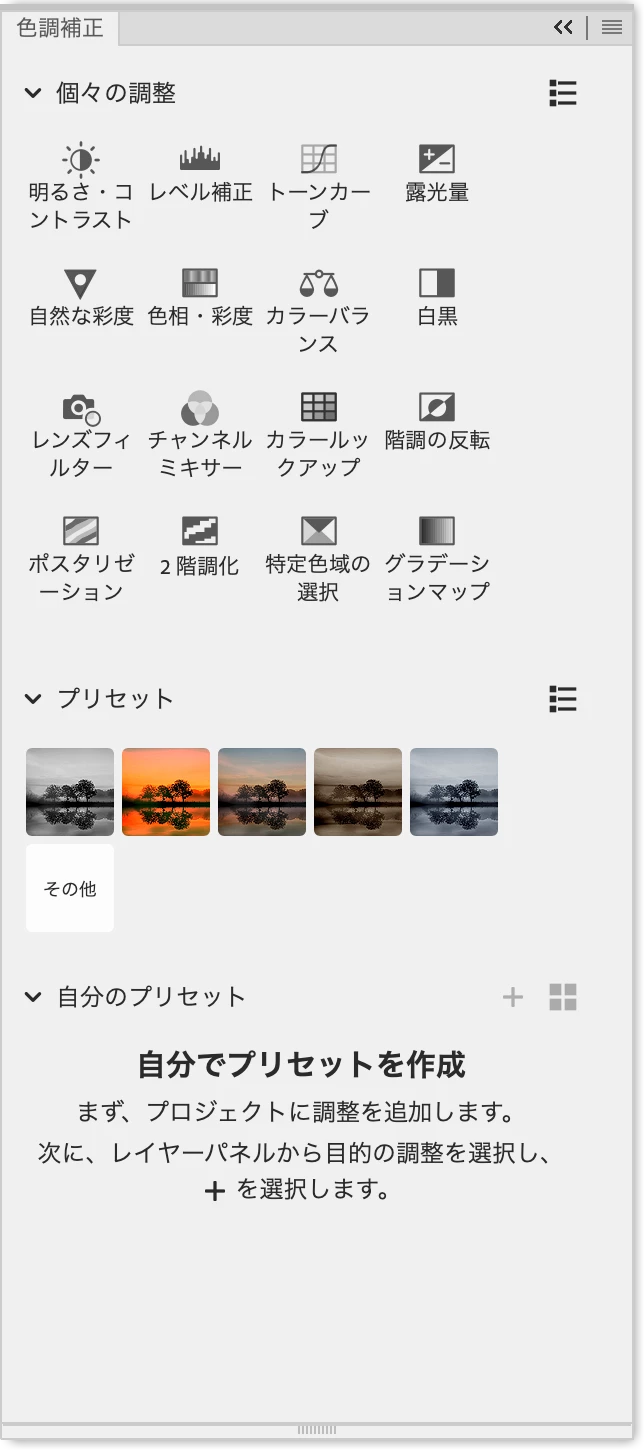
色調補正パネルに最新バージョンで「説明文」がついているが、これを非表示にして欲しい(今までと同じアイコンのみにして欲しい)

  • July 24, 2024
  • 3 replies
  • 333 views

スイマーン、また「要望」ですぅーー。UIのジャンルですが。。。
色調補正パネルに、アイコンだけだったものに「説明文」がついていますが、これをなくす(以前のlook&feelに戻す)か、非表示にするオプションをつけてください!

今までと同じで、アイコンのみで、わかりますから...!


Another "request." This time it's in the UI genre.
The color correction panel previously only had icons, but now it has "descriptions." Please either remove these (return to the previous look and feel) or add an option to hide them!
Just like before, you can understand just by looking at the icons...!
3 replies

Jeff Arola
Community Expert
Community Expert
July 24, 2024

Apparently Adobe made the change due to customer feedback:

https://community.adobe.com/t5/photoshop-beta-ideas/single-adjustments-interface-changes-in-new-ps-versions/idi-p/14749411


In the flyout menu for the Adjustments panel Adobe could add the the option to Show/Hide names.

デザインジーでは無い
Inspiring
July 24, 2024

はい、その方法は知っています。

しかし私が求めているのは、「モダンビュー」の上での、ということです。

8*2の並びの表示がわかりやすく、しっくりくるのです。


Yes, I know how to do that.
But what I want is to display it in "modern view".
The 8*2 layout is easy to understand and looks good.

Ged_Traynor
Community Expert
Community Expert
July 24, 2024

@デザインジーでは無い you can return to the classic view from the flyout menu