


Proxies should adhere to "Assume this frame rate" setting of highres footage
SUMMARY
When changing the playback frame rate of a clip, the playback adjustment should apply to the high res footage as well as to the proxy media.
If not (as is the case now), the proxy workflow is basically useless unless generating a new proxy for the clip(s).
EXAMPLE
Our base frame rate is 25fps. We ingest footage at it's original frame rate and generate proxies at that frame rate, say 24 fps.
As Premiere's internal frame rate interpolation often degrades the quality of the footage, we like to change the playback frame rate to 25 fps in cases like this:
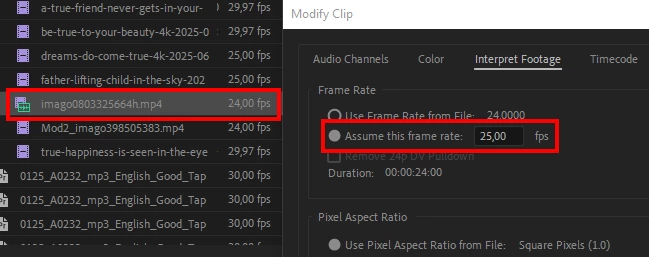
However the proxy will still play back at 24fps. This will result in different fames shown when viewing highres vs. viewing proxies, as in this example at the same point in the timeline in highres vs. proxy mode (see track marks):


This issue can only be fixed by creating new proxies. As Premiere has no issue handling the change of playback speed for highres footage, surely it can handle the same for proxies?
Seems like a no-brainer to me with no downsides in usability 🙂
 AdChoices