
















Design the future of fashion, win Firefly Pro 👗✨
Illustrator (Beta)
Recently active
The only way to unlock an object is by clicking the lock icon on it.I think we should add a shortcut for unlocking selected objects as an alternative option.
Hello :) Latest Beta Build 30.4.0.187 is now available in CCD. This build has the following changes :GenAI HubWhat's NewWe're excited to introduce the GenAI Hub - your new centralized, in-app destination for all generative AI credit activity in Illustrator.OverviewThe GenAI Hub makes it easier than ever to stay on top of your generative credits - from checking your balance to understanding exactly which features consume credits and how many.Key FeaturesCredits BalanceGet a clear, real-time snapshot of your credit usage at a glance:View your current credit balance and total credits available under your planKnow exactly when your next credit reset is scheduledFeatures TabUnderstand the credit cost for every generative feature available on your plan:Browse a full list of generative features (e.g. Generate Vector, Generative Shape Fill, Generative Expand, and more)See the credit cost per use for each model optionFeatures marked as Unlimited do not draw from your credit balancePurchase Cred
Hello :) Latest Beta Build 30.4.0.159 is now available in CCD. We have below fixes in this build: Sketch to VectorIntroducing Sketch to Vector, a faster, more flexible way to convert sketches or images into usable vector or raster artwork directly in Illustrator. Refine a sketch, turn it into an illustration or reimagine any image using just a prompt. Use the creativity slider to control how closely the output matches the original image.Unleash your creativity using any raster image. Start with a sketch, scan, photo, or similar input, and generate artwork based on your intent. We encourage you to test this feature across a range of scenarios and workflows. Some identified use cases are listed below but the possibilities are endless. Sketch refinement: Turn rough sketches into more refined outputs Sketch to illustration: Convert rough sketches into filled artwork Photo to vector: Transform photos into stylized vector illustrations with more personalized results and the ability to explor
The Hand tool reaches its limits when the mouse cursor touches the edge of the screen. On a fairly large workspace, this forces you to zoom out and re-centre to avoid scrolling for too long. In Blender, there is no limit; you can scroll indefinitely. The only limit is physical: the mouse touches the wall or moves off the desktop. It may not seem like much, but for someone looking to optimise their working time, it makes a difference. L’outil Main atteint ses limites quand le curseur de la souris touche le bord de l’écran. Sur un espace de travail assez grand cela oblige à dézoomer et recentrer afin d’éviter de scroll trop longtemps. Dans Blender, il n’y a pas de limite, on peut défiler à l’infini, la seule limite est physique, c’est la souris qui touche le mur ou sort du bureau. Ca n’a l’air de rien mais pour quelqu’un qui veut optimiser son temps de travail, ca compte.
I use the Blob Brush to outline the shape of a fill but then have to delete the floating vertices inside of the shape, it would be nice to have a checkbox in the Blob Brush Tool Options that removed/undid any Compound Paths. That way you can stop interrupting your Blob Tool brushing to delete the hollow center, so to speak. In this example, I’m using the Blob tool to create a cell that will eventually be a shadow. I would like the Blob Tool to have an option that releases the compound path after de-selection and remove the inside path. This would alleviate the need to deselect, use the Direct select tool to delete the inside vertices, and would let an artist continue using the Blob Tool without having to interrupt the workflow. Procreate doesn’t even do this yet.
everytime i try to take a pick with the eyedropper or just choose the tool, the smart guides turnes off.!
Issue:When opening existing documents from Creative Cloud, type objects do not appear. There is no error message (e.g., “font not found”), but no text objects, handles, or outlines are visible.Expected Behavior:Type objects should display normally when opening documents from Creative Cloud.Observed Behavior:Type objects are completely invisible (no bounding boxes, handles, or outlines). No font or missing asset warnings are shown.Workarounds / Additional Findings:Opening the same document in Adobe Illustrator 2026 displays the type objects correctly. Saving the document locally from Illustrator 2026 allows it to open properly in Adobe Illustrator Beta, with all type objects visible. Newly created documents (saved either locally or to Creative Cloud) display type objects correctly when reopened.Environment:Software: Adobe Illustrator Beta Version: 30.4.103 Windows 11
Since updating Illustrator, my files won’t open. Support hasn’t resolved it. I urgently need my files back or access to an older version. If my device isn’t compatible, I’ll revert—but why is my saved work corrupted despite paying for cloud services?
Sometimes the copy/paste shortcut is not working at all. I have to help myself with alt button. I searched the issue and obviousely I'm not the only one with that issue. Thank you
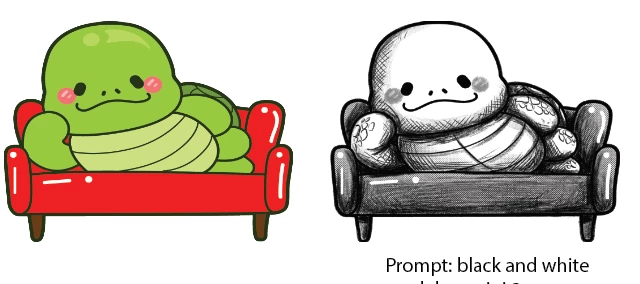
Introducing Sketch to Vector, now available in Adobe Illustrator (Beta). It is a faster, more flexible way to convert sketches or images into usable vector or raster artwork directly in Illustrator. Refine a sketch, turn it into an illustration or reimagine any image using just a prompt. Use the creativity slider to control how closely the output matches the original image. Prompt: fill the sketch with colors and fill the background wall with polka dots of red colorLow creativity and raster output of Gemini 3 modelUnleash your creativity using any raster image. Start with a sketch, scan, photo, or similar input, and generate artwork based on your intent. We encourage you to test this feature across a range of scenarios and workflows. Some identified use cases are listed below, but the possibilities are endless.Sketch refinement: Turn rough sketches into more refined outputs Sketch to illustration: Convert rough sketches into filled artwork Photo to vector: Transform photos into stylize
This may be more of a feature request than a bug report, and may already be on the roadmap. When using turntable to generate a turnaround of something, you can edit what you see in a particular view, but if you rotate away and back, those edits are not saved and they revert back to what was originally generated.There’s a little bit of text saying "edits in this view will not sync with other rotated views", but it’s not clear that your work will be lost if you rotate to another view.The expected result would be to save those edits to a view. If I make a change, I expect it to be able to retain that edit even if I rotate off of that view and then back again.Additionally, it would be useful to be able to lock certain views and then regenerate the turntable views to generate the views between those which are locked. Otherwise, if it just went by what was edited, or perhaps if views could be selected and then allow the user to select a “regenerate selected views” option.Example 1: I have a
I cannot save files. I have tried several files, and updating the application but neither fixed the issue. It gets stuck on anywhere between 50% and 95%. Sometimes it doesn't happen, especially if it's a brand new file. The files were totally fine two updates ago.
Help us review our latest Gen AI feature - Instruct Edit. What is Instruct Edit?Instruct Edit enables you to refine your generated vector artwork (initially created via Text to Vector) using just a prompt. You can modify existing artwork by describing the changes you’d like to see, while preserving the original composition. The feature makes the iteration process faster, more precise, and more intuitive. Where is it available?Instruct Edit is currently available in the Illustrator Beta application (version 30.4.0.87 and above).You can help by:Sharing your feedback via this short survey: https://survey.adobe.com/jfe/form/SV_8wzNrDMhFkSF5Wu Or scheduling a quick session with us to walk through your experience: Book time with Vidushi Keshwani: Instruct Edit - Edit your generated artwork conversationallyWe would greatly appreciate receiving your feedback by April 3, 2026, to help inform our next steps.Prompt: Make the smile of the boy wider and change the color of the ball to Green.
Error message when I want to use Turntable since 2 days. «We ´re experiencing high demand. Please Wait and retry your prompt soon»
ao tentar usar a ferramenta placa giratória, recebo esta mensagem de erro
I haven’t been able to find what triggers that but sometimes, lines towards the top-left corner or inside a shape appear when hovering an item (text, shape, whatever).This is highly disturbing. The only way to get rid of them is to restart the application.
Ls librerías no aparecen
Hello,Latest Beta Build 30.4.0.103 is now available in CCD. We have the below fixes in this build:https://illustrator.uservoice.com/forums/601447-illustrator-desktop-bugs/suggestions/5008[…]AB%E3%81%AA%E3%81%A3%E3%81%A6%E3%81%97%E3%81%BE%E3%81%86 https://illustrator.uservoice.com/forums/601447-illustrator-desktop-bugs/suggestions/5095[…]95%E4%BD%9C%E3%81%97%E3%81%A6%E3%81%84%E3%81%AA%E3%81%84 https://illustrator.uservoice.com/forums/601447-illustrator-desktop-bugs/suggestions/35260906-illustrator-window-shrinks-size-not-big-enough-c https://illustrator.uservoice.com/forums/601447-illustrator-desktop-bugs/suggestions/5008[…]B5%E3%83%B3%E3%83%97%E3%83%AB%E3%81%95%E3%82%8C%E3%82%8B https://illustrator.uservoice.com/forums/601447-illustrator-desktop-bugs/suggestions/46935916-words-get-broken-when-hyphenation-is-off-with-no-h https://illustrator.uservoice.com/forums/601447-illustrator-desktop-bugs/suggestions/50960360-export-for-screens-scale-dropdown-doesn-t-work
Hello,Instruct Edit — Just Say It. We’ll Edit It. (Beta Build 30.4.87)Ever felt like your generated artwork was almost perfect? So close… but needed just one small tweak? Ever hit Regenerate and thought, - “Why am I starting from scratch when I only wanted to change one thing?” With Instruct Edit (Beta), you can now refine your generated vector artwork using just a prompt. Instruct Edit lets you modify existing generated artwork by simply describing the change you want. Your original composition stays intact while the requested edits are applied—making iteration faster, more intentional, and far less frustrating.How to UseOpen Text to Vector Graphic. Generate artwork using any model (1P or Partner Models). Check the pencil icon in the Context HUD Describe the changes you want in the prompt. Hit Generate and see your update applied. For this initial release, Instruct Edit works best with Nano Banana models, and is currently enabled only for Nano Banana models. Support for additional s
Hello, The latest Beta Build 30.4.0.80 is now available in CCD. We have the below fixes in this build: Live Text on a Curve:Live Text just got even more flexible. You can now generate curved text in your vector artwork—and keep it fully editable. Whether it’s circular logos, badge-style icons, emblems, or text flowing along a path, your generated curved text stays live so you can easily update wording, adjust fonts, tweak spacing, or refine styling—without regenerating the artwork.Combined with support for complex backgrounds, Live Text now gives you even more creative freedom across a wider range of designs. This feature is in Beta, and your feedback matters. Align Center (Both Axes):You asked, we delivered! You can now center objects both horizontally and vertically in a single click. No more clicking twice. Look for the new option in the Align panel. Improved Curve Fitting for Image TraceImage Trace now handles corners, text regions, and T-junctions more accurately and consistently,
I installed the new Illustrator beta because my previous version was saying the build was no longer there. After I installed it, my entire page of designs I was working on, the text has disappeared for all of them. I tried going to previous versions of this design, and I see the text in the preview image, but when I go back to that version the text still does not show up. I am very frustrated because I put in a lot of time and work into those designs and it would be a huge waste of time to do it all over again..Someone please help!
Our computer crashed and we had to reinstall our epilogue zing engraver - now when I print, I change the document size but then it reverts and won’t “hold” it when it comes back out of the settings tab and I can’t get anything to engrave over 8.5x11
Olá, tudo bem?Estou enfrentando um problema ao tentar abrir um arquivo no Adobe Illustrator. Ao abrir o arquivo, recebo a seguinte mensagem de erro:“Não é possível abrir a ilustração. Talvez o arquivo seja apenas leitura ou esteja sendo usado por outro aplicativo, ou você não tenha as permissões necessárias. Identificação: -54.”Já realizei diversas tentativas de solução antes de entrar em contato, incluindo: Salvar o arquivo com outro nome e em diferentes diretórios Verificar e alterar permissões (removendo “somente leitura”) Copiar o arquivo para o ambiente local (fora de nuvem como Google Drive/OneDrive) Reiniciar o computador e fechar todos os programas que poderiam estar utilizando o arquivo Tentar abrir o arquivo como cópia Tentar importar o arquivo em um documento novo Abrir o arquivo em outros softwares (Photoshop e Acrobat) Renomear o arquivo para .PDF para tentar acessar o conteúdo interno Testar em diferentes versões do Illustrator Infelizmente, nenhuma dessas
I’ve been diving into the Adobe Illustrator Beta recently to test out the new Generative Turntable feature. If you haven't seen it yet, it basically allows you to take flat, 2D vector artwork and spin it like a 3D object to see different angles and top-down views. This brings up a question I’ve been thinking about: Is AI making things too easy? When we can generate a 180-degree character turnaround with a slider instead of manually redrawing every limb and perspective, are you feeling empowered by the speed, or do you feel a bit of "creative guilt" over how much of the heavy work that Illustrator’s AI is doing?It’s definitely not perfect yet—for example, on my character turnaround, the "back view" still required a bit of manual correction to get the hair and outfit looking right. But even with those "wonky" beta glitches, the speed is undeniable. Please drop a comment with your experience! ~ Love to hear how your process or thoughts has shifted—No right or wrong answers here—just your
When not connected to the internet, Illustrator hangs when switching documents (Mac spinning wheel). Other operations also seem sluggish at times.This occurs on a fresh Mac install (Mac OS Tahoe 26.3). It appears to have been introduced in either Illustrator v30.2 (not tested) or v30.2.1 (tested). I’ve gone back to v30.1, which does not have the problem. The following issue seems to report the opposite problem (maybe a fix has created this new issue):
Remix with Firefly Community Gallery
Thousands of free creations to fall in love with and remix in Firefly.
Already have an account? Login
Enter your E-mail address. We'll send you an e-mail with instructions to reset your password.