

Participant
November 16, 2018
質問

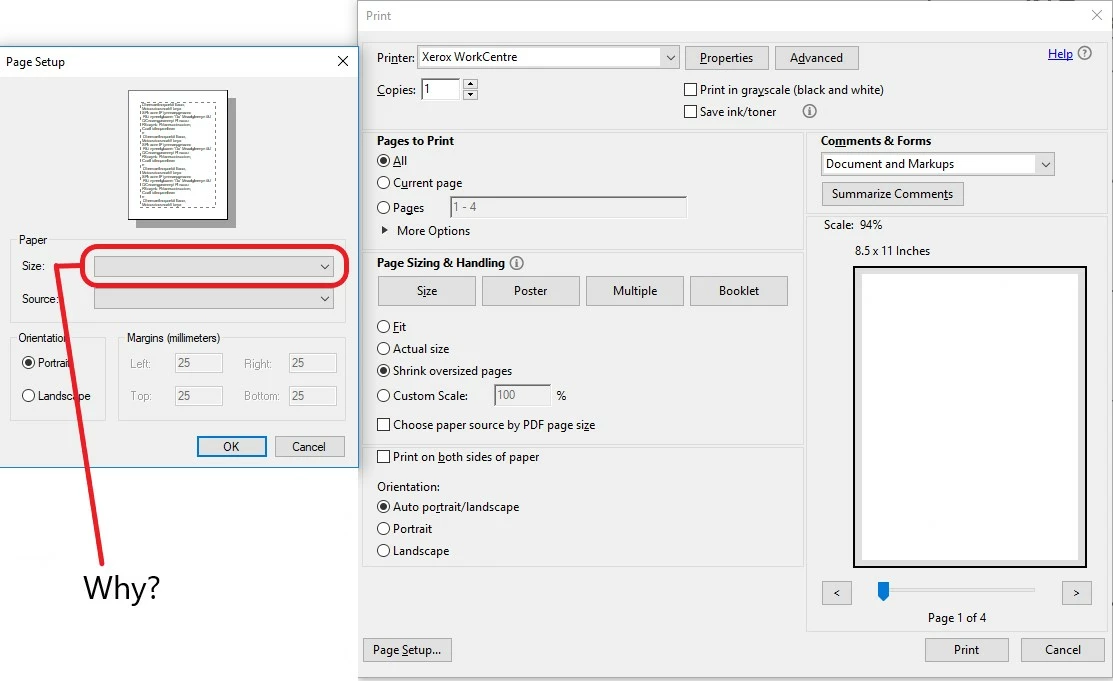
Why can't I change the page size when trying to print?

  • November 16, 2018
  • 返信数 1.
  • 366 ビュー

I have been searching and searching for an answer but I can't seem to figure it out.

Why can't I change my paper size when printing???

I attached a photo to explain what is happening.
このトピックへの返信は締め切られました。

返信数 1

AnandSri
Legend
November 23, 2018

Hello Bs,

I am sorry for the delayed response and inconvenience caused, please reboot the machine and check for any pending updates of Adobe Reader from help>check for updates, reboot the machine again after updating Adobe Reader.

Make sure that you have the latest printer driver/firmware installed.

Are you not getting the option to change the page size option while printing one specific PDF or with all the PDF files?

have you tried printing any other document using other application and tried changing the page size? If not, please try once and check.

For testing purpose, turn off 'Enable Protected Mode at Startup' and ' Enable Enhanced Security' from Edit menu of Adobe Reader>Preferences>Security(Enhanced) and check if this brings any difference.

Please enable these two options back.

Are you on Windows or Mac OS and what is the version installed?

What is the version of Adobe Reader installed? To identify, refer to Identify the product and its version for Acrobat and Reader DC

Let us know how it goes and share your observation.

Thanks,

Anand Sri.
