


Inspiring
January 26, 2022
Answered

how to put the anchor point to the middle of an object

  • January 26, 2022
  • 1 reply
  • 301 views

Hi community


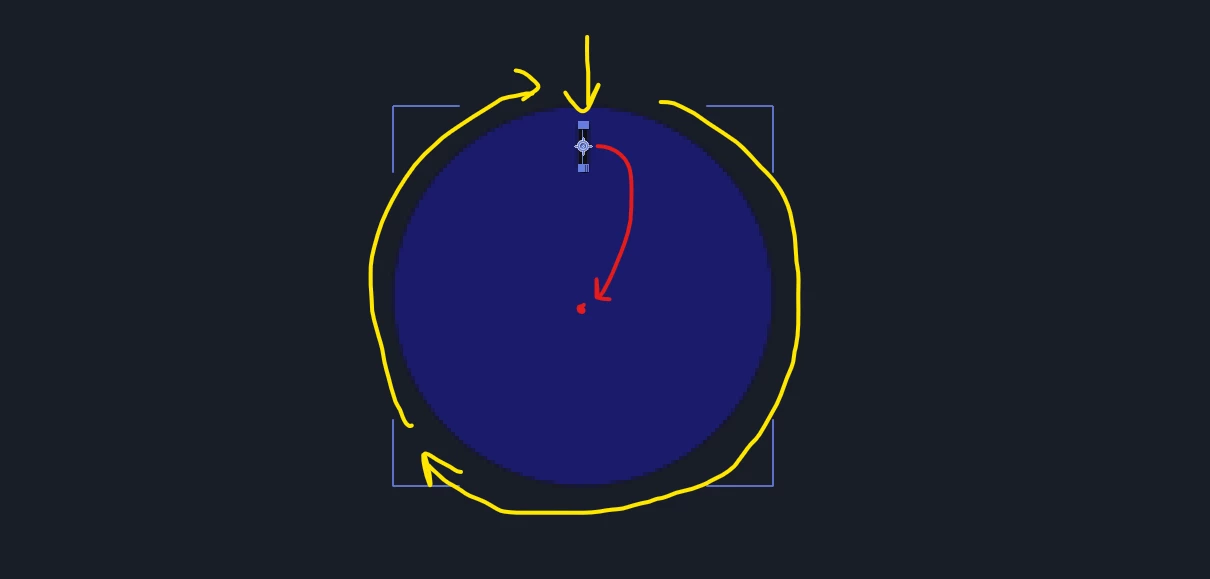
I would like to put the anchor point of the black line in the exact middle position of the circle shape, so I can animate it going around. Is there a way the anchor point can snap to the exact middle section of the circle shape? I cannot centre it 100%, it always seems to be off by a little bit.


This topic has been closed for replies.
Correct answer Conrad_C

With the layer selected, choose Layer > Transform > Center Anchor Point in Layer Content.

1 reply

Conrad_C
Community Expert
Conrad_CCommunity ExpertCorrect answer
Community Expert
January 26, 2022

With the layer selected, choose Layer > Transform > Center Anchor Point in Layer Content.