

Participant
April 1, 2022
質問

What is the easiest way to make curved grid like this in 3D.
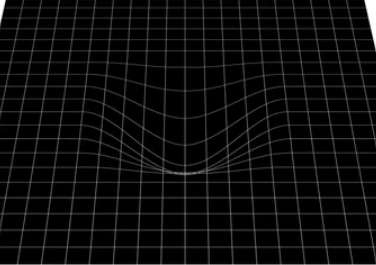
  • April 1, 2022
  • 返信数 3.
  • 573 ビュー

At first I thought there was a way to curve a flat 3D layer only using AE but I couldn't find a way.
Now I think I'll do it just by using Maya. Do you know any other way?

このトピックへの返信は締め切られました。

返信数 3

Community Expert
April 2, 2022

In 2007 I wrote an article on using displacement maps that were animated using point lights as a light source with positive and negative intensity values to get mirrored displacement from positive and negative red and green values created by the lights. The result looks like this:

I have uploaded an updated project file for you to play with. This is what the Displacement Map comp looks like:

If you have a budget for a plugin, I suggest Freeform Pro from AE Scripts. You can even add Projection Mapping to a Freeform layer to distort any type of image. Here's an overview of the plugin:

I use both techniques. One is easier than the other for some designs. The other is more efficient for different scenarios. It all depends on the project. If I knew what you were trying to accomplish, I could give you some more efficient suggestions.


Community Expert
April 2, 2022

Doing it in Maya is the best way. After Effects is not very good at making these types of graphics.

Byron.
Mylenium
Legend
April 2, 2022

For a static view it could easily be re-created using shape layer paths and masiks with strokes, but of course if you need to swish around in 3D this would be a lot of extra work, so yes, doing it in Maya is perhaps a good idea unless you want to spend money on extra plug-ins or putting up with the mess that is the Cinema 4D renderer and import.


Mylenium