


Participant
September 20, 2022
Answered

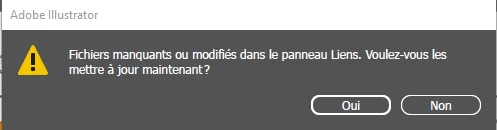
Fichiers manquants ou modifiés dans le panneau Liens. Voulez-vous les mettre à jour maintenant ?

  • September 20, 2022
  • 1 reply
  • 1058 views

Bonjour à tous !


Depuis peu, ce message s'affiche régulièrement (parfois plusieurs fois par minute, toujours avec moins de 3 minutes d'écart), et je n'arrive pas à m'en débarrasser. Lorsque j'entre dans la fenêtre "liens", elle est vide. Il n'y a aussi aucune raison que j'ai des liens, puisque j'ai tout créé moi même.


Pour info :

- J'ai plusieurs plans de travail, avec plusieurs calques.

- Nous sommes plusieurs à travailler sur ces fichier, mais jamais en même temps.

- Ce fichier est sur un disque partagé, mais ça n'a jamais posé de problèmes avant.

- Cela arrive de manière aléatoire, sur différents fichiers qui n'ont pas l'air d'avoir de points commun.

- Cela arrive aussi aux autres utilisateurs du fichier.


Merci d'avance pour vos réponses.


This topic has been closed for replies.
Correct answer Anubhav M

Hello -Lizzie-,


Sorry to hear about this experience. When you save and open files across a network/removable media or a cloud-synced folder, many variables impact performance leading to damaged files, access issues, or slow performance. We recommend you save your work to a location on the internal hard drive, such as the desktop, and then manually copy it to the external location to avoid such problems.


You may learn more about this here: https://helpx.adobe.com/illustrator/kb/illustrator-support-networks-removable-media.html.


Kindly update this thread if you need further assistance. We'd be happy to help.


Thanks,

Anubhav

1 reply

Abambo
Community Expert
Community Expert
September 20, 2022

Bonjour Lizzie,


Vous utilisez quelle version d'Illustrator (numéro exact svp) et sous quel système d'exploitation  (+version exacte) ?


Est-ce que votre réseau est bien chargé ?

ABAMBO | Hard- and Software Engineer | Photographer
-Lizzie-Author
Participant
September 20, 2022

Bonjour Abambo,


Je travaille avec la version la plus récente d'illustrator à ce jour (26.5) et sous Windows 10 Professionnel (x64).

Oui, le réseau est bien chargé, je l'utilise toute la journée et je n'ai pas de problème avec les autres fichiers.


Merci d'avance,


Lizzie

Anubhav M
Community Manager
Anubhav MCommunity ManagerCorrect answer
Community Manager
September 20, 2022

Hello -Lizzie-,


Sorry to hear about this experience. When you save and open files across a network/removable media or a cloud-synced folder, many variables impact performance leading to damaged files, access issues, or slow performance. We recommend you save your work to a location on the internal hard drive, such as the desktop, and then manually copy it to the external location to avoid such problems.


You may learn more about this here: https://helpx.adobe.com/illustrator/kb/illustrator-support-networks-removable-media.html.


Kindly update this thread if you need further assistance. We'd be happy to help.


Thanks,

Anubhav