Participant
November 28, 2018
Answered

Illustrator Layer Styles Missing

  • November 28, 2018
  • 3 replies
  • 17136 views

I'm trying to add a drop shadow to an object in Illustrator CC. Most of the forums I've read say to select the object/layer and go to the layer styles button that looks like an FX at the top of the layer panel. My layer panel does not have this button. I was also told to go to effect > stylize > drop shadow, but there is no drop shadow option.

Either how to do I add a drop shadow without either of these options or how do I find my layer styles button.

Thanks!

This topic has been closed for replies.
Correct answer Rob de Winter

Hey,

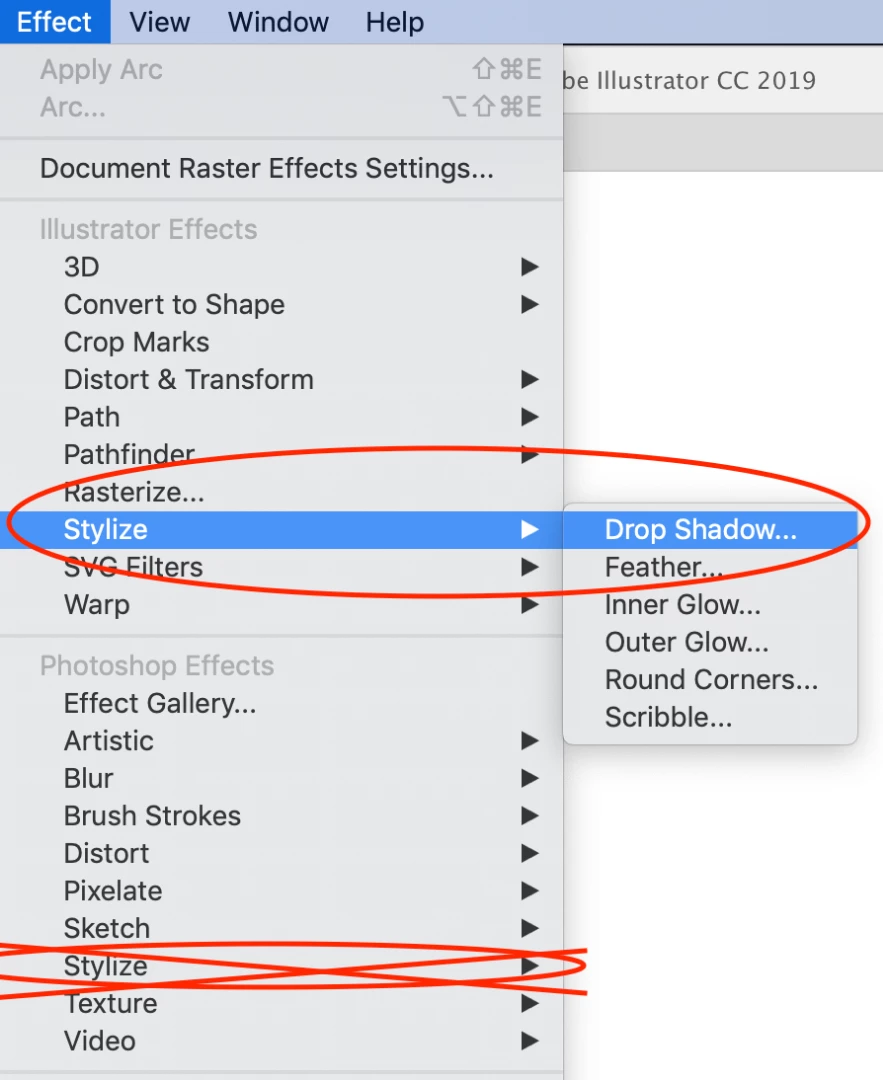
Make sure you go to the right "Stylize" option in the Illustrator Effects. There are two of them. One Illustrator effect and one Photoshop effect. See the screenshot below. So go to Effect > take the first Stylize > Drop Shadow, and not the second one

3 replies

Participant
February 20, 2020

Thank you for pointing that out.  As a newbie and trying to self educate in these adobe software programs, it is nice to have a simple solution for my oversight.

Rob de WinterCommunity ExpertCorrect answer
Community Expert
November 28, 2018

Hey,

Make sure you go to the right "Stylize" option in the Illustrator Effects. There are two of them. One Illustrator effect and one Photoshop effect. See the screenshot below. So go to Effect > take the first Stylize > Drop Shadow, and not the second one

Tuyishime Gloriose
Participant
March 26, 2021

Hello how can i make a golden color in illustrator. for photoshop when you go to layer style and choose gradient overlay then u can easily choose from gradient and keep changing colors to make gold one. please how is it done in AI


Monika Gause
Community Expert
Community Expert
March 26, 2021

Apply a gradient to your objects. There are metallic gradients in the swatches libraries.

Mohammad.Harb
Community Expert
Community Expert
November 28, 2018

In photoshop we ise the term “ layer style” but In illustrator there is “graphic style”

you can apply drop shadow from :

effect-> stylize -> drop shadwo

or for the appearance panel ( window -> appearance)

In this window, you can add or edit effects (fx) as well.