Hello @Rob217717683hsl,
We understand that encountering technical issues can be frustrating. We are here to help and would like to suggest trying to reset Illustrator's preferences manually and checking if it helps:
• Close all Adobe applications.
• Go to the following locations
• ~/Library/Caches
• ~/Library/Application Support/Adobe
• ~/Library/Preferences
• Rename Adobe Illustrator, com.adobe.illustrator and Adobe Illustrator 27 Settings folders to Adobe Illustrator.old, com.adobe.illustrator.old and Adobe Illustrator 27 Settings.old
• Launch Illustrator from the Creative Cloud.
Note: Location starting with this "~" sign indicates the User Library, which is hidden. So, you need to copy & paste the exact path in spotlight search or from Finder Menu > Go > Go to Folder > Paste the location in the dialog box like this:
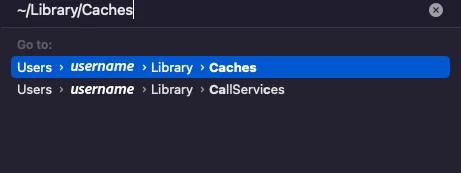
Disclaimer: Please note that renaming preferences folders will remove all the custom settings, and Illustrator will launch with default settings. You can also save a backup of the folders in case you want to. The location is mentioned above.
If you don't mind, could you please follow the steps and share your observations with us? We appreciate your time and effort in helping us resolve this issue.
Looking forward to your response.
Thanks,
Anubhav





 AdChoices