


Participant
June 1, 2017
Question

Scissors tool

  • June 1, 2017
  • 2 replies
  • 2827 views

Hi,

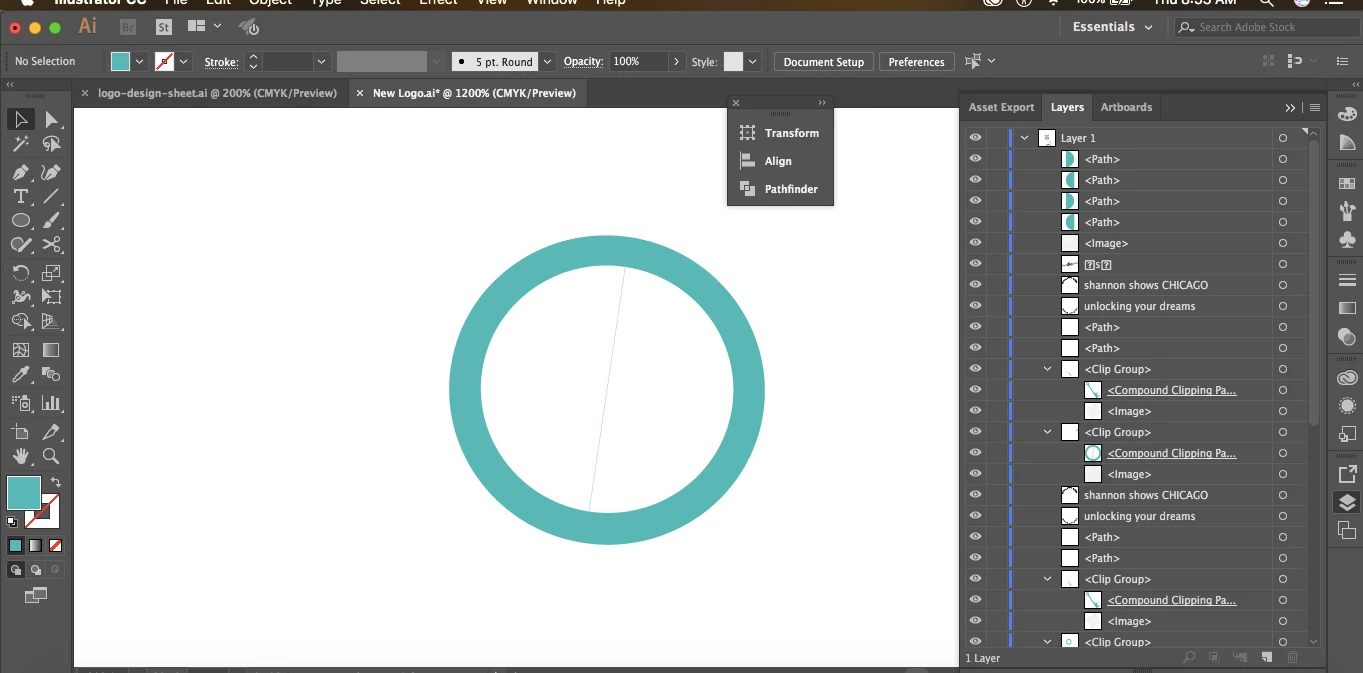
I was trying to make a cut to a clipping mask. When I cut it, the cut line changed to the color of the clipping mask. I thought it was just there to show me where I cut, but I previewed it in the export and it still had the blue line. Help.

Thanks

Julie

P.S. here is a screenshot
    This topic has been closed for replies.

    2 replies

    Inspiring
    June 1, 2017

    Hello,

    The best way to cut a hallowed circle is to use the pathfinder.

    But, before doing that, draw a horizontal line where you want to cut.

    Then, select line and circles > go to pathfinder palet and clic on the first icon, second row (split)

    This, I'm certain will solve your problem.

    The inner circles will become white, they could deleted if wanted.

    If wish you good luck.

    Patrick T

    Mike_Gondek10189183
    Community Expert
    Community Expert
    June 1, 2017

    Not sure how you built that as looks more like a compound shape rather than a clipping mask. I do see the thin blue line in the middle, and my guess is that is what you are having issue with.

    Rather than using masks you may find what you need with the transparency palette. Can you provide a little more detail about what exactly the result is you hope for.

    Participant
    June 1, 2017

    I don't know the terms, but here are my steps.

    I created a circle with eclipse tool

    Then I created a smaller one

    Then I excluded to make a hollowed out circle

    Then I took the scissors tool and cut. It worked, but it made the cut mark blue.

    What is a transparency palette?

    I dont understand

    Thanks

    Julie

    Monika Gause
    Community Expert
    Community Expert
    June 1, 2017

    What is it that you want to achieve?