Participating Frequently
March 3, 2018
Answered

Using zig zag tool

  • March 3, 2018
  • 2 replies
  • 6811 views

Hi there and please excuse if this is a very basic question,

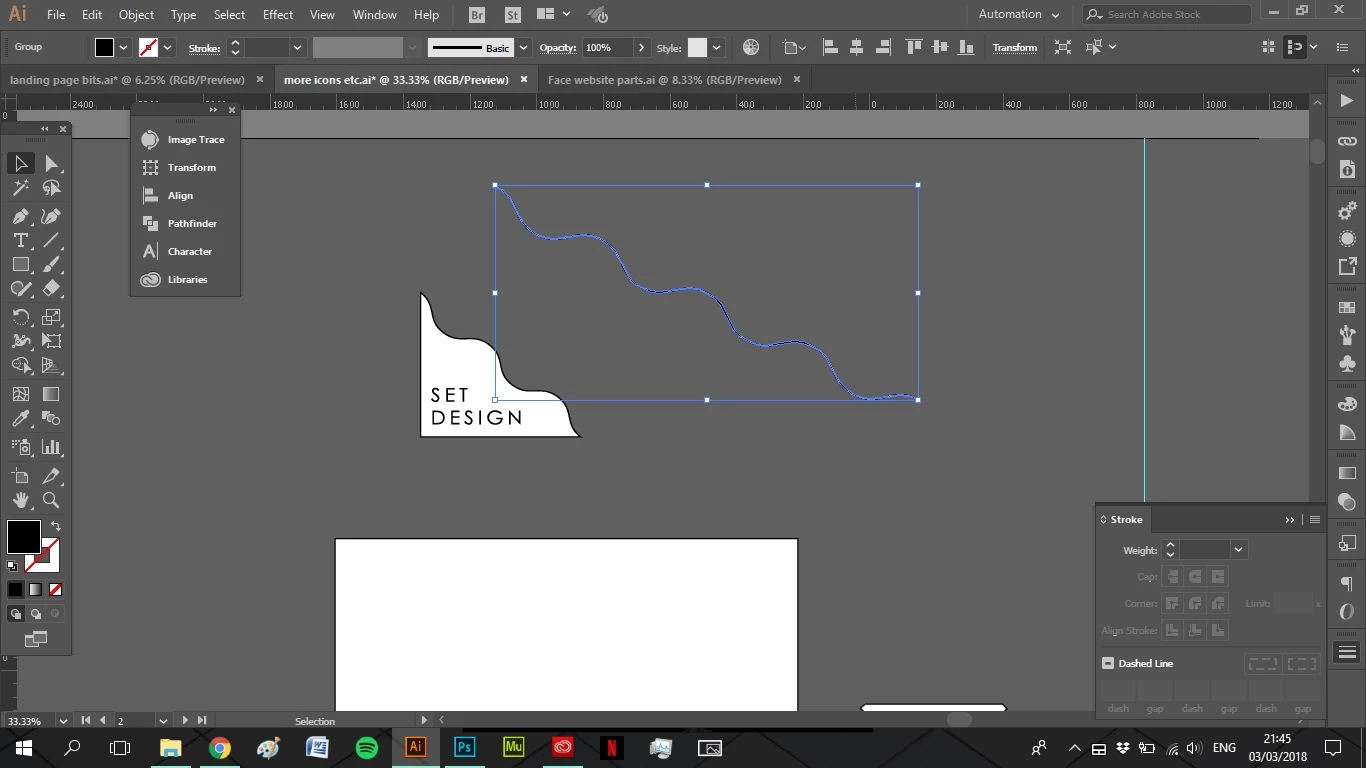
Please see image as reference. I want to make a shape like the one with set design written in it. I draw a line, use zig zag to desired effect, expand it, and then want to add anchors to give the box a base and make it fillable with colour. The pen tool deletes my end anchor points and join tool draws an extra line through the squiggly one. Any help greatly appreciated,

This topic has been closed for replies.
Correct answer Monika Gause

ailbhefstudent  schrieb

The pen tool automatically turns to the delete anchor when I hover over the end point? Should I change some setting?

That shouldn't happen.

You could turn off that option in the Preferences > General: Automatic add/delete.

2 replies

macpawel
Participating Frequently
March 3, 2018

Try this;

Select M - Rectangle Tool and draw rectangle

Select Knife Tool and just cut rectangle (just draw the similar line)

Be sure you deselect all and then select and remove unwanted part

You can also draw rectangle then draw single line and select both pth. Then use Shape Builder (Shift+M) Tool with pressed Alt key to remove unwanted part of rectangle

pawel

Monika Gause
Community Expert
Community Expert
March 3, 2018

You are using the pen tool, not the Delete anchor point tool, right?

You need to select the path, then hover over the end point, the cursor icon will sho a diagonal line next to the icon. then click on the point, then click the nect point, then close the path.

How to draw with the Pen, Curvature, or Pencil tool in Illustrator

Participating Frequently
March 3, 2018

Thanks for replying

The pen tool automatically turns to the delete anchor when I hover over the end point? Should I change some setting?

Monika Gause
Community Expert
Monika GauseCommunity ExpertCorrect answer
Community Expert
March 3, 2018

ailbhefstudent  schrieb

The pen tool automatically turns to the delete anchor when I hover over the end point? Should I change some setting?

That shouldn't happen.

You could turn off that option in the Preferences > General: Automatic add/delete.