Known Participant
February 15, 2026
質問

how to make Trifold Brochure in Adobe InDesign 2026

  • February 15, 2026
  • 返信数 7.
  • 96 ビュー

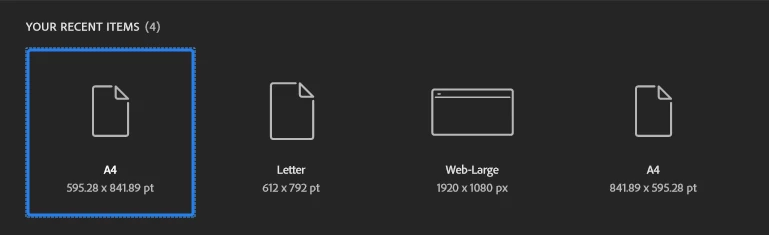
Hi there, would help me I was making a Trifold Brochure in InDesign but the create the new document has no print, and other to make other stuff are not in there in InDesign 2026 would you update the InDesign 2026 Thanks Kevin
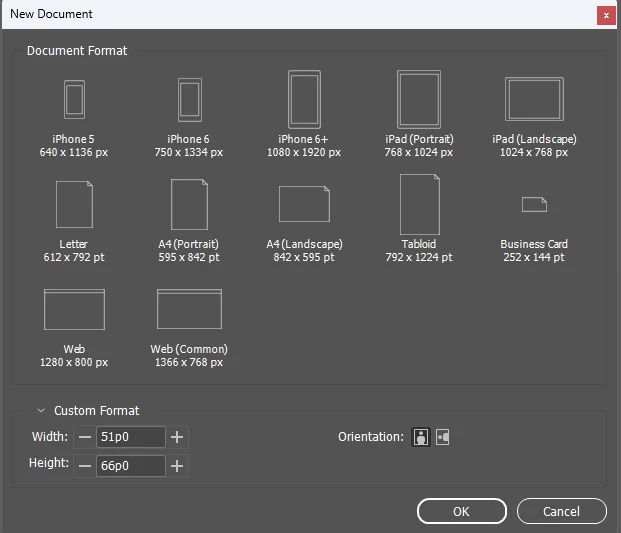

No print and others


has print and others


    返信数 7

    Mike Witherell
    Community Expert
    Community Expert
    February 16, 2026

    Here is a sample template I use in the training classroom.

    Samples like this would be useful if they were included in the New Document dialog box. Hey Adobe, could you do that? 

    Mike Witherell
    Dave Creamer of IDEAS
    Community Expert
    Community Expert
    February 16, 2026

    In the past, I’ve used FoldFactory’s template builder <https://foldfactory.com/template-builder/> but it appears to be down. I’ve emailed them to find out what the problem is or if it’s down permanently. 

    David Creamer: Community Expert (ACI and ACE 1995-2023)
    Mike Witherell
    Community Expert
    Community Expert
    February 16, 2026

    Hi Dave,

    FoldFactory looks very interesting. Thank you.

    I was sampling some trifold brochure indt files from stock.adobe.com. They are visually pleasing, but generally are not setup in a way that reflects any physical/mechanical awareness of prepress and bindery.

    Mike Witherell
    Abhishek Rao
    Community Manager
    Community Manager
    February 16, 2026

    Hi ​@Sammy Red the Betta Fish


    Thanks for the update and glad to hear the issue is resolved. If possible, could you please share what worked for you here in the community so it can help other users facing the same situation? Also, if any of the suggestions from our esteemed experts helped you fix the problem, we’d really appreciate it if you could mark the relevant reply as the correct answer.


    Looking forward to hearing from you.

    Abhishek

    M.Hasanin
    Inspiring
    February 16, 2026

    @Sammy Red the Betta Fish 
    The following Video might help, you can change language of titles or just watch the steps, easy abstracted video, the size in Trifold in video are A4 :
    https://www.youtube.com/watch?v=SueFhKlYp_A

    Mohammad Hasanin
    Dave Creamer of IDEAS
    Community Expert
    Community Expert
    February 16, 2026

    I have a letter tri-fold template from 20 years ago. 

    David Creamer: Community Expert (ACI and ACE 1995-2023)
    Scott Falkner
    Community Expert
    Community Expert
    February 15, 2026

    There’s no built in template for what you ask for. Special fold or cuts are something you need to add yourself. How you do that depends on the type of fold you want. Z-folds have three identical panels and fold like the letter Z.What I think of as a Trifold has one panel tucked into the other two. This means one of the side panels is narrower.

    If you are printing on 8½˝ ⨉ 11˝ paper, a Z-fold brochure would have three panels 3⅔˝ wide. A Tri-fold brochure would have the left and middle panels 3¾˝ wide and the right panel 3½˝ wide. For this type of brochure the other side would reverse this, placing the narrower panel on the left.

    Typically I prefer to make my page size the size of the paper and add fold marks in the slug, as others have suggested. 

    I’m sure if you search you can find templates for this type of project.

    Dave Creamer of IDEAS
    Community Expert
    Community Expert
    February 15, 2026

    You can do one of the following:

    1. Create your pages the size of the panel.
    2. Turn off Allow Selected Spread to Shuffle under the Page panel menu.
    3. Create each side of your brochure with three pages side by side.
    4. Print as spreads.

    OR

    1. Create your page full size.
    2. Make three columns with a gutter twice the size of your margin.
    3. Use spread guides to mark where the folds are.
    4. Create a slug area to add your own fold lines for the printer (typically a dashed line)

    Option one setup (I used US sizes--adjust for your sizes):

    Option 2 setup:


    David Creamer: Community Expert (ACI and ACE 1995-2023)
    Willi Adelberger
    Community Expert
    Community Expert
    February 15, 2026

    A trifold has 6 pages and 2 of them are slightly smaller. 

    #Here in Germany I make 2 sizes, 100mm * 210mm and 97mm * 210nn.

    I put them together in 2 3 page spreads. Each of them is in a final size of a wide landscape A4 as most printers desire.

    Singe pages give the advantage to work with margins and help to avoid miscalcukations which is often happening.


    I have here some examples of specific folds. In German a Trifold is Wickelfalz. You can find it here:

    https://www.dropbox.com/scl/fo/mr8oaamdsbm0pawdi97go/ALXrceQccp0veLoaj9T34X4?rlkey=yu64t187v0bef02j0lecn1n7w&st=duofziy2&dl=0


    Known Participant
    February 15, 2026

    Hi there, it fixed problem solved Thanks Kevin

    Sammy the Red the Betta fish
    Dave Creamer of IDEAS
    Community Expert
    Community Expert
    February 15, 2026

    I’m not sure I understand your post…
    Are you asking someone to make the brochure FOR you?

    The screen captures I used were from 2026, but have been basically the same for many versions now.


    David Creamer: Community Expert (ACI and ACE 1995-2023)