


Participant
July 20, 2025
解決済み

Can't rotate identity plate when printing in portrait orientation

  • July 20, 2025
  • 返信数 2.
  • 220 ビュー

I just started using an identity plates to "sign" my work for shows.   I use custom text.  It works well for landscape orientation -- the text shows up as expected with the baseline near the bottom and reading left-to-right.  When I switch to portrait orientation, the text rotates 90 degrees clockwise, so the baseline is along the left edge and it reads top-to-bottom.   I can find no way to rotate it back to "normal".    Is this a known limitation or am I missing some simple way to have landscape-oriented identity text in a portrait print?
解決に役立った回答 Rob_Cullen

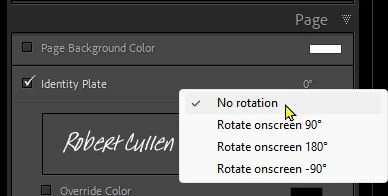
Can you not change the orientation in the Page panel?  Click on the 'Degrees' number.

And then drag the identity Plate to any location you want on the page.


返信数 2

Community Expert
July 21, 2025

It sounds as if your desired page layout is of a different design when an image is portrait, from when it is landscape. You would like an identity plate to sit parallel to the long side in one case, parallel to the short side in the other, and associated to a different corner of the image. Furthermore, we may often have different (aesthetic) requirements for image position in these two cases. This suggests two different saved page setups, and outputting a selected sub-batch of images with each. LrC can filter down a set of images on portrait / landscape, to help you with this. Or you can semi-automate the filtering through Smart Collection rules / make a saved Print Collection for repeatability which associates the relevant page setup with the suitable image selection. 


As an alternative, it may be possible to instead Export to JPG (as an intermediate file) using Watermarking to impose a custom text. This provides some more dynamic placement options, and a different underlying handling of the whole issue of orientation.

Rob_Cullen
Community Expert
Rob_CullenCommunity Expert解決!
Community Expert
July 21, 2025

Can you not change the orientation in the Page panel?  Click on the 'Degrees' number.

And then drag the identity Plate to any location you want on the page.


Regards. My System: Windows-11, Lightroom-Classic 15.1.1, Photoshop 27.3.1, ACR 18.1.1, Lightroom 9.0, Lr-iOS 10.4.0, Bridge 16.0.2 .
Cliff Elis作成者
Participant
July 22, 2025

Yes, of course!  Somehow my eye just skipped over the degree display.   Thanks.