


Participating Frequently
March 8, 2023
質問

Hi everyone! Quick question regarding green tint I found in my pictures.

  • March 8, 2023
  • 返信数 5.
  • 3260 ビュー

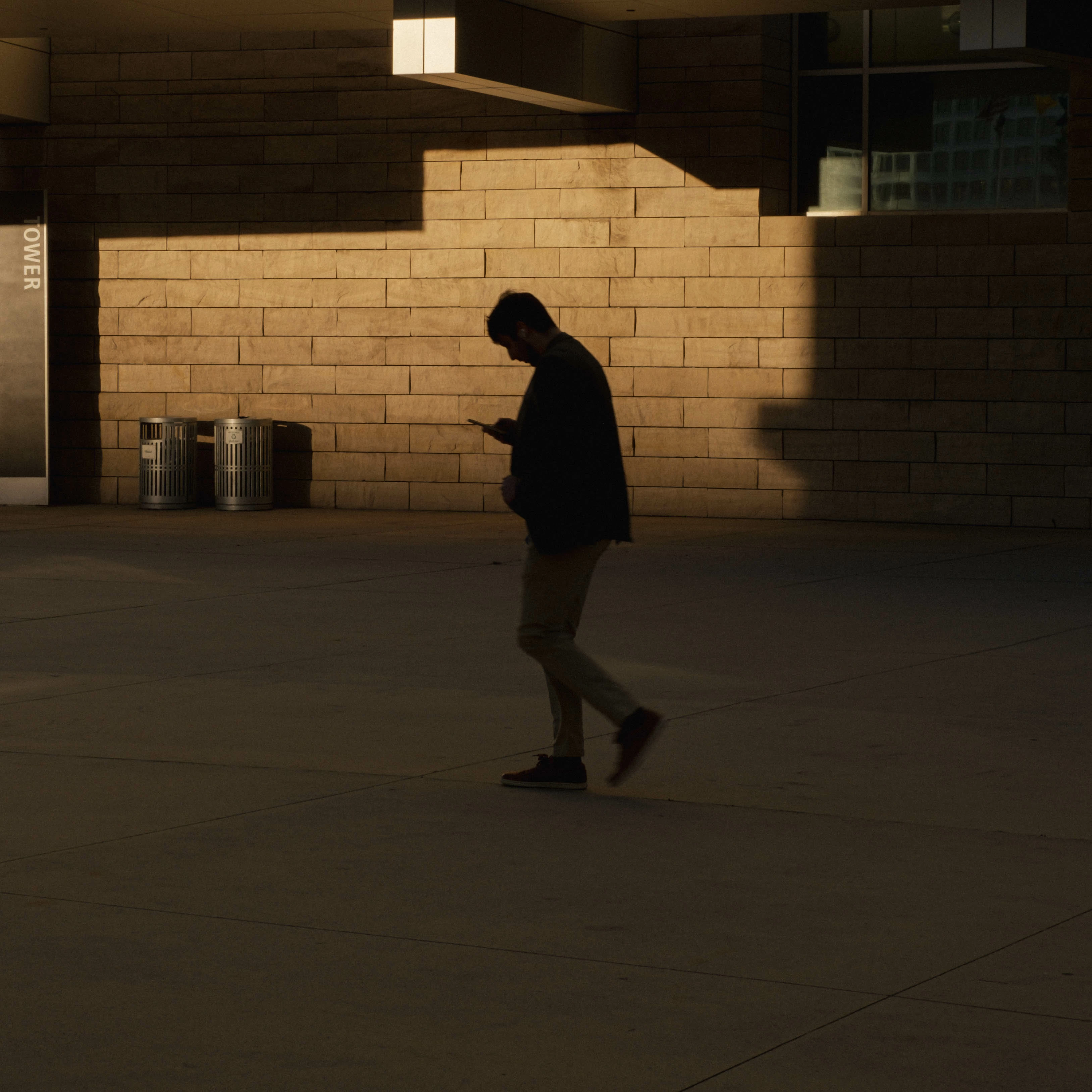
I was recently editing some pictures and noticed some green tint on some of them. On this one that i uploaded you can see the green tint along the bottom right corner, the more you zoom in the more noticeable it is. The tint is more intense if i turn the blacks or shadows down, any idea why this would happen?
このトピックへの返信は締め切られました。

返信数 5

TheDigitalDog
Inspiring
March 9, 2023

I also can't see any green. So this highly suggests this is a preview issue, not your data.

Try disabling GPU in preferences; any difference?

It could be a corrupted display profile; try making a new one. If you are using a product and instrument to do so, make sure the software only produces version 2 (V2) not V4 ICC profiles.  

Author “Color Management for Photographers" & "Photoshop CC Color Management/pluralsight"
Participating Frequently
March 10, 2023

Are you able to see it here? it looks like its happening after exporting the pictures from lightroom. The green tint is right infront of the guys feet.

TheDigitalDog
Inspiring
March 10, 2023
quote

Are you able to see it here? it looks like its happening after exporting the pictures from lightroom. The green tint is right infront of the guys feet.


By @daniel28765492g0ut

No (+5). 

Author “Color Management for Photographers" & "Photoshop CC Color Management/pluralsight"
Community Expert
March 9, 2023

Perhaps as an empirical confirmation, why not rotate the image and see whether the corner that seems green-tinted rotates correspondingly, or stays at lower right of the display? Sometimes a subtle effect is only evident with some photos.


I see no obvious green tint artefact myself.

Participating Frequently
March 10, 2023

Are you able to see it here? it looks like its happening after exporting the pictures from lightroom. The green tint is right infront of the guys feet.

Conrad_C
Community Expert
Community Expert
March 9, 2023

What you notice in Rob’s Info Panel screen shots is that actually, red is the highest value, not green. This is consistent when hovering the color sampler around different areas of the corners, red remains most prominent. So if green is being perceived, there could be some kind of color perception effect going on with nearby colors.


Another potential variable is the display setting. If you are using a Mac with display Reference Mode settings, which Reference Mode is selected? If it is an older Mac display, which color profile is applied in the Displays settings? For example, is it using a custom display profile?

Participating Frequently
March 10, 2023

Are you able to see it here? it looks like its happening after exporting the pictures from lightroom. The green tint is right infront of the guys feet.

Conrad_C
Community Expert
Community Expert
March 10, 2023

I don’t see it, and in the Photoshop Info panel, four color samplers still indicate that the color values there are slightly more red, not green. So if green is still being perceived there, again it might be a color perception issue with adjacent colors, or an issue with the settings of your computer display (it looks like you haven’t yet answered the questions I asked about the display settings?)


However, if you are convinced that there is a green tint there, one quick fix is to use the Calibration panel to shift the Shadows away from green. You could also use the Color Grading panel, using the Shadows wheel to shift color balance away from green in the shadows only.


But again…first make sure there is not a problem with your display settings. Because if a misadjusted display is showing you green that is not there (remember, the Info panel says the color values are actually slightly red), and so you shift the shadows away from green, then that shadow is going to look too magenta when the image is viewed on any other display that is properly profiled/calibrated.


Rob_Cullen
Community Expert
Community Expert
March 9, 2023

Like @Ian Lyons I do not see any significant green tint.

Photoshop places the RGB values close for lower-left and lower-right corners of the image.

Maybe you are seeing come color noise in the deep shadows.


Regards. My System: Windows-11, Lightroom-Classic 15.1.1, Photoshop 27.3.1, ACR 18.1.1, Lightroom 9.0, Lr-iOS 10.4.0, Bridge 16.0.2 .
Participating Frequently
March 10, 2023

Ian Lyons
Community Expert
Community Expert
March 8, 2023

I downloaded your your file and on viewing same on my caliabrated display can see no colour shift or tint in bottom right corner.


The photo looks to have been taken in low warm coloured light (natural or artificial isn't clear), and some noise is present in bottom right corner, but nothing extreme. I also applied a white balance corrrction based on the trashcans and still see nothing that I wouldn't expect to see. So, not sure where you're seeing a green tint.


Participating Frequently
March 10, 2023

Are you able to see it here? it looks like its happening after exporting the pictures from lightroom. The green tint is right infront of the guys feet.