


Known Participant
December 31, 2022
質問

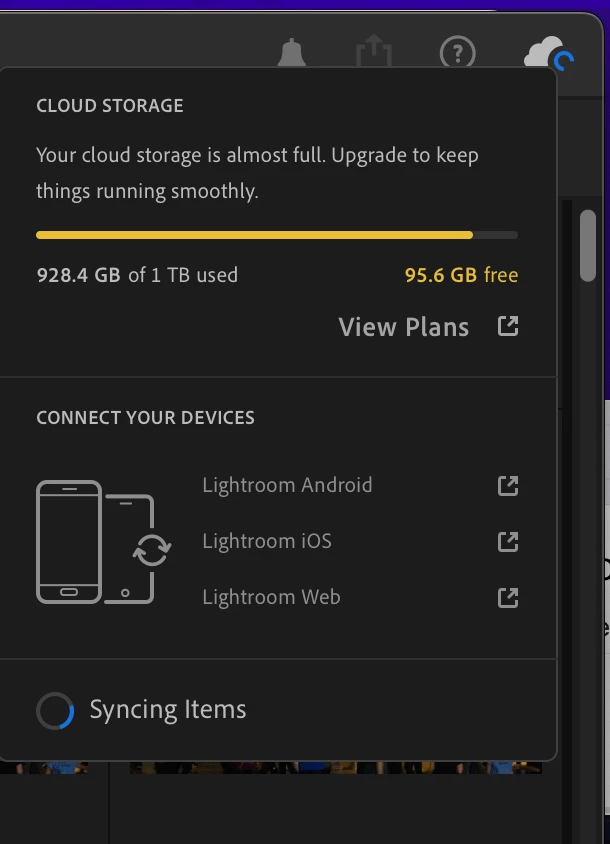
I freed up 250GB of cloud storage but a week later it says I only have 95.6GB available

  • December 31, 2022
  • 返信数 2.
  • 1417 ビュー

A week ago I deleted approximately 250GB of unedited RAW files to clear up space since I was nearing my 1TB limit.  I exported all files before deleting, and they take up about 270GB on my hard drive after exporting.  On 12/24 after finishing the clean-up work I wrote down that I had 67,846 files in my account, and 249.9GB free, which should keep me in the clear for upcoming vacation photos I plan to take.  But I came back today (12/30) and while I still have 67,846 files, it now shows only 95.6GB free.  I have over 7000 photos and videos in the Deleted folder, but purging a couple dozen of the larger files made no difference to the remaining storage, so I don't think those are counted in my total (and they weren't counted back on 12/24 after deleting the files).  What happened to the roughly 150GB of free space that I no longer have?  My last imported file was on 12/16, before I removed all the old RAW files, and the file count is still 67,846 files, so why are the same number of files now taking up 150GB more space than they did a week ago?
 

このトピックへの返信は締め切られました。

返信数 2

JohanElzenga
Community Expert
Community Expert
December 31, 2022

Your screenshot shows that Lightroom is currently syncing. Is it possible that you had a lot of images that were never uploaded to the cloud because your cloud space was full? These images would be uploaded now that there is space again.


-- Johan W. Elzenga
Jim Wilde
Community Expert
Community Expert
December 31, 2022

Good thinking, Johan. Well spotted.

Jim Wilde
Community Expert
Community Expert
December 31, 2022

Have you added anything to the Creative Cloud Files folder on your computer? Anything in that folder also counts against you 1 TB cloud space allowance.

johnd21444027作成者
Known Participant
December 31, 2022

I haven't knowingly added anything there.  It does show 107GB.  But isn't that local storage that is synced to the cloud, so it shouldn't be double-counted (once on my HD, once in the cloud)?


johnd21444027作成者
Known Participant
December 31, 2022

Our replies crossed. Definitely need to see the Lightroom Preferences>Local Storage tab on the MacBook Pro, as it would seem that you might have set the CC Files folder as the target for the locally stored originals (when all this is sorted out you might want to rethink the strategy for storing files locally).


On the 2016 MacBook it's likely that you are not yet signed in to your creative cloud account (you can only be signed in to two systems at the same time).


Jim, regarding the limitation of only being signed in on two systems at the same time, which I was not aware of, does this include an iPhone as well?  I will be taking my iPhone and MacBook on vacation, so if the iPhone counts as a system then it seems I should sign out of both my iMac and MBP and sign in on the iPhone and MacBook before leaving, would you agree?  Presumably anything I upload to LR on my MacBook stays local if it's not also signed in to CC, which would put the photos at risk if something happened to the MacBook before I get back (exactly what I'm trying to avoid by uploading to CC).