


Participating Frequently
August 3, 2026
Question

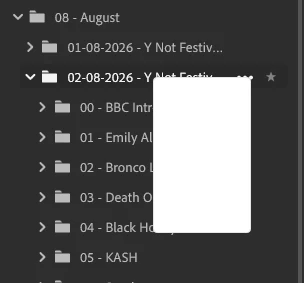
I'm having a problem with right click menus in LR 9.4.1, after a small amount of usage , like creatng subfolders in Local, theey stop working and just a small gray box appears with no text.
  • August 3, 2026
  • 3 replies
  • 30 views
When I right click on a Local Folder
​​​​​​

It also happens when I click on the arrow next to Copy Photos to Cloud 
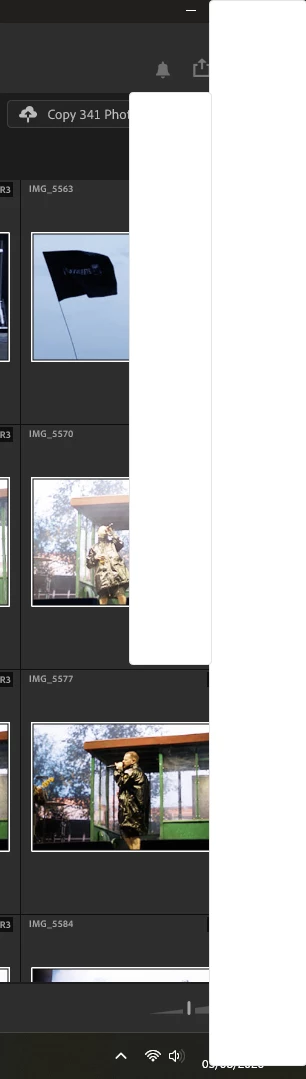
The only answer is to close LR and restart.
I have tried reinstalling LR.

    3 replies

    NigelBigAuthor
    Participating Frequently
    August 4, 2026

    I have now updated to v 9.5 and still have the same problem.

    I’ve also noticed that is only happening when “Local” is selected. 
    When “Cloud” is selected right click pop up menus appear correctly as normal.

    Sameer K
    Community Manager
    Community Manager
    August 3, 2026

    Hey, @NigelBig. Welcome to the Lightroom Community. I'll need more information to help you figure this out. What troubleshooting steps have you tried already? Please share more details about your workflow and the system info from Lightroom.

    Go to Help > System info, copy and paste it into a text document, then upload and attach it here along with a short video.


    In general, you can try resetting Lightroom as a primary step in troubleshooting this:

    1 - While holding down the CTRL + SHIFT keys, launch Lightroom from the Creative Cloud desktop app. 

    2 - Select 'Yes' when prompted to reset Preferences. 


    Let me know how it goes. Thanks!
    Sameer K

    (Type '@' and type my name to mention me when you reply)

    NigelBigAuthor
    Participating Frequently
    August 3, 2026

    Hi ​@Sameer K 


    I have tried resetting the Preferences, and also uninstalling and re-installing Lightroom.

    Here is the “System Info” details


    Lightroom version: 9.4.1 x64 [ 20260625-0318-d30e963 ] (Jun 24 2026)
    NGL Version: 1.43.0.5
    WF Version: 8.4.1 542baca
    VF Version: 1.0.164
    HIL Version: 40501
    CAI Version: c2pa-c/0.6.0 c2pa-rs/0.46.0
    PH Version: 6.1.1
    Adobe GSDK Version: 1.4.0.210
    CR Version: 29.0.0.202506270808_710830c
    Catalog ID: 6a9bc0bcfb6443baaa92ff55d7e64136

    Operating system: Windows 11
    OS Version: Windows 11 Pro (2009)
    Application architecture: x64
    System architecture: x64
    Computer model: Dell Inc. Precision 5820 Tower X-Series / Intel(R) Core(TM) i7-9800X CPU @ 3.80GHz
    Logical processor count: 16
    Processor speed: 3.7 GHz
    Real memory available to Lightroom: 32465.7 MB
    Real memory used by Lightroom: 9993.3 MB (30.7%)
    Virtual memory used by Lightroom: 12053.9 MB
    Memory cache size: 1833.6 MB

    Internal Camera Raw version: 18.4 [ 2608 ]
    Maximum thread count used by Camera Raw: 9
    Camera Raw SIMD optimization: SSE2,AVX,AVX2
    Camera Raw virtual memory: 1206MB / 14184MB (8%)
    Camera Raw real memory: 1460MB / 32465MB (4%)

    Displays: 1) 1920x1080, 2) 1920x1080
    System DPI setting: 96 DPI
    Dark Mode: No
    Desktop composition enabled: Yes
    Input types: Multitouch: No, Integrated touch: No, Integrated pen: No, External touch: No, External pen: No, Keyboard: No

    Graphics Processor Info: DirectX: NVIDIA Quadro P620 (32.0.15.5639) - 2 GB
    Graphics Processor Detail: loaded: Yes, supported: Yes, compute: Yes, init: I3_GPU4, hard: success, soft: success, al: No, dl: No
    OS Media Capability: true

    Application Folder: C:\Program Files\Adobe\Adobe Lightroom CC
    Settings Folder: C:\Users\Erica\AppData\Roaming\Adobe\Lightroom CC
    Library Folder: C:\Users\Erica\AppData\Local\Adobe\Lightroom CC\Data