


Participating Frequently
October 29, 2018
質問

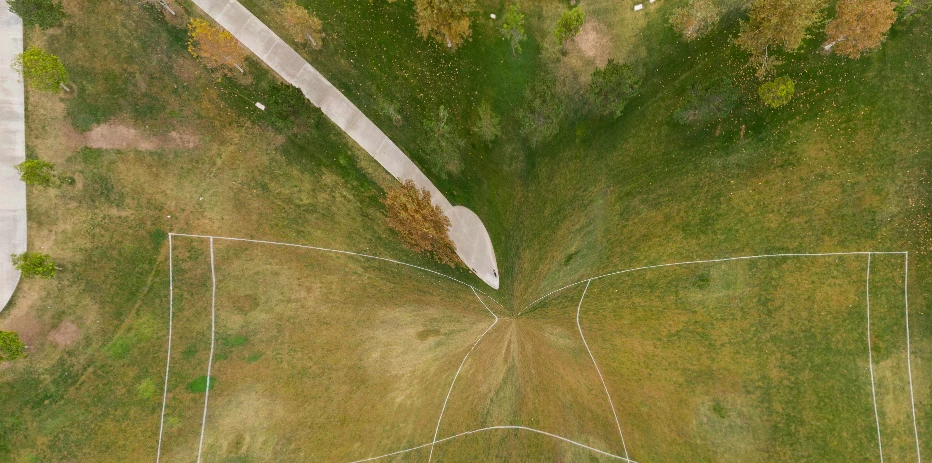
Distortion at Nadir and Zenith of 360 Panorama

  • October 29, 2018
  • 返信数 1.
  • 1281 ビュー

Hi All, 

I used my drone to take a group of images that I stitched into a 360 panorama in Lightroom.  I imported the panorama into Photoshop, then added more sky so that the panorama was twice as wide as it was tall.  I then put the panorama into a website that will allow you to rotate the 360 spherical panorama (facebook will do this) but the nadir and the zenith of the panorama are distorted as shown in the attached image.  How can I fix this?  It looks like there aren't enough pixels to fill in the bottom, so the image had to be stretched to fill it in.  I included two nadir photos in the set that that panorama was stitched from. 
    このトピックへの返信は締め切られました。

    返信数 1

    mglush
    Community Expert
    Community Expert
    October 29, 2018

    Hi!

    Was there any distortion in your original photos? Because it looks more like the distortion came from the angle of your shots as the image was stitched together. Do you have any other shots you can use to create the panorama?

    This might be an occasion where you have to fix it manually.

    mattw9665449作成者
    Participating Frequently
    October 29, 2018

    I don't think there was any distortion in the original image.  Here is the raw image from the drone and it looks good. 

    mglush
    Community Expert
    Community Expert
    October 29, 2018

    But you can definitely see the distortion in the 360 shot--it looks like the middle was pinched together. Can you use the original photo to collage together and fix the distortion?