


Participant
March 27, 2020
質問

Epson 9890 and 3880 photoshop printing colors incorrectly, but printing correctly in Paint?

  • March 27, 2020
  • 返信数 2.
  • 412 ビュー

Hello and thank you for your time and help, I'm new here and quite a novice so don't kill me for that!  What I do is pretty basic I simply print glossy photos/posters for retail so I haven't needed much expertise in PS other than basic things but I'm having an issue I can't solve and would appreciate some help.


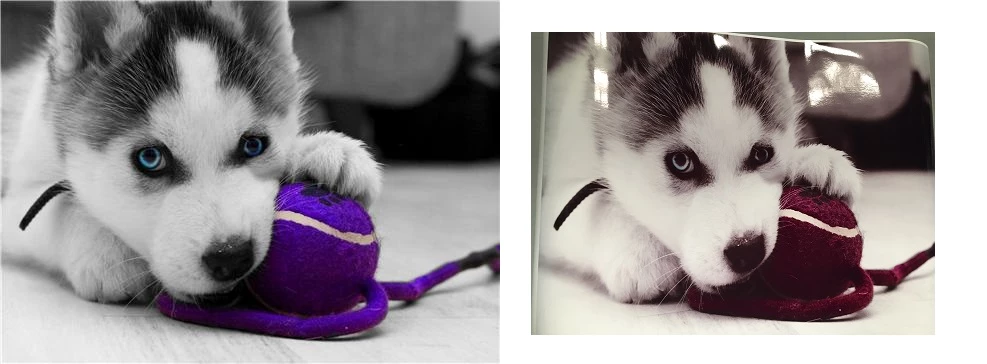
I’m using an Epson 3880 and a 9890 with rolls of glossy photo paper.  I’m having an issue where they are both printing colors incorrectly, I’ve attached an example. Blues are coming our purple, black and whites have a purple tint, skin tones have an orange tint and just generally printing colors differently than the original. I’m using Photoshop and I’ve tried letting PS handle the colors and also the printers handle the colors and the issue persists. Although with the example attached I tried printing it with MS Paint and it printed correctly, I've been told I need a custom ICC profile but that wouldn't account for it printing correctly in Paint also this isn’t an issue with my epson 1430 a much less sophisticated printer even though I’m also using PS so I'm thinking perhaps there is a simply setting somewhere that I have wrong.  Another thing which may be relative is that printers both use a substantial more amount of light magenta than any other color.


Does anyone have any suggestions, I would sincerely sincerely appreciate any help thank you!
 

このトピックへの返信は締め切られました。

返信数 2

davescm
Community Expert
Community Expert
March 27, 2020

Photoshop uses colour management, which means it uses colour profiles in documents, for monitors and for printers to ensure colours are reproduced accurately. None colour managed software just sends the pixel numbers to the printer.

A colour profile for a printer/paper combination tells Photoshop exactly how colours will be reproduced on that particular printer, with that particular paper, with those particular inks and with those specific printer settings. If all that is accurate then the colours will be printed accurately.

However a few things can go wrong.

1. Very common - the wrong profile is used for the printer and paper combination. This should be set in the Photoshop printer dialogue, using "Photoshop manages colours" and the profile selected to match your specific printer and media.

2. Also common. In the printer driver settings (accessed via "Print Settings" in the Photoshop dialogue) colour management must be set to "Off" or "No color management". You cannot have both the printer and Photoshop managing colour.

3. The other media and printer settings in the print driver must be set the same way as they were set when the color profile was produced. If using manufacturers profiles, make sure the media is set correctly. If using independant paper profiles then the paper manufacturer should tell you how to set the print driver.

4. Independant inks or independant paper is used , but the manufacturers profile is still used. This is a recipe for wrong colour - the profile has to describe the printer, settings, ink and media actually being used.


A final one - also common, is that the printer is printing correctly but the monitor is off. Colour managed software also uses the monitor profile in your system to display document colours on screen. So the monitor profile has to describe exactly the way your monitor displays colours. This is why we use hardware calibration and profile devices for our monitors.


Dave

Mylenium
Legend
March 27, 2020

You have not told us anything about the actual color management and printer settings, so we can't advise specifically. This typically happens if you're futzing around and using faux color mangement in PS when in fact you are not, meaning you may have used a color profile somewhere when you shouldn't have and just stuck with the default sRGB/ Adobe RGB setup.. So at the very least check the relevant CM policies in the preferences, your proof setup and whether you inadvertently have assigned color profiles to your images.


Mylenium