


Inspiring
June 11, 2019
質問

How can I "clean" this photo of a painting?

  • June 11, 2019
  • 返信数 6.
  • 1228 ビュー

I have a photograph of a painting. Here is a small screenshot.
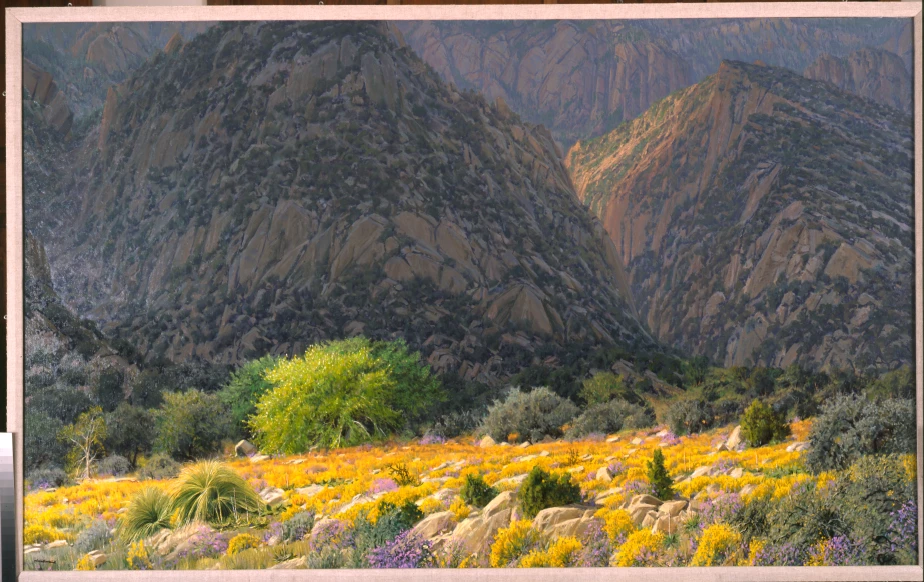
On the left you can see some horrendous noise. This is a 100% screenshot.

How can I clean this up? There isn't enough good material to work with to allow me to use either the spot healing brush or the patch tool. And I tried some of the noise reducing filters, but they made the rest of the image look mushy.

Here is a link to the original. Dropbox - 2005-11001.tif - Simplify your life

    このトピックへの返信は締め切られました。

    返信数 6

    Grant H
    Community Expert
    Community Expert
    June 12, 2019

    Hi, okay I really couldn't spend more than 15 or so minutes on it so here is a before and after on a small section zoomed in...

    I used healing brush, brush, and spot brush - all set to Darken so as to refine just the white reflective colours as a base to work from and painting techniques (thanks Wacom). Like I said. This is hours and hours of work. It may be best to reshoot (assuming of course that it possible) if not have errm fun, or use a filter as mentioned to get an "okay-at-best" result.

    Simmer1
    Community Expert
    Community Expert
    June 11, 2019

    Here is a useful tutorial on how to remove Noise from a photo: How To Reduce Noise: In Grainy Photos - YouTube

    Cheers,

    Sim

    joanH
    Inspiring
    June 11, 2019

    Hello, Here is a small part of what can happen just running the photograph through Adobe Express Photoshop. There are at least 10 more to try out. Best regards, JH

    D Fosse
    Community Expert
    Community Expert
    June 11, 2019

    That's not noise, but reflections caused by incorrect positioning of the lights. Move the lights further away, and at 45° angle.

    Once you have reflections in the shot, it's not possible to remove without extensive manual work. Any automated procedure is at the risk of destroying actual detail.

    If you really want to eliminate all reflections and glare, use cross-polarized lighting. This is a polarizer on the lens, together with polarizing film on the light sources. When they are rotated at right angles to each other, stray reflections are almost 100% blocked.

    Also, invest in a ColorChecker. It has standardized values for each patch, so you can use the six neutral patches to set a basic tone response curve, as well as gray balance. For instance, the #3 darkest corresponds to Lab 52-0-0, or 48% in Lightroom if you use that.

    melissapiccone
    Community Expert
    Community Expert
    June 11, 2019

    I take pics of my paintings all the time, before I varnish but sometimes I still get glare. Taking 2 pics doesn't work because each pic shows different textures in the canvas. Any tips for using a cell phone for avoiding glare? I usually have to try several different locations to get a good pic and even then... I'm not a photographer, I'm an artist

    Melissa Piccone | Adobe Trainer | Online Courses Author | Fine Artist
    D Fosse
    Community Expert
    Community Expert
    June 11, 2019

    Melissa, the camera doesn't matter. The light is the key. A basic setup for art repro - any flat surface - is two lights at 45° angle. Move them away as far as you can. Or actually it's not the distance, but to minimize reflection the ideal is a point light source. Diffused light is wonderful for a lot of things, but not this.

    However, once you get into heavily textured surfaces, thick impasto paint and so on, it starts to get complicated because you also want to avoid hard shadows. Then I start looking at diffused light from above, not the sides, and polarizing gets even more important. You then have to avoid both shadows and reflections, and those two are often mutually exclusive unless you employ some nifty tricks.

    Grant H
    Community Expert
    Community Expert
    June 11, 2019

    Well good news is this definitely can be done! "Bad" news is it's going to be painstakingly slow manual process if you want a fantastic result. You can use a combination of the stamp tool the healing brush tool and normal brush.

    (if I have sometime i will do a small section to show you the results that can be achieved)

    /G

    MarieMeyer作成者
    Inspiring
    June 11, 2019

    I would appreciate that.

    c.pfaffenbichler
    Community Expert
    Community Expert
    June 11, 2019

    That does not seem to be noise but rather reflections or scratches.

    Are there no photographs with different lighting?

    Some painting may be necessary but the Filter Minimum with a Mask might help a little.

    MarieMeyer作成者
    Inspiring
    June 11, 2019

    Can you explain to me how you did that?

    c.pfaffenbichler
    Community Expert
    Community Expert
    June 11, 2019

    The screenshot shows that the Filter Minimum has been applied to a Smart Object and has a Filter Mask.

    One can paint on that Mask to hide (black) or reveal (white) the Filter’s effect.