


Participating Frequently
August 30, 2022
解決済み

how can i delete the black border of the shape path mask

  • August 30, 2022
  • 返信数 2.
  • 20251 ビュー

i made this shape path using the Pen tool but want to delete the black color border of it 

not able to get any properties of the shape 

please anyone help

このトピックへの返信は締め切られました。
解決に役立った回答 mglush

Hi,

In your screen shot, you did not show the Options Bar--and the Options bar is where you can delete the stroke:
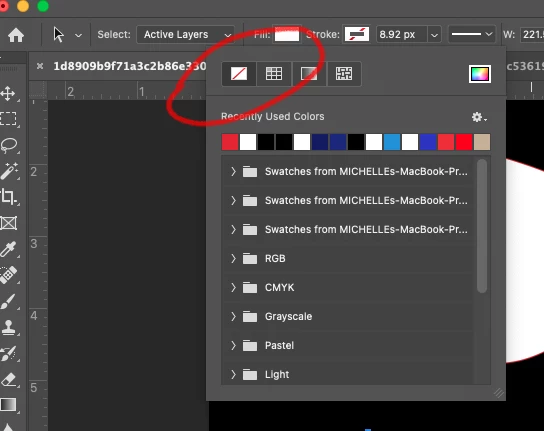
With your Shape selected, click on the Stroke Option in the Options Bar, and select None. See the image above.

Let us know if that works, or if you are still having the issue.

Michelle

返信数 2

Chris 486
Community Expert
Community Expert
August 31, 2022

In your Pen toolbar, You should be able to select either the Fill or Stroke Swatch to select how you want it colored. If you want not color or fill, you can select "no fill" in the upper left.

Select the layer and shape you want to edit.

Select the pen tool

make the swatch change in the toolbar and it sould make the change for you.

Let us know if that helps!


-Chris

Participant
February 22, 2024

I selected my shape layer and then selected the pen tool and the shape deselected

mglush
Community Expert
mglushCommunity Expert解決!
Community Expert
August 31, 2022

Hi,

In your screen shot, you did not show the Options Bar--and the Options bar is where you can delete the stroke:

With your Shape selected, click on the Stroke Option in the Options Bar, and select None. See the image above.

Let us know if that works, or if you are still having the issue.

Michelle

Chris 486
Community Expert
Community Expert
August 31, 2022

Oh! I responsded without seeing you exact answer first! Glad to see we had the same thought!