

Known Participant
March 12, 2019
解決済み

How to automate the cropping procces of this type of images with script

  • March 12, 2019
  • 返信数 4.
  • 9004 ビュー

Hey guys,

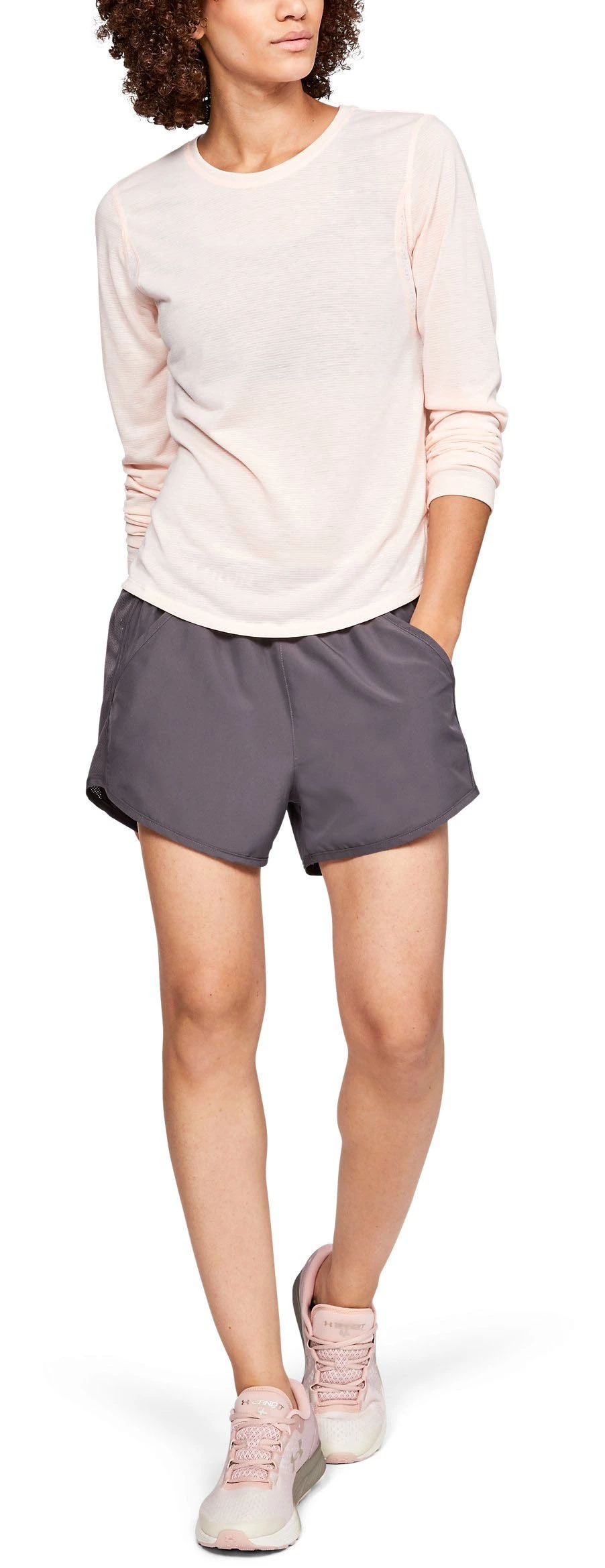
Wondering if I can automate the cropping of this images using a script instead of an action...

I need to crop it to 900 x 1200px full body

Thank you !
このトピックへの返信は締め切られました。
解決に役立った回答 willcampbell7

Here is a script that does what I described in the last message. It requires a path for the subject (currently "Path 1", name editable on line 15) and at least one horizontal guide to indicate top crop. Values for result (width, height, bottom margin) can be adjusted on lines 12-14.


Code below, or download here:

https://www.marspremedia.com/software/download?asset=crop-model.zip


Also note: the script could have more error protection (perhaps I'll add some when time allows).

At this point, two possible errors are:

  1. there are no horizontal guides set.

  2. the subject path doesn't exist (there is none or it's named different).

If the script throws an error, first check a horizontal guide is set and the subject path name matches what the script expects to find.


// Crop Model.jsx

#target photoshop

var b = []; // cropping bounds
var doc;
var guides = [];
var i;
var isBackgroundLayer;
var layerBottom;
var path;
var visible;

// Target values for result (in pixels).
// Adjust these values as desired.
var w = 900; // width
var h = 1200; // height
var m = 50; // bottom margin
var pathSubject = "Path 1"; // crop to this path name

if (!app.documents.length) {
    alert("Open a document.");
    return;
}
doc = app.activeDocument;
// Create array of horizontal guides, sorted from top to bottom.
for (i = 0; i < doc.guides.length; i++) {
    if (doc.guides[i].direction === Direction.HORIZONTAL) {
        guides.push(parseInt(doc.guides[i].coordinate, 10));
    }
}
guides.sort(function (a, b) {
    return (a > b) ? 1 : ((a < b) ? -1 : 0);
});

app.preferences.rulerUnits = Units.PIXELS;

// Ensure bottom layer is a layer, not background.
// (to preserve pixels while resizing canvas)
//
// Get bottom layer.
layerBottom = doc.layers[doc.layers.length - 1];
// Preserve 'visible' property to reset when done.
visible = layerBottom.visible;
// Preserve 'isBackgroundLayer' property to reset when done.
isBackgroundLayer = layerBottom.isBackgroundLayer;
// Make bottom layer a layer, not background.
layerBottom.isBackgroundLayer = false;

// SET BOUNDS OF DESIRED CROPPING
// Get subject path.
path = doc.pathItems.getByName(pathSubject);
// Make selection of subject path.
path.makeSelection(0, true, SelectionType.REPLACE);
// Copy selection bounds to b (cropping bounds).
b = doc.selection.bounds;
// Update top bounds to position of highest guide.
b[1] = guides[0];
// Deselect.
doc.selection.deselect();
// 'b' array now set to desired cropping.
// ( array = [left, top, right, bottom] )

// CROP IMAGE
// Using resize canvas to preserve pixels outside bounds.
//
// Resize canvas to crop out above first horizontal guide.
doc.resizeCanvas(null, doc.height - b[1], AnchorPosition.BOTTOMCENTER);
// Resize canvas to crop out below subject.
doc.resizeCanvas(null, b[3] - b[1], AnchorPosition.TOPCENTER);
// Resize canvas to crop out left of subject.
doc.resizeCanvas(doc.width - b[0], null, AnchorPosition.MIDDLERIGHT);
// Resize canvas to crop out right of subject.
doc.resizeCanvas(b[2] - b[0], null, AnchorPosition.MIDDLELEFT);

// RESIZE IMAGE
// Target height less bottom margin.
doc.resizeImage(null, h - m, null, ResampleMethod.AUTOMATIC);
// Resize canvas height to add bottom margin.
// At same time resize width to center subject.
doc.resizeCanvas(w, h, AnchorPosition.TOPCENTER);

// Restore original bottom layer properties.
layerBottom.isBackgroundLayer = isBackgroundLayer;
layerBottom.visible = visible;


返信数 4

willcampbell7
Legend
March 21, 2019

Yes a script can do what *I think* you want. Totally possible. However, the thread is a bit confusing about 1. what you start with, and 2. what you want to end up with exactly.

I have made scripts for clients who deal in similar images. Here is how most of them work:

First off there is a path for the model. This really helps. Usually "Path 1" is the primary subject path. Having this makes it easy to automate positioning the model centered and the shoe a defined distance from the bottom.

For an example, let's say the image has "Path 1" (outline of the model), and the desired result is 900x1200, model centered and shoe 50px from bottom.

The only part a script doesn't know is where to crop at top. Clients of mine crop across the neck. Looks like you want to crop just below the eyes.

How my clients and I have solved this is to have retouch operators add a ruler guide where they want the top crop.

Given all those conditions met, here is what a script can do:

Get the first guide and get its Y position.

Crop the image using...

    the guide value for top

    Path 1 bottom bounds for bottom

    Path 1 left and right bounds for left and right.

Scale image so it is 1150px tall. Then anchored top, add 50px to bottom of canvas. Now it's 1200 tall, shoe 50px from bottom.

Anchored center, resize canvas to 900 wide (centers the model).

Does this sound like what you are trying to accomplish? I ask before I post code to avoid wasting time if I've missed the mark and don't correctly understand what you're trying to do.

William Campbell
willcampbell7
willcampbell7解決!
Legend
March 21, 2019

Here is a script that does what I described in the last message. It requires a path for the subject (currently "Path 1", name editable on line 15) and at least one horizontal guide to indicate top crop. Values for result (width, height, bottom margin) can be adjusted on lines 12-14.


Code below, or download here:

https://www.marspremedia.com/software/download?asset=crop-model.zip


Also note: the script could have more error protection (perhaps I'll add some when time allows).

At this point, two possible errors are:

  1. there are no horizontal guides set.

  2. the subject path doesn't exist (there is none or it's named different).

If the script throws an error, first check a horizontal guide is set and the subject path name matches what the script expects to find.


// Crop Model.jsx

#target photoshop

var b = []; // cropping bounds
var doc;
var guides = [];
var i;
var isBackgroundLayer;
var layerBottom;
var path;
var visible;

// Target values for result (in pixels).
// Adjust these values as desired.
var w = 900; // width
var h = 1200; // height
var m = 50; // bottom margin
var pathSubject = "Path 1"; // crop to this path name

if (!app.documents.length) {
    alert("Open a document.");
    return;
}
doc = app.activeDocument;
// Create array of horizontal guides, sorted from top to bottom.
for (i = 0; i < doc.guides.length; i++) {
    if (doc.guides[i].direction === Direction.HORIZONTAL) {
        guides.push(parseInt(doc.guides[i].coordinate, 10));
    }
}
guides.sort(function (a, b) {
    return (a > b) ? 1 : ((a < b) ? -1 : 0);
});

app.preferences.rulerUnits = Units.PIXELS;

// Ensure bottom layer is a layer, not background.
// (to preserve pixels while resizing canvas)
//
// Get bottom layer.
layerBottom = doc.layers[doc.layers.length - 1];
// Preserve 'visible' property to reset when done.
visible = layerBottom.visible;
// Preserve 'isBackgroundLayer' property to reset when done.
isBackgroundLayer = layerBottom.isBackgroundLayer;
// Make bottom layer a layer, not background.
layerBottom.isBackgroundLayer = false;

// SET BOUNDS OF DESIRED CROPPING
// Get subject path.
path = doc.pathItems.getByName(pathSubject);
// Make selection of subject path.
path.makeSelection(0, true, SelectionType.REPLACE);
// Copy selection bounds to b (cropping bounds).
b = doc.selection.bounds;
// Update top bounds to position of highest guide.
b[1] = guides[0];
// Deselect.
doc.selection.deselect();
// 'b' array now set to desired cropping.
// ( array = [left, top, right, bottom] )

// CROP IMAGE
// Using resize canvas to preserve pixels outside bounds.
//
// Resize canvas to crop out above first horizontal guide.
doc.resizeCanvas(null, doc.height - b[1], AnchorPosition.BOTTOMCENTER);
// Resize canvas to crop out below subject.
doc.resizeCanvas(null, b[3] - b[1], AnchorPosition.TOPCENTER);
// Resize canvas to crop out left of subject.
doc.resizeCanvas(doc.width - b[0], null, AnchorPosition.MIDDLERIGHT);
// Resize canvas to crop out right of subject.
doc.resizeCanvas(b[2] - b[0], null, AnchorPosition.MIDDLELEFT);

// RESIZE IMAGE
// Target height less bottom margin.
doc.resizeImage(null, h - m, null, ResampleMethod.AUTOMATIC);
// Resize canvas height to add bottom margin.
// At same time resize width to center subject.
doc.resizeCanvas(w, h, AnchorPosition.TOPCENTER);

// Restore original bottom layer properties.
layerBottom.isBackgroundLayer = isBackgroundLayer;
layerBottom.visible = visible;


William Campbell
Stephen Marsh
Community Expert
Community Expert
March 19, 2019

As JJMack said, an action can easily do this:

However as you ask for a script, my minor “contribution” would be to simply trim white space based on the upper left pixel, fit image and change canvas size:

// Trim White Space & Fit Image & Resize to 900x1200px

// Mostly based on a script posted here: https://stackoverflow.com/questions/17580923/photoshop-javascript-to-resize-image-and-canvas-to-specific-not-square-sizes

// https://coffeeshopped.com/2008/11/conditional-image-resizing-with-photoshop-and-javascript

// https://forums.adobe.com/thread/2603328

#target photoshop

// Get a reference to the current (active) document and store it in a variable named "doc"

doc = app.activeDocument; 

// Store the current ruler units for restoration

var savedRuler = app.preferences.rulerUnits;

// Set the ruler units to pixels

app.preferences.rulerUnits = Units.PIXELS;

// Trim based on the upper left pixel which is presumed to be pure white

doc.trim(TrimType.TOPLEFT)

// These are our values for the END RESULT width and height (in pixels) of our image

var fWidth = 900;

var fHeight = 1200;

// Do the resizing.  if height > width (portrait-mode) resize based on height.  otherwise, resize based on width

if (doc.height > doc.width) {

    doc.resizeImage(null,UnitValue(fHeight,"px"),null,ResampleMethod.BICUBIC);

}

else {

    doc.resizeImage(UnitValue(fWidth,"px"),null,null,ResampleMethod.BICUBIC);

}

// Save the original background color

var savedBackgroundColor = app.backgroundColor;

// Makes the default background white

var white = new SolidColor();

white.rgb.hexValue = "FFFFFF";

app.backgroundColor = white;

// Convert the canvas size as informed above for the END RESULT

app.activeDocument.resizeCanvas(UnitValue(fWidth,"px"),UnitValue(fHeight,"px"));

// Restore the original background color

app.backgroundColor = savedBackgroundColor

// Restore the saved ruler units

app.preferences.rulerUnits = savedRuler;

Known Participant
March 12, 2019

Guys, Thank you for your ideas   but I need the full body shoes included 

Known Participant
March 12, 2019

Geppetto Luis
Legend
March 12, 2019

See this if it's okay.

resizeCanvas(900, 1200); 


function resizeCanvas(newWidth, newHeight) { 

    var desc1 = new ActionDescriptor(); 

    desc1.putUnitDouble(charIDToTypeID('Wdth'), charIDToTypeID('#Pxl'), newWidth); 

    desc1.putUnitDouble(charIDToTypeID('Hght'), charIDToTypeID('#Pxl'), newHeight); 

    desc1.putEnumerated(charIDToTypeID('Vrtc'), charIDToTypeID('VrtL'), charIDToTypeID('Cntr')); 

    desc1.putEnumerated(charIDToTypeID('Hrzn'), charIDToTypeID('HrzL'), charIDToTypeID('Cntr')); 

    desc1.putEnumerated(stringIDToTypeID("canvasExtensionColorType"), stringIDToTypeID("canvasExtensionColorType"), charIDToTypeID('BckC')); 

    executeAction(stringIDToTypeID('canvasSize'), desc1, DialogModes.NO); 

Known Participant
March 12, 2019

Hi geppettol66959005

Thank you, almost there but it's not the full body

JJMack
Community Expert
Community Expert
March 12, 2019

While that image can be cropped like that. How would a script be able to do that? There is no Photoshop feature align selection to subject's full body.  Or a Content aware serarch  find and select full body.

JJMack
