



Kapik
Known Participant
August 13, 2024
解決済み

How to make a color adjustment to a multiple group layers at the same time?

  • August 13, 2024
  • 返信数 1.
  • 779 ビュー

Hi all,


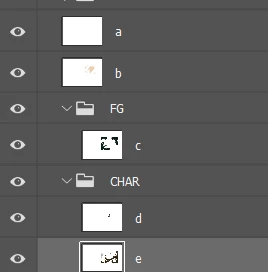
I need to make a color adjustment to a multiple group layers at the same time without merging all the layers inside each of the groups?

You can refer to the image below, basically I need to make a color adjustment (auto contrast, color balance etc2) to all of these layers without merging all.
 

このトピックへの返信は締め切られました。
解決に役立った回答 Myra Ferguson

Both the Levels and Curves adjustment layers have an Auto button that you can press in the Properties panel to automatically adjust the color. To access that button, make sure that the adjustment layer has been added and that the thumbnail of the adjustment layer has been selected in the Layers panel.

返信数 1

Myra Ferguson
Community Expert
Community Expert
August 13, 2024

You can add an adjustment layer above the layers. An adjustment layer affects all of the layers below it (unless you want it to only affect the layer directly below it, in which case, you would clip it to the layer below).


Several adjustment layers affect color. You could try Levels, Curves, or Hue/Saturation adjustment layer.


Here's more information about adjustment layers:

https://helpx.adobe.com/photoshop/using/adjustment-fill-layers.html


Kapik
Kapik作成者
Known Participant
August 13, 2024

This is very useful. However, is there a way to use auto tone, auto contrast and auto color to his adjustment layer?

Myra Ferguson
Community Expert
Myra FergusonCommunity Expert解決!
Community Expert
August 13, 2024

Both the Levels and Curves adjustment layers have an Auto button that you can press in the Properties panel to automatically adjust the color. To access that button, make sure that the adjustment layer has been added and that the thumbnail of the adjustment layer has been selected in the Layers panel.