Choopex
Participant
April 10, 2017
解決済み

I created an image (1280 * 720) but file is too big. [Title edited for brevity]

  • April 10, 2017
  • 返信数 1.
  • 1281 ビュー

Hello, I come to you because I have a big problem with PhotoShop.

I created an image (1280 * 720) but by saving it (PNG) it measures (92120 * 51840) The problem is that it does not suit me at all ...

In addition when recording I had almost no format available (JPEG for example).

Then when I restarted my computer I realized that my SSD had gone from 40GB to 13GB. And can not find the cause but this happens just after the image recording and a restart ...

I really need help ...

(Translated from French)
    このトピックへの返信は締め切られました。
    解決に役立った回答 davescm

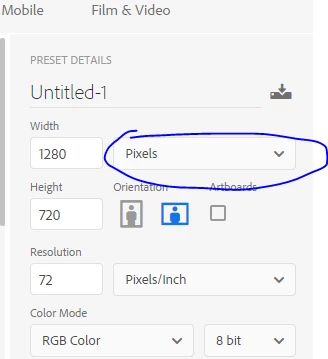
    Hi it sound like you have created your image as 1280 x 720 inches. You need to set the dimensions as pixels.

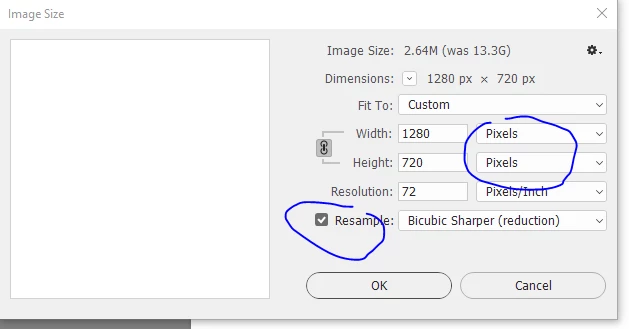
    You can resize to pixels using Inage Size - setting it to 1280x720 pixels and ensuring resample is checked

    Dave

    返信数 1

    davescm
    Community Expert
    davescmCommunity Expert解決!
    Community Expert
    April 10, 2017

    Hi it sound like you have created your image as 1280 x 720 inches. You need to set the dimensions as pixels.

    You can resize to pixels using Inage Size - setting it to 1280x720 pixels and ensuring resample is checked

    Dave

    Choopex
    Choopex作成者
    Participant
    April 10, 2017

    Hello, thank you for your answer but or are you finding these settings?

    Lilybiri
    Legend
    April 10, 2017

    It was mentioned: open Image menu, choose option Image Size.