



CherylGraham
Inspiring
April 14, 2022
解決済み

Is there a way to see the registered user of Photoshop from the PSD metadata?

  • April 14, 2022
  • 返信数 2.
  • 873 ビュー

With an Illustrator EPS file, I can open the EPS in TextEdit and see the registered user of that copy of Illustrator. 


Is there a way to do this in Photoshop? This is what it looks like with an Illustrator EPS; I'm asking if there is a similar line in the PSD metadata, and where do I find it.
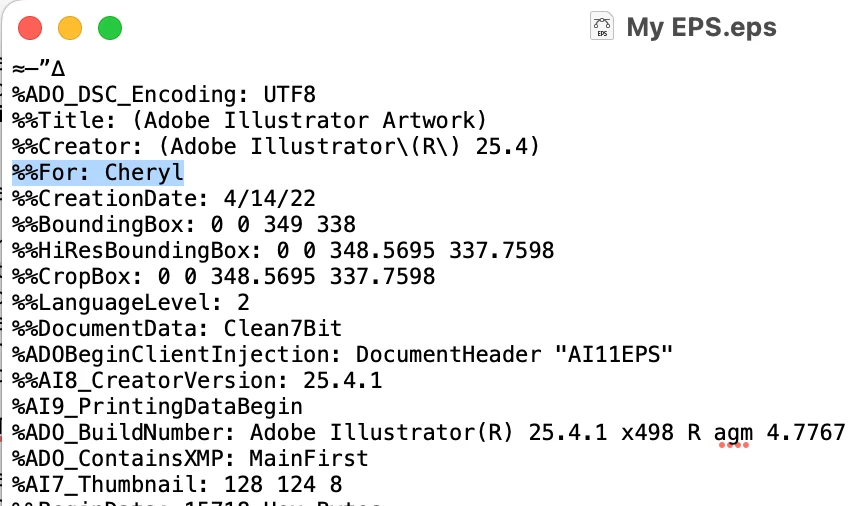


I'm trying to determine whether the same person has created two different PSDs. If there's another way to do this in Photoshop, please let me know. Thanks

このトピックへの返信は締め切られました。
解決に役立った回答 Bob_Hallam

User information is not saved in the Metada of any PSD file.  PS version is and the type of computer and OS, the type of image, ICC profile etc, but no user info.  EXIF data can be added to provide more robust descriptions if that's what you are looking for.  


To check what data is saved in your PSD file just open it in MS Word.  

返信数 2

Brad @ Roaring Mouse
Community Expert
Community Expert
April 14, 2022

Simple, answer, No, not if the user didn't put it there.

But just so you know, what you see in an EPS is NOT the registered user of that copy of Illustrator at all, it's the user (account) of the computer that it was last created/saved on.

As for Photoshop, you can ADD user information (under File Info), and it would then list in the IPTC and EXIF, but it's not included by default. Again, there's nothing there that would auatomatically identify the registered user of that copy of PhotoShop, if that's what you are trying to find out.


Background: What you are seeing is unique to EPS* files as it is a requirement of the PostScript Language Document Structuring Convention. It's included in the PostScript that would go to a printer to, for e.g., identify which workstation sent the print job. Since an EPS is just PostScript print instructions wrapped in container, the user name comes along for the ride. (* AI still writes code in similar fashion, so you can possibly find the user name in those as well, but it's not a requirement of the PDF format)

CherylGraham
CherylGraham作成者
Inspiring
April 14, 2022

Interesting! 


But just so you know, what you see in an EPS is NOT the registered user of that copy of Illustrator at all, it's the user (account) of the computer that it was last created/saved on.


That makes sense, since it just lists my first name, which is the "short" user name on my Mac. I nver looked at one of my own EPS files before.


I'm investigating possible copyright infringement, so with EPS files, that's one clue I use to compare an original and a suspected copy. I know it's not definitive, but it's a data point. People who are deliberately ripping off photos or PSD files usually know to strip out any IPTC and EXIF, so I was looking for a similar "hidden" clue available in Photoshop.


Thanks for all of your help!

Brad @ Roaring Mouse
Community Expert
Community Expert
April 14, 2022

You might want to look at a hidden watermark plug-in. e.g. DigiMarc. Doesn't help you now, unfortunately.

Bob_Hallam
Bob_Hallam解決!
Legend
April 14, 2022

User information is not saved in the Metada of any PSD file.  PS version is and the type of computer and OS, the type of image, ICC profile etc, but no user info.  EXIF data can be added to provide more robust descriptions if that's what you are looking for.  


To check what data is saved in your PSD file just open it in MS Word.  

ICC programmer and developer, Photographer, artist and color management expert, Print standards and process expert.
Bob_Hallam
Legend
April 14, 2022

You of course can also look at File infoo under the File menu which will give you similar results.  

ICC programmer and developer, Photographer, artist and color management expert, Print standards and process expert.
CherylGraham
CherylGraham作成者
Inspiring
April 14, 2022

Haha, yes, that is preferable since my Word doc was well over 1000 pages and 4.2 million "words" before I had to force quit it 🙂


So I can see software version and platform for a PSD, but beyond that, there aren't any unique signifiers? (Word and File Info, respectively)