


Participant
September 25, 2018
Answered

Liquify Tool Black pixels after MOJAVE OS

  • September 25, 2018
  • 66 replies
  • 40915 views

Just updated my Mac to Mojave today.

Liquify is creating black pixels when used.

I have tried to optimize performance but I still get the same error.

I have a super fast machine, so is not a RAM error. Liquify was working normally before Mojave OS.

In the image below, I have slightly adjusted the smile of the subject.
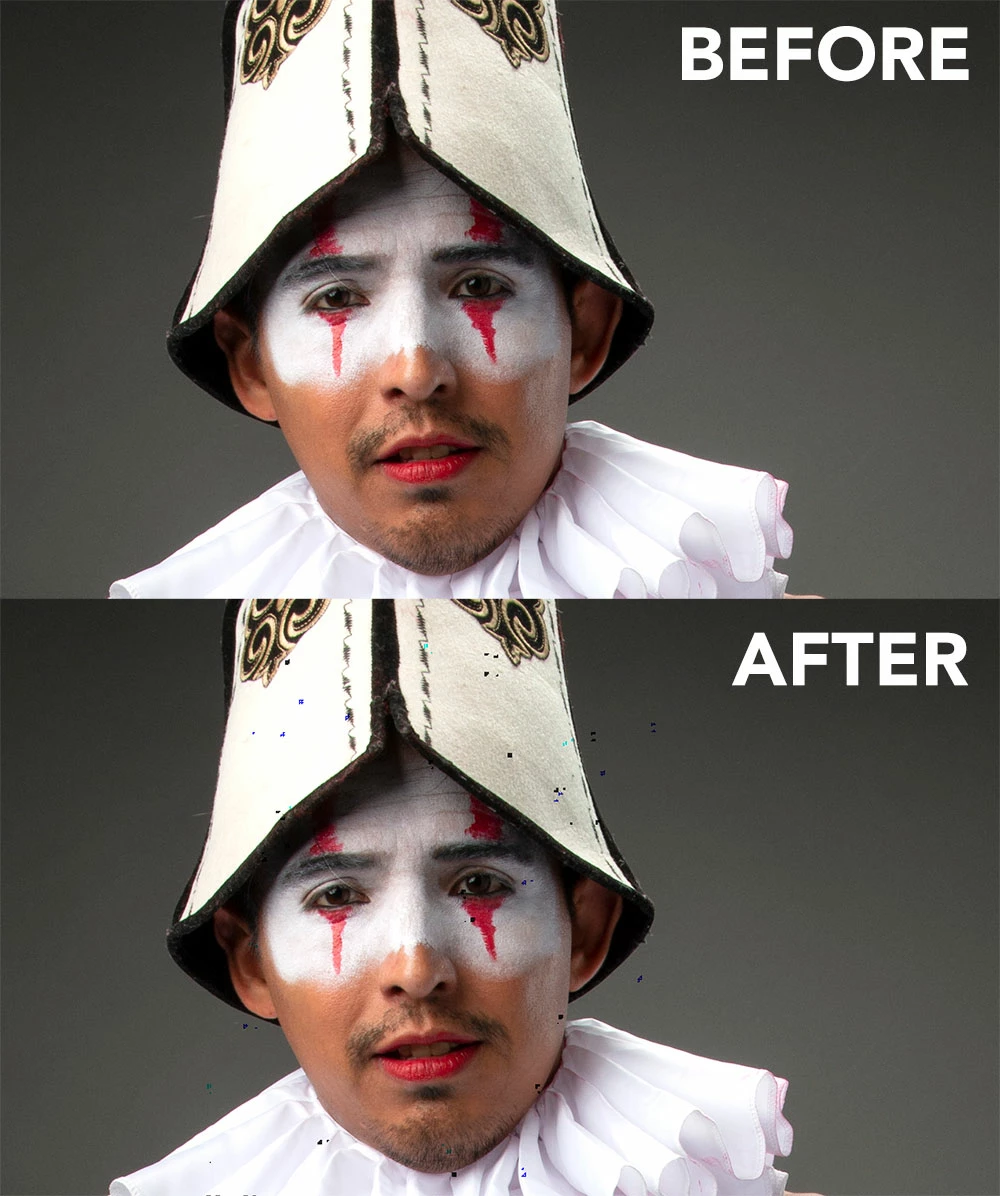
This topic has been closed for replies.
Correct answer Jeff Arola

This doesnt work for me.


Apple has just released the 10.14.1 Mojave update so install that and see if the Liquify issue is solved.

66 replies

Participant
September 26, 2018

The same problem.

MacBook Pro (Retina, 15-inch, Mid 2015)

mglush
Community Expert
Community Expert
September 26, 2018

Hi!

Here is some information that might be helpful in regards to Mojave and Photoshop:

Known issues - Running Photoshop CC on macOS 10.14 Mojave

Hope this helps!

Michelle

julesgodfreyphotography
Participant
March 24, 2019

OMG! Thank you! This was causing me all kinds of problems and this workaround is so quick and easy!

gener7
Community Expert
Community Expert
September 26, 2018

That is interesting. I'm running Mojave on a mid-2012 MBP that uses a 1536 MB Intel HD 4000 card and 16 GB laptop memory. I don't see this on CC 2018 19.1.6 playing with the same image you provided.

What might be worth trying is installing CC 2017 or even 2014 to see if it has the same problem.

Usually older versions stress the graphics less.

If you have an "energy saving" onboard Intel card on your system, you can see if switching to that helps.

PPhotography808
Known Participant
September 26, 2018

YESSSSS!!!

So it's not just me. On Mac Pro (2013), 32GB Ram, 12 VRAM.

Changed all the GPU settings in Photoshop to no avail. Everything else seems to function properly.

Note they're little "dots" if you are working with full rez files. However if you're working with smaller JPG files they become little funky artifacts.

Calle T
Participant
October 29, 2018

Me too bro. 2013 Max Pro 32gb RAM. AMD 500 Fire Pro.

S_Gans
Community Expert
Community Expert
September 25, 2018

Very often, it takes an application some time to catch up with OS releases and vice versa. It's possible that Mojave has a bug with your video card (yes, that even happens with native Mac cards). It's possible that Photoshop needs a dot release to fix the issue on the Adobe end. Mojave is so new, we're going to see quite a few bugs between the OS and many of our apps, until things get smoothed out (it was released today, so the full volume of issues hasn't even arisen for most people yet). I strongly recommend following davescm​'s suggestion of posting to the Customer Community, and hopefully enough people will have a similar problem so Adobe gets right on it. Or, wait for the MacOS's .1 release, which often fixes issues like this that come up, as well.

Adobe Community Expert / Adobe Certified Instructor
davescm
Community Expert
Community Expert
September 25, 2018

Hi

I use Windows here so cannot test for you. However, if you have a repeatable bug it is worth raisng at the link below where it will be seen by Adobe staff (this forum is answered mainly by volunteer users). Please give details of your system and Photoshop version.

Photoshop Family Customer Community


Dave