Bob Ulius
Known Participant
April 6, 2026
Question

Logitech MX creative Console Plugin and Photoshop

  • April 6, 2026
  • 1 reply
  • 16 views

Recently bought a Logitech MX Creative Console and had a few issues with Photoshop integration, now mostly resolved. If you have this and use with Photoshop, could you check two things for me?:

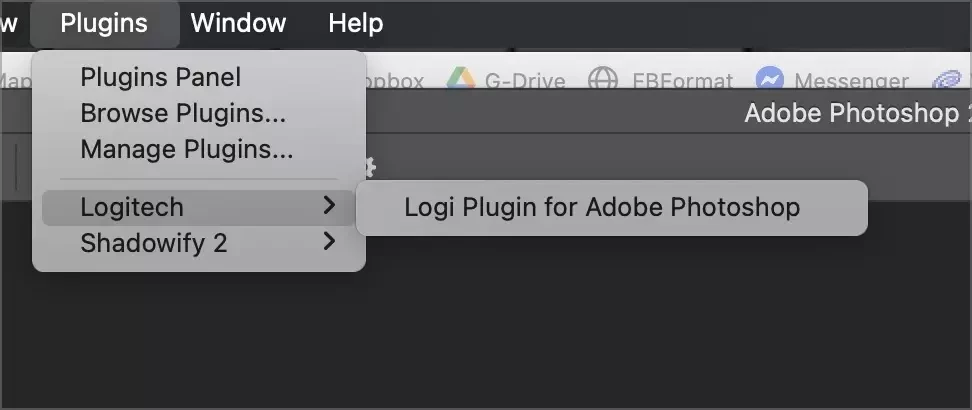
  1. In photoshop/plugins/logitech if you have more than one profile for your keypad, is there a listing for each? I could swear there was for me, but not now. You would need Default and Essentials, for example, assigned to your Logitech keypad for photoshop. Right now I have one even though both of those profiles installed and enabled and working.
     
  2. My current plugin listing
  3. If you have Essentials, are there many buttons on pages 2 and 3 with text only and no icons? I did not recall that before my issues and fixes and now many buttons text only. For you?

Thanks for the help!


    1 reply

    Kevin Stohlmeyer
    Community Expert
    Community Expert
    April 6, 2026

    Hi ​@Bob Ulius  - I would engage with the Logitech forums for more assistance. What version of PS are you using? Have you made sure you have run all available updates for the Logitech utility?


    While I have the same hardware, I am not having the issues you are describing. All of this is managed in the Logitech Hub+ not in Photoshop. 

    https://hub.sync.logitech.com/discussions


    Bob Ulius
    Bob UliusAuthor
    Known Participant
    April 6, 2026

    Thanks. I am well aware of all updates and Logitech. You did not address either of my questions. They are not ISSUES, but questions :)

    Do you see more than one listing under Plugins? Knowing that would be most helpful. Same with buttons on the Essential Profile.

    Thanks.,