I touched something on my keyboard by mistake, and now all my open tabs are gone. I still have one of the .PSDC file open, but I do not see its name at the top either.
How to get back to my missing tabs (with the names of the opened files)?
FYI There is another Photoshop gotcha that can hide all of your documents. If your document window is floating, you can minimise it and it can be a bugger to get back. I use some of the Michael Ninness Power Shortcuts from his MAX workshop in 2014 (I think). Consolidating all docs back to tabs makes even minimised floating windows reappear.
They withdrew Michael's video from YouTube because some of the shortcuts and tips would have been confusing after changes to ACR. The Shift Ctrl Alt T shortcut also breaks Transform Step & Repeat, so I save the custom shortcuts with a workspace, and return to Essentials when I need T S&R.
Hmmm... that's interesting. My menu still shows F5 and F6 as performing their defaults, but I use them to trigger actions.
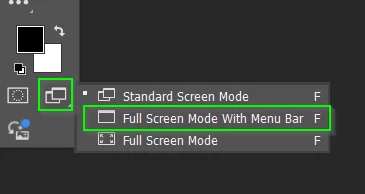
I'm having this problem as well. I can EITHER see my documents as tabs OR see my panels, but not both. I've tried TAB and F and reset my preferences but am unable to get both to show at the same time. How can I get my tabs and panels to show at the same time?



 AdChoices