


Participant
January 9, 2017
Answered

Photoshop 2015.5.1: how to disable scrubby zoom

  • January 9, 2017
  • 3 replies
  • 3921 views

In Photoshop 2015.5.1 the "scrubby zoom" checkbox has been removed from the zoom tool options. Does anyone know how to disable scrubby zoom in this version? Or to enable marquee zoom? (Disabling "animated zoom" in preferences does not help.) Thanks.
This topic has been closed for replies.
Correct answer Jeff Arola

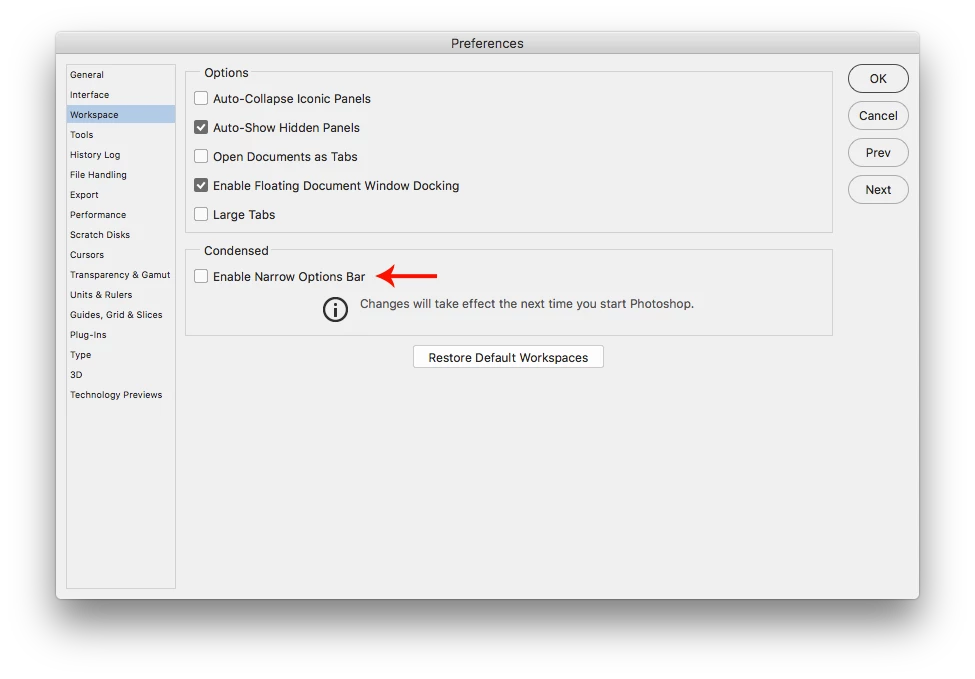
Looks like you have Enable Narrow Options Bar checked

Uncheck it and restart photoshop

Mac

Photoshop CC>Preferences>Workspace

Windows

Edit>Preferences>Workspace

3 replies

Jeff Arola
Community Expert
Jeff ArolaCommunity ExpertCorrect answer
Community Expert
January 10, 2017

Looks like you have Enable Narrow Options Bar checked

Uncheck it and restart photoshop

Mac

Photoshop CC>Preferences>Workspace

Windows

Edit>Preferences>Workspace

mrrodesAuthor
Participant
January 10, 2017

That works. Thanks! I would never have found that.

Supposedly Narrow Options replaces text options with icons, but in this case it appears to be removing an option altogether. I think Adobe used poor judgment to enabling this "feature" by default.

gener7
Community Expert
Community Expert
January 10, 2017

I've always used the regular Options bar, and kept my settings I upgraded, so that's why I did not catch that.

Gene

gener7
Community Expert
Community Expert
January 10, 2017

Scrubby Zoom is in Photoshop CC 2015.1.2  Be sure that's what you are running.  Reset the Tool to see if that fixes it.

mrrodesAuthor
Participant
January 10, 2017

Unfortunately, I don't have a way to roll back to 2015.1.2. The problem occurs in later versions. And I just updated to the latest available -- 2017.0.1, and it too contains no scrubby zoom checkbox:

kglad
Community Expert
Community Expert
January 9, 2017