


Photoshop 25.7.0 shows erroneous histograms in Curves and Levels adjustment layers
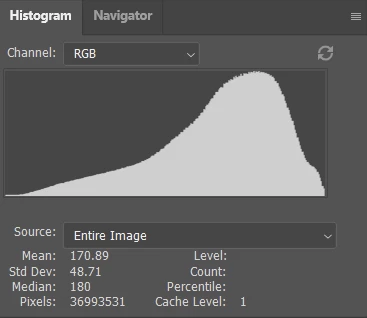
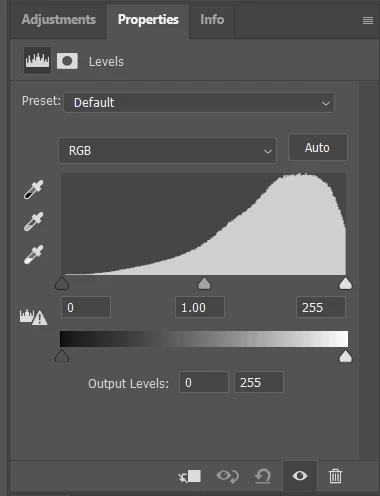
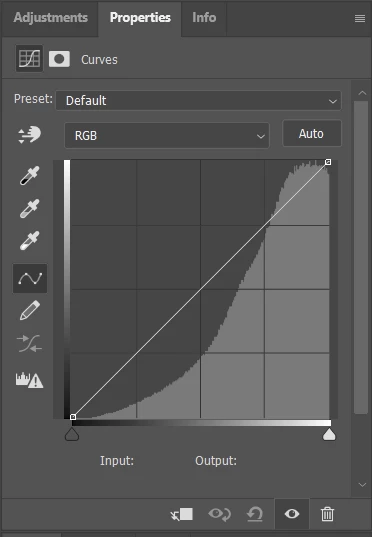
Issue: When working with a color TIFF file (I haven't tried other file types), Photoshop shows erroneous histograms in Curves and Levels layers in color TIFF files. Specifically, the histogram built into a Curve or Levels adjustment layer shows wildly blown out highlights, despite that there are none and that this can be confirmed by looking at the image's histogram.
Adobe Photoshop Version: 25.7.0 20240415.r.504 130b225 x64
OS: Windows 11, version 23H2
Steps to reproduce behavior:
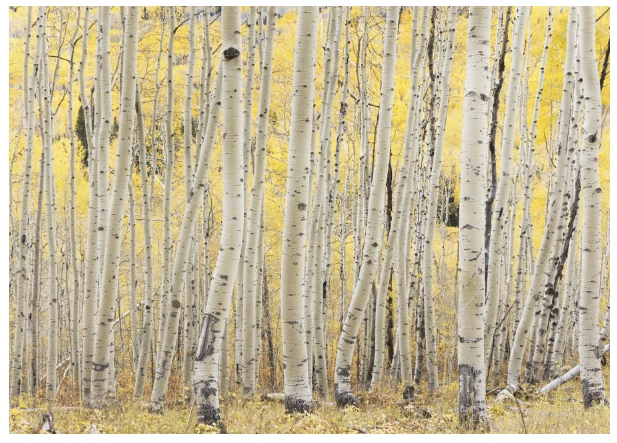
1. Open a 16 bit RGB TIFF. (Try a file with a lot of yellow? I'm not sure here.)
2. Layer --> New Adjustment Layer --> Levels... (or Curves...)
Expected result: The histogram shown within the adjustment layer tool should match with the image's actual histogram as shown in the Histogram window.
Actual result: The adjustment layer's historgram shows wildly blown highlights where there are none.
Important note: This only seems to be in a bug in version 25.7.0. I tested this in the latest version of Photoshop 2023 (version 24.7.3) on the exact same file, and that version does NOT show this problem.
SAMPLE SCREENSHOTS:
Actual image histogram:
Histogram shown in Levels adjustment layer:
Histogram shown in Curves adjustment layer:
Sample image (at 8.33%):
 AdChoices