


Participant
April 5, 2017
Answered

Photoshop CS6 is tiny and illegible on a High DPI screen

  • April 5, 2017
  • 3 replies
  • 780 views

My computer tech installed CS6 on a new laptop from files on the old laptop. The links/writing on the CS 6 primary screen is so tiny I literally need a magnifying glass to see the icons. Trying to change the view hasn't improved anything. I have uninstalled and re-installed, and the icons are still tiny and illegible. This has never been a problem before with CS6, and I've had multiple versions of Photoshop CS. What can I do to get the proper sizing back in place on the screen so that I can see the icons? Thanks to whomever can help!
This topic has been closed for replies.
Correct answer Nancy OShea

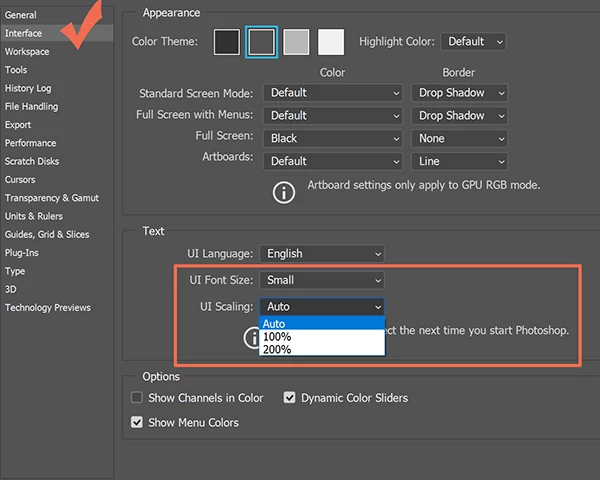
CS5 is legacy software now.  It's no longer sold, supported or updated.  CS6 was released before Hi-DPI displays became widely used so there is no native support for increasing the UI.  That feature was introduced in Creative Cloud.  See screenshot.

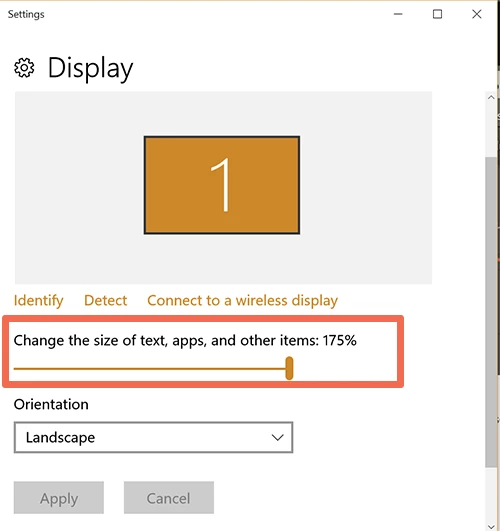
Until you step up to Creative Cloud, you'll need adjust your display's resolution settings downward from your operating system.  Of use the slider on Windows 10, to increase the scale of text + apps.  See screenshot.

3 replies

Nancy OShea
Community Expert
Nancy OSheaCommunity ExpertCorrect answer
Community Expert
April 5, 2017

CS5 is legacy software now.  It's no longer sold, supported or updated.  CS6 was released before Hi-DPI displays became widely used so there is no native support for increasing the UI.  That feature was introduced in Creative Cloud.  See screenshot.

Until you step up to Creative Cloud, you'll need adjust your display's resolution settings downward from your operating system.  Of use the slider on Windows 10, to increase the scale of text + apps.  See screenshot.

Nancy O'Shea— Product User & Community Expert
John T Smith
Community Expert
Community Expert
April 5, 2017

Adjusting font size for a high DPI display https://forums.adobe.com/thread/2171036 see reply #2

-and https://forums.adobe.com/thread/2263440

Akash Sharma
Legend
April 5, 2017
Jeffrey_A_Wright
Community Manager
Community Manager
April 5, 2017

Moving this discussion to the Photoshop General Discussion forum.