


Participating Frequently
May 17, 2024
Question

Photoshop toll bar UI Is broken. Blue layer hint jumping aroun without reason from layer to layer.

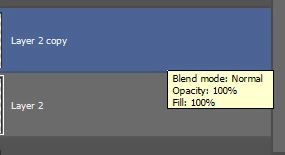
  • May 17, 2024
  • 2 replies
  • 243 views


Ps version 25.7.0
Windows 11
Steps to reproduse
1. Find app icon
2. Run Ps
3.  Realize that the problem has not been solved for six month or more. 

Expected result: I am able to see the icons of tools.
Actual result: I can't use Adobe photoshop smoothly! UI is broken by default in any file.


This topic has been closed for replies.

2 replies

Participating Frequently
May 21, 2024

Thnx I guess. But "On hover" settings are still have unpredictable behavior.
I think you know that is not solution! UI tools fixing is not thing I want to waste my time all the time again and again. 
But thnx for help.

jane-e
Community Expert
Community Expert
May 17, 2024
quote

Photoshop toll bar UI Is broken.

Blue layer hint jumping aroun without reason from layer to layer.

By @Viktar37458932tzs2


1. To fix the missing tools, reset your preferences using the manual method of renaming the file after backing it up
Details here

https://helpx.adobe.com/photoshop/using/preferences.html


2. The second issue sounds like "Hover Layer Bounds". Uncheck it using the cog icon in options for the Move tool


Jane


Participating Frequently
May 25, 2024

all useless. I cant use Ps even after reinstall