


Participant
June 15, 2021
Question

Problem Creating Actions

  • June 15, 2021
  • 1 reply
  • 684 views

It's been awhile since I have created an action however I am running into an iisue I don't remeber having before. When I record the action and group all my layers together then stop recording, if I run another action on top of it that is also grouped, it puts the previous group in the folder as well. How do I stop it from doing that?


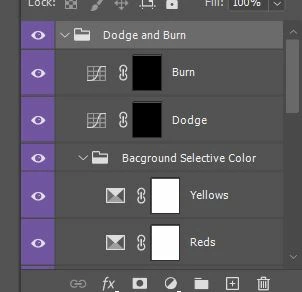
In the example below I ran my Background Selective Color action. Then I ran my Dodge and Burn action. It automatically put the first action in the D&B group which I dont want. I want to keep all my groups separate
This topic has been closed for replies.

1 reply

jane-e
Community Expert
Community Expert
June 15, 2021

When you create an action, it will ask you which folder (set) you want to record it into. No worries if it's in the wrong set: just create a new set, name it, and drag and drop your action into it. Be sure to save each Action Set (folder) in the Action panel menu every time you make a change to it or you risk losing those changes.


Read this Help file for more info:

https://helpx.adobe.com/photoshop/using/playing-actions.html


~ Jane

Participant
June 15, 2021

I already have them in a set. The problem is when I run the action itself, it puts the layers below it in the action group.

jane-e
Community Expert
Community Expert
June 15, 2021

I think I'm confused.


What does it mean to have layers below the action and what does it mean that the layers are put into an action set? Can you clarify what is happening?


~ Jane