


Inspiring
February 18, 2024
Question

Trying to open 3 images into photoshop,as layers

  • February 18, 2024
  • 2 replies
  • 384 views

I am trying to create a pattern using 3 flowers. I need to be able to move them around on the canvas?When I select 1 or all of them,only 1 appears in layers?
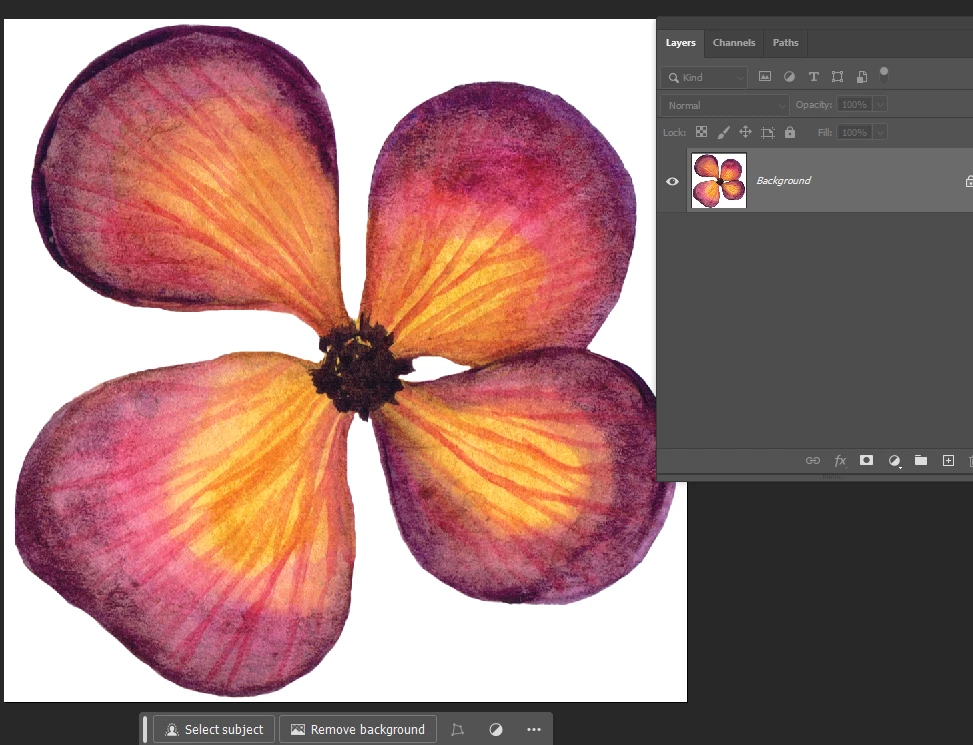
Everytime I open all three,only one shows in layers.

I tried new layer with no luck?


This topic has been closed for replies.

2 replies

Myra Ferguson
Community Expert
Community Expert
February 19, 2024

You could open all 3 images into one document by using File > Scripts > Load Files into Stack... and in the Load Layers dialog select the 3 images.

Inspiring
February 19, 2024

I managed to get 2 of the images,but when again it was not available to add.But glad I got 2 of 3

George_F
Community Expert
Community Expert
February 19, 2024

How are you getting the images into Photoshop?  Are you opening them from your computer or importing another way?

George F, Photographer & Forum Volunteer
Inspiring
February 19, 2024

from my computer

George_F
Community Expert
Community Expert
February 19, 2024

I like the solution @Myra Ferguson posted.  You can also open them as 3 separate documents and then manually copy+paste them over.  I do this sometimes when I'm adding a new element to a project I'm working on.


Just open the file, Select All and copy, and then move to the other document and paste it onto a new layer.


Cheers!

George F, Photographer & Forum Volunteer