


Participant
November 3, 2020
解決済み

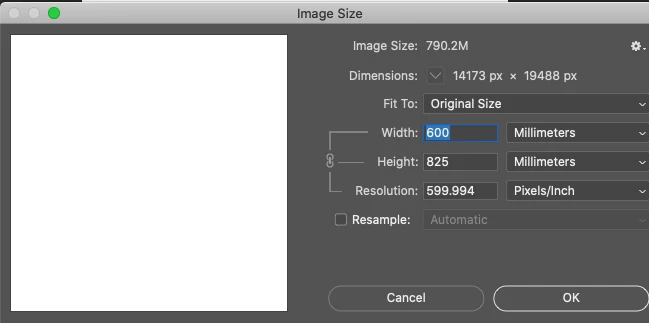
When creating a canvas in down to the exact mm, after I open the project it is no longer exact

  • November 3, 2020
  • 返信数 2.
  • 1033 ビュー

This may not seem like much of a pain but if it is not exact by .10 of a mm if the image is scaled up or down then the .10 is multiplied and it becomes a big problem. 
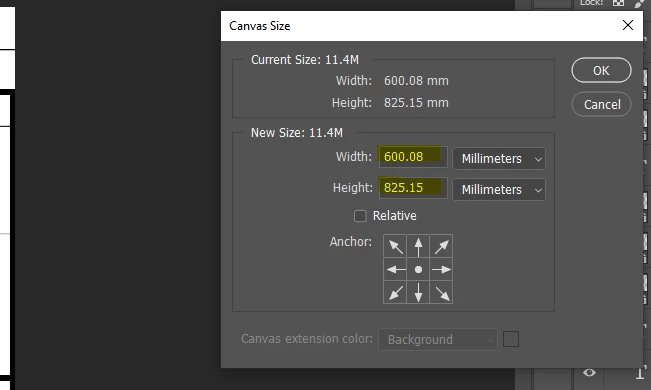


I created this project to be 600 x 825, why is it off? 
このトピックへの返信は締め切られました。
解決に役立った回答 gener7

There is a way to get what you want, not sure you will like it.


返信数 2

gener7
Community Expert
gener7Community Expert解決!
Community Expert
November 3, 2020

There is a way to get what you want, not sure you will like it.


Randy Hufford
Community Expert
Community Expert
November 3, 2020

this is how i do it


D Fosse
Community Expert
Community Expert
November 3, 2020

Photoshop works with pixels, not sizes. The file is just pixels, and pixels have no size. To calculate a print size, the ppi number (pixels per inch) is used. Pixels per inch is a measure of pixel density.


This translation can be subject to rounding errors. Going from inches to cm/mm and back is one common reason.