


cherokeet34889102
Participant
March 14, 2021
Answered

Color labeling ONLY applies to entire timeline - Not individual cuts.

  • March 14, 2021
  • 2 replies
  • 1233 views

Premiere Pro CC 2021


I am simply trying to re-color individual clips as idividual colors:

Right-click > Label > "Color of choice"

(Just like in CS6 and all before, to my knowledge)

Though... the entire timeline changes color. Always.


I've restarted the program, my computer, and double checked clip links... all seperate.
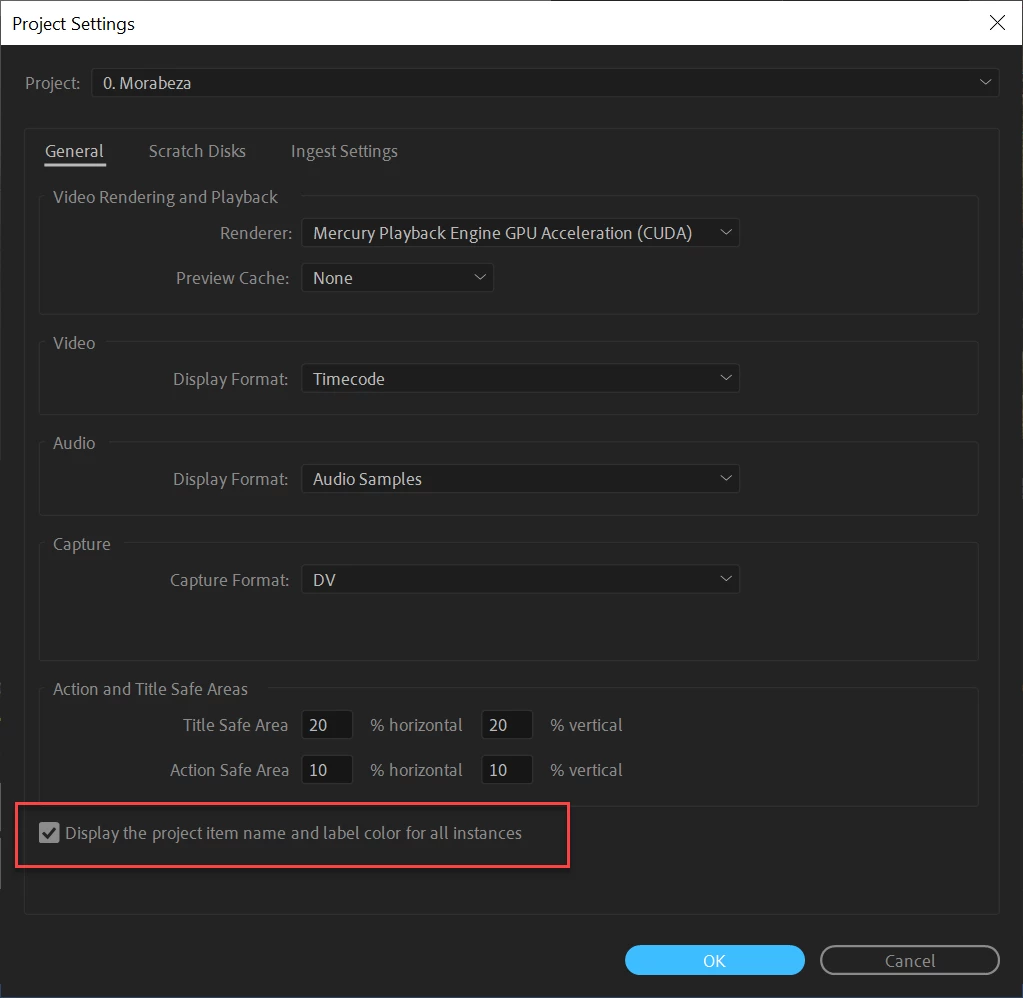
This topic has been closed for replies.
Correct answer Ann Bens

Uncheck:

2 replies

DKins
Known Participant
July 22, 2023

Two years later I know, but I have the opposite need: how you got the whole track to be the same color? I can change the individual clips easily enough. And if I toggle the switch in the correct answer the colors all go back to that awful "Caribbean green" UGH! Maybe I'm overthinking this but I just want my Track 1 (dialogue) to be blue, Tracks 2 & 3 (music) to be another color and tracks 4-9 (SFX) to be another color. Is this possible?  (NOTE: I'm using PP CC 2023)


Thanks,

- DK

Ann Bens
Community Expert
Ann BensCommunity ExpertCorrect answer
Community Expert
March 14, 2021

Uncheck:

cherokeet34889102
Participant
March 15, 2021

Holy Bologna... Thank you.

I would have never found that. (don't really understand why it exists either)