


Brit.b
Inspiring
June 19, 2018
Answered

Lumetri colors suddenly not working at all in the color tab or in presets

  • June 19, 2018
  • 1 reply
  • 19962 views

Out of the blue, the Lumetri colors suddenly do not work at all in both the color tab, or in the Lumetri  presets in the latest version of Premiere. I installed the latest driver for my NVIDIA Geforce GTX 1060 graphics card, and it still will not work - unless I turn off the Mercury CUDA acceleration, which of course slows things down immeasurably...And then it only works intermittently when pressing on a slider (say, for saturation...as soon as I let go of the slider it stops the saturation changes).

I just tried  the "Brightness and Contrast" effect and they don't work either (unless I turn off the Mercury CUDA acceleration, and hold the slider down).

Any suggestions? I did recently buy a new Dell U2412M monitor for my second screen. could that be the culprit?
Correct answer Brit.b

Hi Brit,

Hope your issue is resolved now. Thanks for your time.

//Vinay


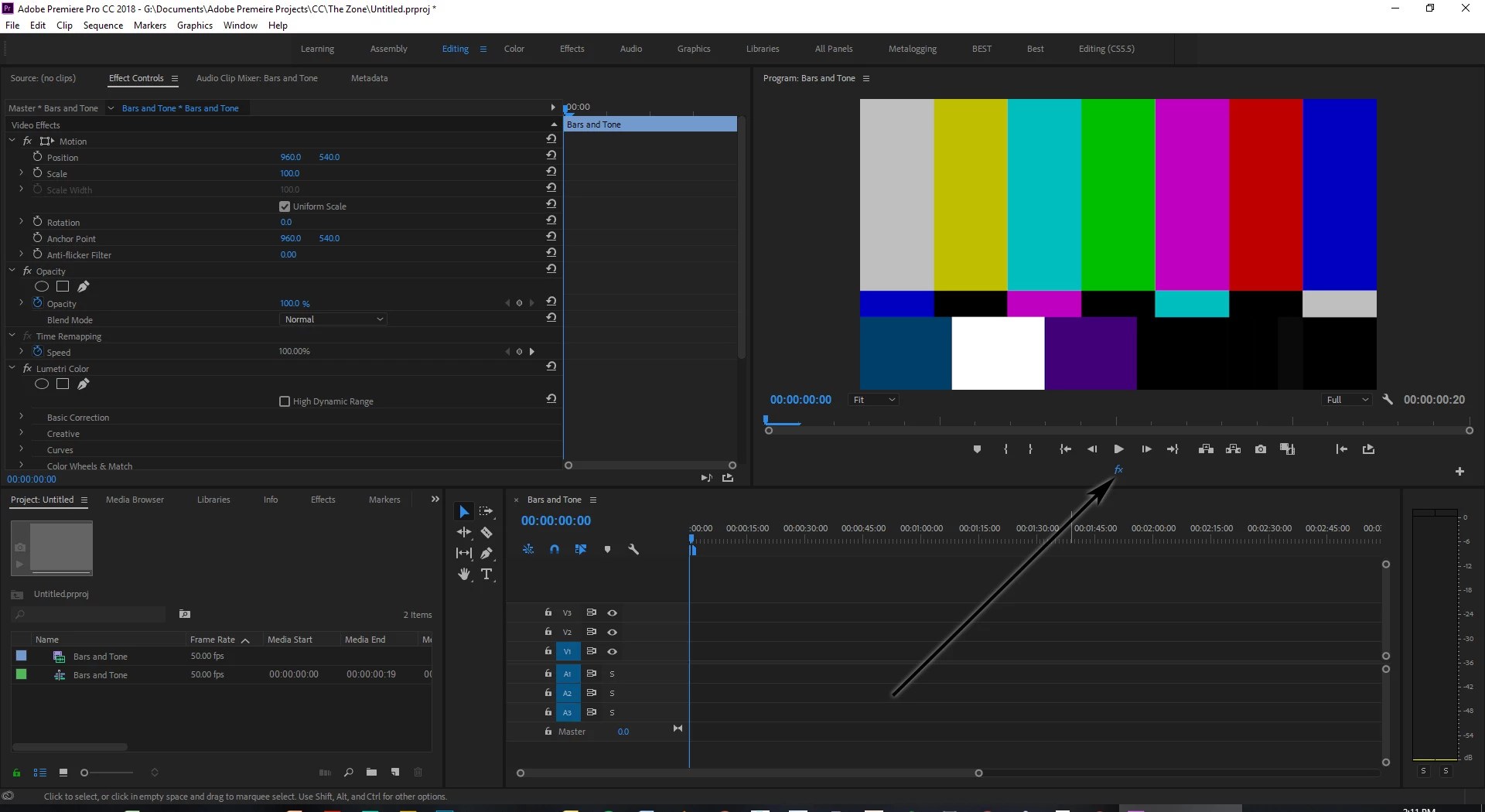
Thanks so much. It was an easy solution. Its the "FX" button on the Program Monitor. I must have accidently clicked on it.

Best,

Brit

1 reply

Brit.b
Brit.bAuthor
Inspiring
June 19, 2018

My Premiere Pro has been rendered useless for no apparent reason, and I cannot find an answer anywhere. I deleted all cache files as recommended on on forum. I have spent several hours on this problem, and then waited 50 minutes on hold on the phone to adobe support and gave up.

Is there anything I can do? I'm getting desperate.

R Neil Haugen
Legend
June 19, 2018

I've got a similar Dell monitor, working perfectly, so I doubt it's the monitor.

I'm assuming that this is happening in multiple projects, and not just one. (If only one, try creating a new one and see what happens.)

First, go to the website for the GPU (Nvidia, in your case) and make sure you are running the latest driver for that GPU. Don't assume the OS or card will make sure you're updated.

If that's not the solution, I would suspect an installation issue in PrPro. Which can happen. And I would suggest going to the CC desktop app, uninstalling PrPro, rebooting, and re-installing PrPro.

If that doesn't work, use the Adobe CC Cleaner tool to both uninstall & cleanup after PrPro, then reboot/reinstall.

Neil

Adobe CC Cleaner Tool: https://helpx.adobe.com/creative-suite/kb/cs5-cleaner-tool-installation-problems.html

Everyone's mileage always varies ...
Brit.b
Brit.bAuthor
Inspiring
June 19, 2018

Thanks! I updated the latest driver and then tried earlier ones. Premiere has been working fine for months, and many days after the new version was installed so its a mystery why this happened suddenly yesterday. But I'm now reinstalling. I deleted all preferences (though I didn't reboot). I'm alos downloading the cleaner tool. (BTW I'm still on hold to Adobe phone help for 70 minutes so far, and 20 minutes on hold on the on-line chat line!)